Opera 131 Stable
-
 thelittlebrowserthatcould last edited by
Happy browsing? Not so much with the slow launch time. But at least my screen isn't white.
Logging in to post with my saved email address and password was not a smooth process. -
andrew84 last edited by
@thelittlebrowserthatcould said in Opera 131 Stable:
with the slow launch time
Here (on quite slow PC on Win 10) Edge starts about 2-3 times faster than Opera under the same conditions (almost clean profile + same extensions installed).
Edge has a bit more history data + start page extension from MS store (speed dial) but still faster (Startup boost in Settings is disabled). -
steeveboy last edited by steeveboy
Maybe the first is just a pinned Google-Tab from a previous session? Try unpinning it, then close it. Try a restart. Then it should be gone.
Otherwise it seems like a bug, if it is not a pinned tab.
-
steeveboy last edited by
Try a clean install. Otherwise try a previous Opera Version.
Never had such a behaviour.
If it happens again and again, just file a bug-report and send it to Opera. Maybe you can test it with another PC or Laptop, then at least you know it is your special configuration.
Hope a dev answers your post soon directly, I'm also interested in this one.
Could also be a corrupt installation of the OS, so that TEMP-files mess up in the background. But better let the devs speak for themselves...
-
 leocg Moderator Volunteer last edited by
@theory65-0 right click on the first one - unpin tab. Or simply, right click - close tab
It happens every time you open Opera?
-
burnout426 Volunteer last edited by
@theory65-0 Someone on Reddit had this and it was one of their extensions that was causing it.
-
steeveboy last edited by steeveboy
Me again
Hi! Based on your screenshot, if it's not a standard pinned tab, here are three likely causes and how to fix them:
- "On Startup" Settings
Google might be set as a static startup page in addition to your normal session.
Go to opera://settings/onStartup.
Check if "Open a specific page or set of pages" is selected and if Google is listed there.
If so, remove the entry or switch back to "Retain tabs from previous session".
- Modified Shortcut Target
Sometimes the URL is accidentally added to the Opera shortcut itself.
Right-click your Opera shortcut (on Desktop or Taskbar) and select Properties.
Look at the "Target" field. It should end with opera.exe". If there is a URL (like https://www.google.com) behind the quotes, delete it.
- Corrupt Session Files
If a session file is bugged, it might "freeze" tabs and force them to reopen every time.
Go to opera://about to find your Profile path.
Close Opera completely.
Navigate to that folder and delete the "Sessions" subfolder. (Note: This will clear all currently open tabs, but it usually fixes persistent "ghost" tabs).
Bonus tip: Since Opera 131 uses Tab Islands, check if that Google icon is actually the start of a collapsed "Island." Try right-clicking the icon and selecting "Separate from Island" or "Close Tab Island."
Hope this helps!
- "On Startup" Settings
-
theory65 0 last edited by
@steeveboy: Hi, Thanks
Opera One(Version: 131.0.5877.5)
remove the entry "Retain tabs from previous session"= didn’t help
Modified Shortcut Target = mine is: "C:\Program Files\Opera\opera.exe"
Corrupt Session Files= tested: didn’t help
Bonus tip: i right click on Tab Icon and close it, but it comes back every time I start the program ?Thanks again
Theo -
burnout426 Volunteer last edited by burnout426
Long shot, but check anyway. Goto the URL
opera://flags/#policy, enable the "Show policy page" flag, restart Opera and goto the URLopera://policy. Does it show that any policies are set from the registry? -
burnout426 Volunteer last edited by
@theory65-0 Try uninstalling all extensions instead of just disabling them.
What extensions do you have installed?
-
 whisperer last edited by
Opera One (version: 131.0.5877.5) (Windows)
- Use 2 tabs, one for "Speed dial", the other for YouTube.
- Play a video on YouTube and while playing the video, press Ctrl+Tab (and release it) repeatedly.
After a number of times pressing Ctrl+Tab, Opera crashes and restarts.
(The Speed dial tab is just an example, can be any content and any number of tabs.)
-
 Opera-QA-Team Opera last edited by
@whisperer: By 2 tabs you mean split screen? Could you share a crash ID?
-
-
whisperer last edited by
By 2 tabs you mean split screen?
No, no split screen.
Could you share a crash ID?
No.
-
whisperer last edited by whisperer
@Opera-QA-Team said in Opera 131 Stable:
Could you share a crash ID?
Installed Opera on Windows Sandbox and reported there.
CRASH-14745
CrashID=bp-9238cc72-ca7c-4c47-899c-eb41d0260504
Does that help?Edit:
Switch to the tab playing the video with Ctrl+Tab. Wait long with releasing the Ctrl key. Then it seems to crash.
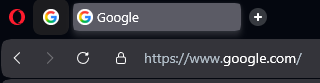 why 2 google Icons on every new program start ?