The German Website "https://www.elster.de/eportal/login/softpse" is crashing as soon as you load a "Zertifikatsdatei" in with the search button. You can't even type the passwort beneath, because Opera crashes. Some Crash Reports have already been sent. Had to revert to Version 102.0.4880.56 for now. Waiting for another update or Major New Version 103.
S
Best posts made by steeveboy
-
RE: Opera 102.0.4880.70 Stable updateBlogs
- Blogs
-
RE: Opera 131 StableBlogs
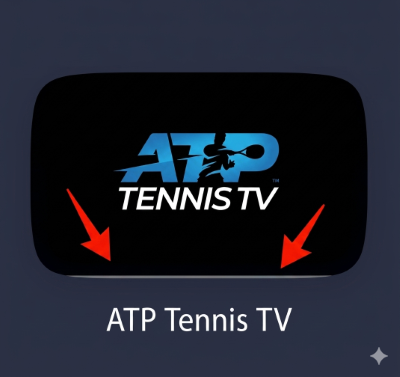
Thumbnails now get a small pix wide stripe at the bottom which is grey. Why? Looks off and annoying. Reverting to Opera stable 130.0.5847.92. Hope that gets fixed...
-
RE: Opera 131.0.5877.55 Stable updateBlogs
@opera-qa-team: Subject: Re: Private window loses address bar focus on launch (Update: Clean profile tested)
Hi everyone,
Quick update: I just did a thorough test using a completely fresh, isolated profile via the --user-data-dir command line switch, and I also completely disabled PowerToys and all other third-party UI/window management tools.
Unfortunately, the issue still persists even in a 100% clean Opera environment. When launching a private window in this virgin state, the address bar still refuses to take focus automatically. This rules out any corrupted local profile settings, extensions, or background customization tools.
Since it happens on a clean profile but only started with the v131 update, there must be a specific interaction between the new build's window initialization code and certain Windows 11 system/hardware configurations (e.g., display scaling, GPU acceleration, or multi-monitor environments) that causes the DWM (Desktop Window Manager) or Opera itself to drop the focus hook right after rendering the private landing page.
Is there any specific debug log I can provide to help you track down what happens to the focus in that split second during launch?
For context regarding my system setup: I am using a high-fidelity display configuration and have forced the sRGB color profile via opera://flags to manage color accuracy. Since private windows initialize with a completely different theme/color scheme compared to regular windows, I highly suspect that the v131 update introduced a slight timing or rendering conflict between Opera's private UI initialization, forced color profiles, and the Windows Desktop Window Manager (DWM), which ultimately causes the address bar to lose focus in that split second.
-
RE: Opera 131.0.5877.55 Stable updateBlogs
@opera-qa-team: Another quick update: I just did a downgrade test and installed an older build (v130.0.5847.92), which used to work perfectly fine for me in the past. Surprisingly, the issue persists even on the older Opera version with a clean profile.
This completely rules out a regression in the Opera v131 code itself. Instead, it points to a recent change in my Windows 11 environment (likely a recent Windows Update, a GPU driver update, or a persistent system hook from customization tools) that altered how the Windows Desktop Window Manager (DWM) handles window initialization and focus allocation for private Chromium windows.
Since it's not an Opera bug, you can close this investigation! I will have to dig deeper into my OS settings and background services to find out what is blocking the focus hook on system level.
Thanks again for your time and help!
-
RE: Opera 131.0.5877.74 Stable updateBlogs
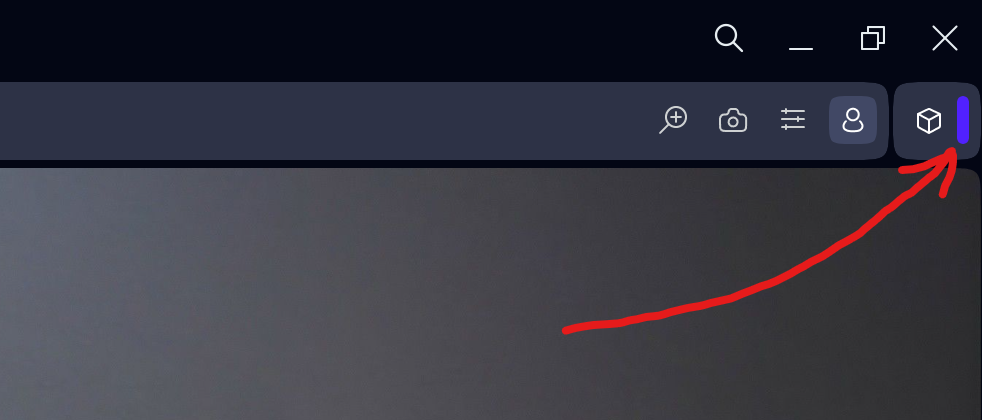
Found a very strange bug... Opera crashes if you click this purple line here right after the extensions symbol...


Latest posts made by steeveboy
-
RE: Opera 131.0.5877.74 Stable updateBlogs
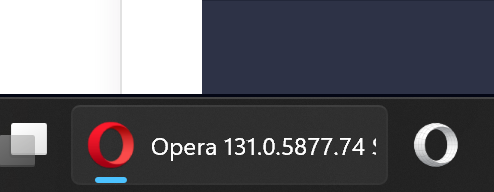
@opera-qa-team: Hi, thanks for the reply. No, I don't have other apps open. Just Opera completely closed. Open it normally --> focus, you can type immediately. Then again close completely. Open via taskbar symbol right click then "New private window" --> no focus, you cannot type immediately. You have to click the omnibox to type e.g. "gmail".
Maybe it's just a special problem with my system. But it definitely worked until Opera version 130. Then some days ago it broke. So my assumption is update from Opera and/or Microsoft (new build, new Explorer focus problems).
I'll just try to see if further Opera updates and/or Microsoft cumulative updates restore the old and normal behaviour.
In the meantime I have a second Opera symbol right next to it with Developer White just for this function (opera.exe --private // WITH normal focus after opening it).
-
RE: Opera 131.0.5877.74 Stable updateBlogs
@leocg Then hopefully in a future version this behaviour will go away.

- Blogs
-
RE: Opera 131.0.5877.74 Stable updateBlogs
Opera One 131.x on Windows 11 (HDR is always ON):
I found a reproducible YouTube video rendering bug related to hardware acceleration.
Issue
While watching YouTube videos, opening UI overlays (especially the notification bell/menu) causes the video black levels / gamma to briefly change:
- video becomes brighter for a moment
- then returns to normal
This only happens with hardware acceleration enabled.
Important findings
- Disabling hardware acceleration completely fixes the issue.
- Disabling MPO (Multiplane Overlay) does NOT fix it.
- Enabling Lucid Mode stabilizes the video completely.
Current workaround:
I enable Lucid Mode permanently on the lowest setting (Level 1/5). With Lucid Mode active:- black levels stay stable
- no brightness/gamma flicker occurs
- opening YouTube notification overlays no longer affects video rendering
This strongly suggests the issue is inside the Opera/Chromium GPU video rendering or HDR/tone-mapping pipeline, possibly related to compositor repainting during UI overlay updates.
The Lucid Mode workaround may help narrow down the rendering path involved.
-
RE: Opera 131.0.5877.74 Stable updateBlogs
Hi Opera team,
i just had a chat with ChatGPT and it thinks it has to be an Opera Problem (focus lost when starting a new private window from taskbar right click Opera then "New private window"). If you cannot reproduce it at all, it's alright. It happened to me by upgrading to version 131. If on your system everything's fine, then I'll wait for a Microsoft cumulative patch, see if this fixes the broken focus handling. So if that's the case, never mind. Just wanted to mention it after asking ChatGPT for a text which I can copy-paste for you devs. Maybe it helps, if not it's ok. So the following is the text from ChatGPT...
I found a reproducible focus issue with private windows on Windows 11 and wanted to provide a clean reproduction case.
Environment
- Opera One: version 131.x
- Windows 11
- Issue reproducible consistently
Problem
When opening a private window via the Windows taskbar jump list:
Right click Opera taskbar icon
→ "New private window"
the new private window opens correctly, but the address bar / omnibox does NOT receive keyboard focus.
Result:
- typing immediately after opening does nothing
- user must click the address bar manually
- sometimes TAB or CTRL+L restores focus
Important observation
The problem ONLY occurs when launching the private window from the Windows taskbar jump list.
The following methods work correctly and DO focus the omnibox:
Works correctly
Keyboard shortcut:
Ctrl + Shift + NDirect command line launch:
opera.exe --privateOpening private windows from inside Opera menus also appears to work normally.
Additional testing already done
The issue persists after:
- creating a fresh Opera profile
- disabling extensions
- disabling hardware acceleration
- restarting Windows
- reinstalling Opera
So this does not appear to be profile corruption or an extension issue.
Likely cause
This looks specifically related to:
- Windows 11 taskbar jump list integration
- AppUserModelID / ShellExecute launch path
- missing focus handoff to the omnibox after private window creation
The direct
opera.exe --privatelaunch path works correctly, which suggests the bug exists specifically in the jump-list-triggered private window handler.Hope this helps narrow it down.
-
RE: Opera 131.0.5877.74 Stable updateBlogs
@opera-qa-team: Thank you very much for the quick fix and update! I appreciate it!
Already downloaded Version: 131.0.5877.97 fromt FTP-server. Great job, it's fixed. It collapses as it should without crashing. Have a great and sunny weekend guys! -
RE: Opera 131.0.5877.74 Stable updateBlogs
Found a very strange bug... Opera crashes if you click this purple line here right after the extensions symbol...
-
RE: Opera 131.0.5877.55 Stable updateBlogs
@opera-qa-team: Another quick update: I just did a downgrade test and installed an older build (v130.0.5847.92), which used to work perfectly fine for me in the past. Surprisingly, the issue persists even on the older Opera version with a clean profile.
This completely rules out a regression in the Opera v131 code itself. Instead, it points to a recent change in my Windows 11 environment (likely a recent Windows Update, a GPU driver update, or a persistent system hook from customization tools) that altered how the Windows Desktop Window Manager (DWM) handles window initialization and focus allocation for private Chromium windows.
Since it's not an Opera bug, you can close this investigation! I will have to dig deeper into my OS settings and background services to find out what is blocking the focus hook on system level.
Thanks again for your time and help!
-
RE: Opera 131.0.5877.55 Stable updateBlogs
@opera-qa-team: Subject: Re: Private window loses address bar focus on launch (Update: Clean profile tested)
Hi everyone,
Quick update: I just did a thorough test using a completely fresh, isolated profile via the --user-data-dir command line switch, and I also completely disabled PowerToys and all other third-party UI/window management tools.
Unfortunately, the issue still persists even in a 100% clean Opera environment. When launching a private window in this virgin state, the address bar still refuses to take focus automatically. This rules out any corrupted local profile settings, extensions, or background customization tools.
Since it happens on a clean profile but only started with the v131 update, there must be a specific interaction between the new build's window initialization code and certain Windows 11 system/hardware configurations (e.g., display scaling, GPU acceleration, or multi-monitor environments) that causes the DWM (Desktop Window Manager) or Opera itself to drop the focus hook right after rendering the private landing page.
Is there any specific debug log I can provide to help you track down what happens to the focus in that split second during launch?
For context regarding my system setup: I am using a high-fidelity display configuration and have forced the sRGB color profile via opera://flags to manage color accuracy. Since private windows initialize with a completely different theme/color scheme compared to regular windows, I highly suspect that the v131 update introduced a slight timing or rendering conflict between Opera's private UI initialization, forced color profiles, and the Windows Desktop Window Manager (DWM), which ultimately causes the address bar to lose focus in that split second.
-
RE: Opera 131.0.5877.55 Stable updateBlogs
Subject: Private window loses address bar focus on launch (Regressed in v131.0.5877.55)
Hi everyone,
I've noticed a frustrating UI regression after updating to the latest Opera stable build (Version: 131.0.5877.55 on Windows).
When opening a new private window (via shortcut or menu), the address bar (Omnibox) does not automatically get focus. If I start typing immediately, nothing happens unless I manually click into the address bar or hit Ctrl + L.
Interestingly, this issue only occurs with new private windows. Regular new windows work perfectly fine and focus the address bar instantly upon launch, just like private windows used to do before the recent update.
It seems like the focus is getting lost or stolen during the initialization of the private browsing landing page. Could the devs please look into this and restore the automatic address bar focus for private windows? It really disrupts the quick-browsing workflow.
Thank you!