YouTube has a white flashing window when opening in a new tab. Really annoying. Reverting to Opera 128 stable until it's fixed.
Posts made by steeveboy
-
RE: Opera 129 StableBlogs
-
RE: Opera 122.0.5643.24 Stable updateBlogs
Thanks to "tastodd" and "leocg" for the quick replies!
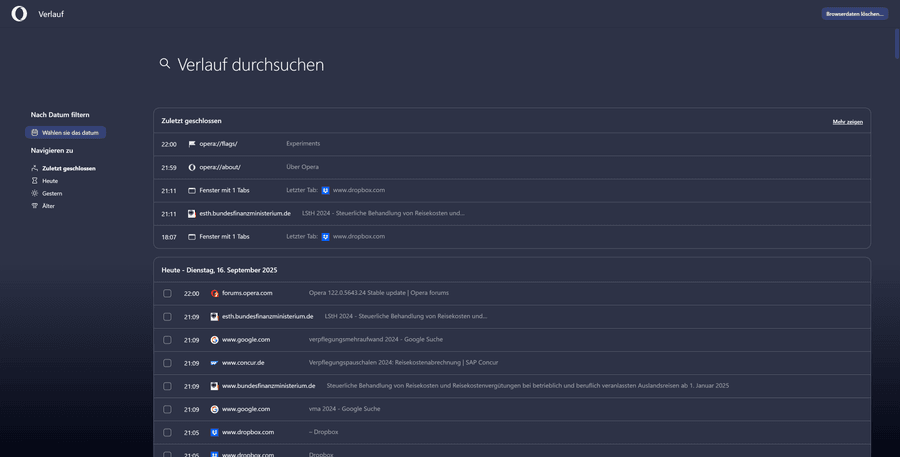
Now in the evening (maybe after a restart of Opera - i opened it, closed it and reopened) the new design for history is visible.
Looks damn f****** cool! Well done!
Just wanted to let you know... the corresponding flag is on default which is "enabled".
Thanks guys

-
RE: Opera 122.0.5643.24 Stable updateBlogs
I think I don't have the new redesigned history page, after updating to ver 122.0.5643.24. Could you please take a look at the screenshots and tell me if it's right? I don't see any new design compared to previous stable build of ver 122. Thanks in advance!


-
RE: Opera 121Blogs
Dear Opera-Team, can you confirm that YouTube seems to have some kind of "overlay-display"-problem when clicking on the notification window on the right? A video must be playing or being paused (ideally something with lots of dark or grey areas). When you toggle the notification bell or click the video settings wheel, the video window flickers. Seems to be a mismatch with the video black levels. By clicking it seems to get to "16-235"-levels, than instantly reverts back to normal full levels "0-255". Everything while HDR is turned on in Windows 11 (24H2, up to date version). NVIDIA graphics card (RTX 4070 Ti Super) with up to date drivers. Color settings in NVCP are set to "accurate".
This behaviour only occurs with "Choose ANGLE graphics backend" set to Default respectively D3D11. D3D11on12 is kind of unstable and the whole screen becomes white and flickers from time to time. It's only fixed when choosing OpenGL oder D3D9. Then you can click the YouTube notification bell on the right (while any video in the main window area is paused) and nothing flickers, the video itself stays as it is and does not change black levels. I guess some kind of overlay problem.
Can you reproduce this and if so, do you have any clue why it is this strange?
Enclosed you find a small GIF illustrating this (it is amplified because of D3D11 angle flag - in real it's a small flickering of black levels, blacks become greyish and then instantly black again... after around 0.5 seconds)
-
RE: Opera 118Blogs
Dear Opera Team,
first of all many thanks for your consistent work in ironing out multiple bugs and glitches over the past few years. Very well appreciated!
From my point of view, there is only one "fault" left... it's a misspelling in German. Is the dev team aware of this and just in case, do you have an error code for this reported problem? Screenshot enclosed
It should be "Benutzerdefiniertes Bild festlegen" not "fesfilegen".
Thanks a lot

-
RE: Opera 117.0.5408.39 Stable updateBlogs
Dear Opera Team, why is the Google Favicon in the Speed Dial's Google Search Bar blurry?
Is there a way to get a hi-res favicon to be shown?

-
RE: Opera 116.0.5366.71 Stable updateBlogs
@daria19 Hi Daria, I am using the classic theme with dark mode.

-
RE: Opera 116.0.5366.71 Stable updateBlogs
The font color of Speed Dial thumbnails is now black, which is hardly readable. If you open a folder, containing multiple speed dials, the font color is white. So I guess something failed here. Hope to be fixed in next version. Downgrading to version 116.0.5366.51.
- Blogs
-
RE: Opera 114.0.5282.102 Stable updateBlogs
Why is the current stable release of Opera not listed on the FTP-Server under "https://get.opera.com/ftp/pub/opera/desktop/"?
There is only 114.0.5282.94, but 114.0.5282.102 is the current one.Also wanted to mention 2 other things...
1.) If you create a group on the speed-dial-page and there are multiple pages in that group, you get a hover-magnifying-effect over the speed-dial-thumbnail (like outside of that group). But if you hover over the most right one in that group, it starts to break the layout and gets bigger for all thumbnails in it. It's kind of distracting.
2.) In German translation when editing a speed-dial-thumbnail, there is a misspelling for "Benutzerdefiniertes Bild festlegen". It's misspelled with "fesfilegen".

-
RE: Opera 114.0.5282.94 Stable updateBlogs
@tastodd said:
when hovering over the close button X it does not highlight in red
Same here. Reverting to 114.0.5282.86
-
RE: Opera 102.0.4880.78 Stable updateBlogs
@andrew84: Yes, I can confirm that. Usually you could just swipe far to the top right corner and click, so it closed. Now you have to hover exactly over the X button. Small inconvenience, but it would be great if it can fe fixed. Guess these buttons have rounded corners now, so few pixels are missing, therefore you don't hit when it is the pixel in the exact top right corner.
- Blogs
-
RE: Opera 102.0.4880.70 Stable updateBlogs
The German Website "https://www.elster.de/eportal/login/softpse" is crashing as soon as you load a "Zertifikatsdatei" in with the search button. You can't even type the passwort beneath, because Opera crashes. Some Crash Reports have already been sent. Had to revert to Version 102.0.4880.56 for now. Waiting for another update or Major New Version 103.
-
RE: Schnellwahl wird nicht mehr angezeigtDeutsch
Hi, ich habe vorhin dasselbe Problem bei mir festgestellt. Ich habe es nun zufriedenstellend gelöst. Es gibt zwar einen kurzen Lag beim Start von Opera sowie beim Laden der Schnellwahl, aber ich denke das ist normal, weil Opera nicht nativ in Windows integriert ist und das Laden der Schnellwahl mit den Thumbnails einen kurzen Moment dauert.
Ich lade es unter Windows 10 auf einer sehr schnellen SSD. Das Laden von Opera dauert ca. 1,5 Sekunden und das Laden der Schnellwahl dauert ebenfalls ca. 1,5 Sekunden. Ich denke noch besser kriegt man es nicht hin außer eben mit einer nativen Implementierung wie z.B. Edge von Microsoft.
Navigiere im Windows Explorer zu deinem Profilverzeichnis, meist unter:
- C:\Users[DEIN NUTZERNAME]\AppData\Roaming\Opera Software\Opera Stable
Kopiere alle Elemente in einen neuen Ordner auf dem Desktop (zur Sicherheit). Lösche dann alle Elemente in diesem Profilverzeichnis. Kopiere dann Elemente wie z.B. "Bookmarks" und "Preferences" aus dem Kopie-Ordner auf dem Desktop zurück in das Profilverzeichnis, sodass möglichst viel von deinen Einstellungen übernommen bzw. beibehalten wird. Du kannst zur Sicherheit auch vorher noch deine Schnellwahleinträge exportieren in einer HTML-Datei. Danach kannst du diese wieder importieren.
Damit müsste Opera dann wieder schneller starten bzw. genauso schnell wie vor dem Fehler auch. Bei mir ist es auch plötzlich aufgetreten und ich habe sekundenlang weder Suchfeld noch Schnellwahl gesehen. Erst nach einiger Zeit wurde es dann angezeigt. Keine Ahnung was sich da im Profilverzeichnis verschoben hat, aber wenn man ein neues erstellt bzw. die Elemente darin löscht, behebt das wohl den Fehler.
Sag mir bitte kurz, ob das für dich auch geklappt hat.

Liebe Grüße
Bojan