• Login
    • Search
    • Categories
    • Recent
    • Tags
    • Users
    • Groups
    • Rules
    • Help

    Do more on the web, with a fast and secure browser!

    Download Opera browser with:

    • built-in ad blocker
    • battery saver
    • free VPN
    Download Opera

    Opera 131 Stable

    Blogs
    desktop blog comments
    16
    36
    2360
    Loading More Posts
    • Oldest to Newest
    • Newest to Oldest
    • Most Votes
    Reply
    • Reply as topic
    Log in to reply
    This topic has been deleted. Only users with topic management privileges can see it.
    • S
      steeveboy @theory65 0 last edited by steeveboy

      @theory65-0:

      Me again

      Hi! Based on your screenshot, if it's not a standard pinned tab, here are three likely causes and how to fix them:

      1. "On Startup" Settings
        Google might be set as a static startup page in addition to your normal session.

      Go to opera://settings/onStartup.

      Check if "Open a specific page or set of pages" is selected and if Google is listed there.

      If so, remove the entry or switch back to "Retain tabs from previous session".

      1. Modified Shortcut Target
        Sometimes the URL is accidentally added to the Opera shortcut itself.

      Right-click your Opera shortcut (on Desktop or Taskbar) and select Properties.

      Look at the "Target" field. It should end with opera.exe". If there is a URL (like https://www.google.com) behind the quotes, delete it.

      1. Corrupt Session Files
        If a session file is bugged, it might "freeze" tabs and force them to reopen every time.

      Go to opera://about to find your Profile path.

      Close Opera completely.

      Navigate to that folder and delete the "Sessions" subfolder. (Note: This will clear all currently open tabs, but it usually fixes persistent "ghost" tabs).

      Bonus tip: Since Opera 131 uses Tab Islands, check if that Google icon is actually the start of a collapsed "Island." Try right-clicking the icon and selecting "Separate from Island" or "Close Tab Island."

      Hope this helps!

      Reply Quote 0
        T 1 Reply Last reply
      • T
        theory65 0 @steeveboy last edited by

        @steeveboy: Hi, Thanks

        Opera One(Version: 131.0.5877.5)

        remove the entry "Retain tabs from previous session"= didn’t help
        Modified Shortcut Target = mine is: "C:\Program Files\Opera\opera.exe"
        Corrupt Session Files= tested: didn’t help
        Bonus tip: i right click on Tab Icon and close it, but it comes back every time I start the program ?

        Thanks again
        Theo

        Reply Quote 0
          1 Reply Last reply
        • T
          theory65 0 @leocg last edited by

          @leocg: it comes back every time I start the program

          Reply Quote 0
            1 Reply Last reply
          • T
            theory65 0 @burnout426 last edited by

            @burnout426: i disabled all extentions = didn’t help

            Reply Quote 1
              burnout426 1 Reply Last reply
            • burnout426
              burnout426 Volunteer last edited by burnout426

              @theory65-0

              Long shot, but check anyway. Goto the URL opera://flags/#policy, enable the "Show policy page" flag, restart Opera and goto the URL opera://policy. Does it show that any policies are set from the registry?

              Reply Quote 0
                1 Reply Last reply
              • burnout426
                burnout426 Volunteer @theory65 0 last edited by

                @theory65-0 Try uninstalling all extensions instead of just disabling them.

                What extensions do you have installed?

                Reply Quote 0
                  1 Reply Last reply
                • I
                  ironbone last edited by

                  on snap there is only the version 130.0.5847.92

                  Reply Quote 0
                    Opera-QA-Team 1 Reply Last reply
                  • whisperer
                    whisperer last edited by

                    Opera One (version: 131.0.5877.5) (Windows)

                    • Use 2 tabs, one for "Speed dial", the other for YouTube.
                    • Play a video on YouTube and while playing the video, press Ctrl+Tab (and release it) repeatedly.

                    After a number of times pressing Ctrl+Tab, Opera crashes and restarts.

                    (The Speed dial tab is just an example, can be any content and any number of tabs.)

                    Reply Quote 0
                      Opera-QA-Team 1 Reply Last reply
                    • Opera-QA-Team
                      Opera-QA-Team Opera @whisperer last edited by

                      @whisperer: By 2 tabs you mean split screen? Could you share a crash ID?

                      Reply Quote 0
                        whisperer 2 Replies Last reply
                      • Opera-QA-Team
                        Opera-QA-Team Opera @ironbone last edited by

                        @ironbone: We will check it, thank you for pointing this out.

                        Reply Quote 0
                          1 Reply Last reply
                        • whisperer
                          whisperer @Opera-QA-Team last edited by

                          @Opera-QA-Team

                          By 2 tabs you mean split screen?

                          No, no split screen.

                          Could you share a crash ID?

                          No.

                          Reply Quote 0
                            1 Reply Last reply
                          • whisperer
                            whisperer @Opera-QA-Team last edited by whisperer

                            @Opera-QA-Team said in Opera 131 Stable:

                            Could you share a crash ID?

                            Installed Opera on Windows Sandbox and reported there.
                            CRASH-14745
                            CrashID=bp-9238cc72-ca7c-4c47-899c-eb41d0260504
                            Does that help?

                            Edit:
                            Switch to the tab playing the video with Ctrl+Tab. Wait long with releasing the Ctrl key. Then it seems to crash.

                            Reply Quote 0
                              whisperer Opera-QA-Team 2 Replies Last reply
                            • N
                              NetSkyCZ last edited by

                              Bug:
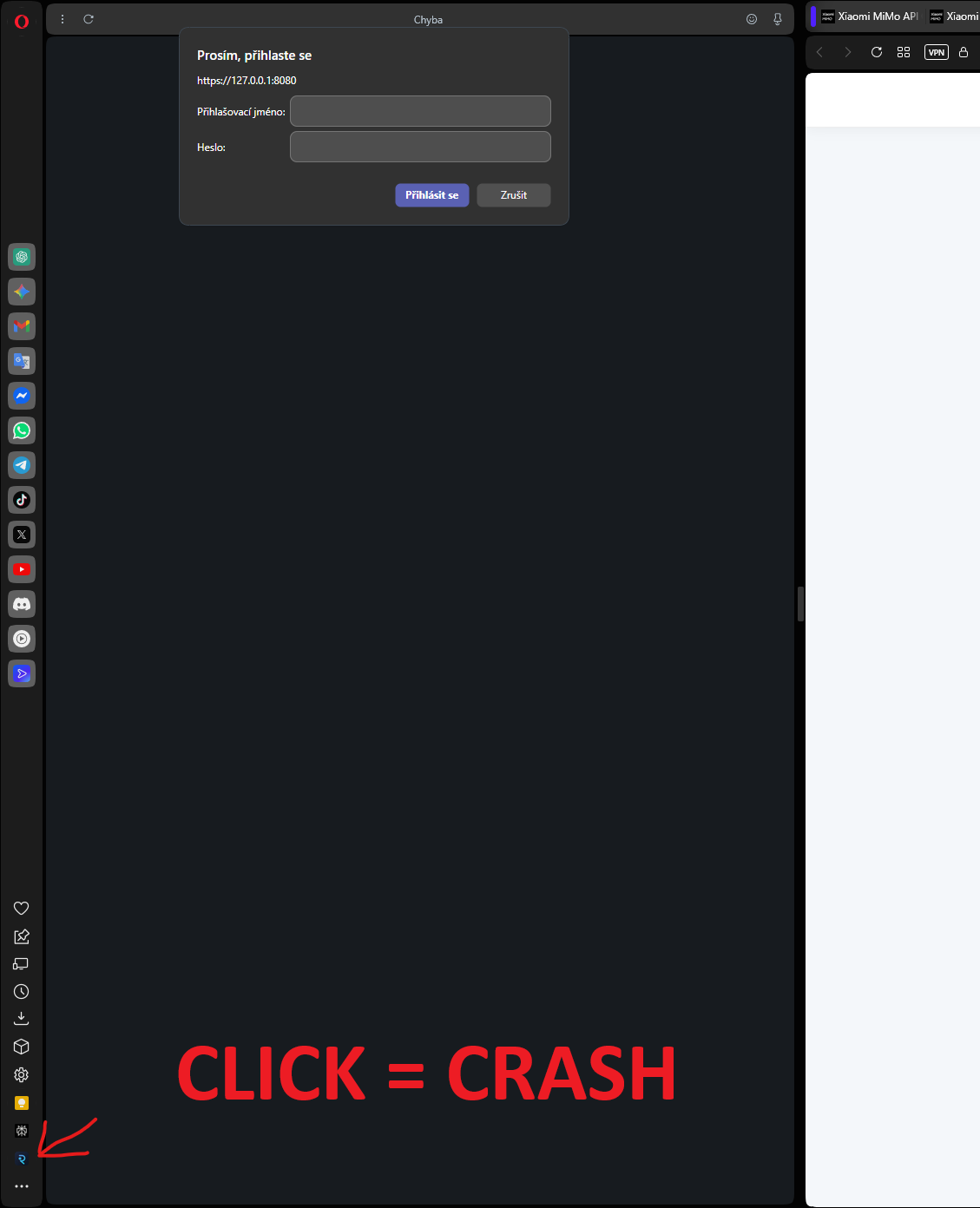
                              e609e712-9a6d-42dc-a4db-2d043bdf98fc-image.png

                              When a login modal is open, closing the bottom side tab causes the browser to crash.

                              Steps to reproduce:

                              Open a page where the login modal is displayed.
                              Keep the modal open.
                              Click on the bottom item in the left sidebar to close the side tab.
                              The browser crashes / the page stops responding.

                              Expected behavior:
                              The side tab should close normally without affecting the modal or crashing the browser.

                              Actual behavior:
                              Clicking to close the side tab while the modal is open causes the browser to crash.

                              Note:
                              The issue only occurs when the modal window is open (see screenshot).

                              Reply Quote 0
                                burnout426 1 Reply Last reply
                              • whisperer
                                whisperer @whisperer last edited by

                                @whisperer said in Opera 131 Stable:

                                Switch to the tab playing the video with Ctrl+Tab. Wait long with releasing the Ctrl key. Then it seems to crash.*

                                Same thing happens when using the developer version Opera One (132.0.5889.0).

                                Reply Quote 0
                                  1 Reply Last reply
                                • burnout426
                                  burnout426 Volunteer @NetSkyCZ last edited by burnout426

                                  @NetSkyCZ I couldn't reproduce it with https://authenticationtest.com/HTTPAuth/. Does it have to be on localhost like in your pic? I even tried with a custom site panel. Edit: Couldn't reproduce with a local server either.

                                  Reply Quote 0
                                    1 Reply Last reply
                                  • Opera-QA-Team
                                    Opera-QA-Team Opera @whisperer last edited by

                                    @whisperer: yes, it helps! thank you. I can see we don't have this crash reported so far. I reported it with your repro steps

                                    Reply Quote 0
                                      1 Reply Last reply
                                    • R
                                      Rogue-River last edited by

                                      Vertical tabs and faster boot up time please!

                                      Reply Quote 0
                                        1 Reply Last reply
                                      • M
                                        max1c last edited by

                                        Can we please get a way to use the 'search pop-up' feature only with a hotkey and some more customizability to the pop-up itself? It makes no sense that after all these years this feature is still so impractical.

                                        Reply Quote 0
                                          1 Reply Last reply
                                        • First post
                                          Last post

                                        Computer browsers

                                        • Opera for Windows
                                        • Opera for Mac
                                        • Opera for Linux
                                        • Opera beta version
                                        • Opera USB

                                        Mobile browsers

                                        • Opera for Android
                                        • Opera Mini
                                        • Opera Touch
                                        • Opera for basic phones

                                        • Add-ons
                                        • Opera account
                                        • Wallpapers
                                        • Opera Ads

                                        • Help & support
                                        • Opera blogs
                                        • Opera forums
                                        • Dev.Opera

                                        • Security
                                        • Privacy
                                        • Cookies Policy
                                        • EULA
                                        • Terms of Service

                                        • About Opera
                                        • Press info
                                        • Jobs
                                        • Investors
                                        • Become a partner
                                        • Contact us

                                        Follow Opera

                                        • Opera - Facebook
                                        • Opera - Twitter
                                        • Opera - YouTube
                                        • Opera - LinkedIn
                                        • Opera - Instagram

                                        © Opera Software 1995-