The same on Linux
I
Best posts made by ironbone
- Opera for Windows
-
RE: Opera 65 comes with an improved tracker blocker and redesigned address barBlogs
@burnout426: I'm on Linux - maybe this is the problem
-
RE: Opera 65 comes with an improved tracker blocker and redesigned address barBlogs
@burnout426: It looks like this on my computer: https://ibb.co/R70FfyP
-
RE: Opera 66.0.3515.103 Stable updateBlogs
Opera does not open RSS feeds well. just click
https://blogs.opera.com/desktop/feed/
I do not want to see the text. It should be open in the feed reader - Blogs
- Blogs
-
RE: Opera 99.0.4788.65 Stable updateBlogs
@jamerx: Use this codec:
https://onedrive.live.com/?authkey=!AC7ddalBsUiWsUE&id=75D48EF8D3750510!451&cid=75D48EF8D3750510In my case, everything works well with this codec.
-
RE: Opera 99.0.4788.65 Stable updateBlogs
@zebra007: Use this codec:
https://onedrive.live.com/?authkey=!AC7ddalBsUiWsUE&id=75D48EF8D3750510!451&cid=75D48EF8D3750510In my case, everything works well with this codec.
-
RE: Aria’s command line becomes more powerful – Chat with Aria and do page deep dives with new Page Context ModeBlogs
I was able to find it. The shortcut was Ctrl+Shift+7
Unfortunately, the Page Context Mode is not active, How to activate it?
Latest posts made by ironbone
-
RE: Opera 136.0.6008.80 Stable updateBlogs
When using Google Slides in Opera on Linux (GNOME), the top navigation menu does not work consistently. Clicking on menu items frequently produces no response, though it occasionally registers.
-
RE: Opera 136.0.6008.80 Stable updateBlogs
Opera issues on Ubuntu 26.04 (Wayland / GNOME): Picture-in-Picture & Menu Rendering Problems
I recently updated my system to Ubuntu 26.04 running GNOME, which defaults to Wayland without an X11 option. Ever since the upgrade, I’ve been running into a couple of major issues with Opera:
Video Pop-out / Picture-in-Picture (e.g., YouTube):
The video pop-out window appears in the middle of the screen instead of the bottom-right corner.
More critically, it fails to stay "Always on Top." As soon as I click anywhere else on the screen, the pop-out hides behind other windows.
Truncated / Invisible Opera Menu:
The Opera main menu is improperly rendered and truncated. Text labels are cut off, making several menu items unreadable or invisible.
Since Ubuntu 26.04 runs Wayland by default, these issues will likely affect all Ubuntu users upgrading to this release.
Is anyone else experiencing these bugs under native Wayland in GNOME? Are there any known workarounds or flags to fix window placement and always-on-top behavior?
-
RE: Opera 134.0.5954.66 Stable updateBlogs
@Opera-QA-Team
Here is the video:
https://streamable.com/zsa4spOn my computer I can all the time see the mouse cursor moving, on the video we do not see it.
Here is the output from the console:
opera --user-data-dir=$(mktemp -d) --disk-cache-dir=$(mktemp -d)
Gtk-Message: 16:49:40.008: Not loading module "atk-bridge": The functionality is provided by GTK natively. Please try to not load it.
[480669:480776:0820/164940.426829:ERROR:opera/opera_components/partner_bookmarks/partner_bookmarks_utils.cc:267] Unable to read partner speeddials file.
[480669:480760:0820/164941.208844:ERROR:extensions/browser/content_verifier/content_verify_job.cc:489] Content verify job failed for extension: ehlmjgafbankbokkgbjnalkgahahjgbd at path: index.html and for reason:1
WARNING: All log messages before absl::InitializeLog() is called are written to STDERR
E0000 00:00:1787237381.614424 480669 re2.cc:242] Error parsing '.?._x_ads_channel=(?!google).*': invalid perl operator: (?!
[480669:480760:0820/164941.633275:ERROR:extensions/browser/content_verifier/content_verify_job.cc:489] Content verify job failed for extension: ehlmjgafbankbokkgbjnalkgahahjgbd at path: index.js and for reason:1
[480669:480760:0820/164942.279893:ERROR:extensions/browser/content_verifier/content_verify_job.cc:489] Content verify job failed for extension: ehlmjgafbankbokkgbjnalkgahahjgbd at path: 5c970459e6839141139d.png and for reason:1
[480669:480760:0820/164942.309700:ERROR:extensions/browser/content_verifier/content_verify_job.cc:489] Content verify job failed for extension: ehlmjgafbankbokkgbjnalkgahahjgbd at path: 76319ed07df274653459.png and for reason:1
[480669:480760:0820/164942.341779:ERROR:extensions/browser/content_verifier/content_verify_job.cc:489] Content verify job failed for extension: ehlmjgafbankbokkgbjnalkgahahjgbd at path: b774f4633fe09bd8bd1f.svg and for reason:1
[480669:480760:0820/164942.344407:ERROR:extensions/browser/content_verifier/content_verify_job.cc:489] Content verify job failed for extension: ehlmjgafbankbokkgbjnalkgahahjgbd at path: b25893558c7f1ad49e5e.ttf and for reason:1
[480669:480760:0820/164942.344590:ERROR:extensions - Blogs
-
RE: Opera 134.0.5954.66 Stable updateBlogs
I’ve been using Opera for more then 25 years—since the days when it literally had an ad banner built into the UI—but I’ve finally reached my limit. I am reporting this exact bug for the 10th time with zero response from the team, and it’s time to find an alternative.
Environment:
OS: Ubuntu, openSUSE
Installation Method: Snap
Persists with clean profile: Yes (tested with opera --user-data-dir=$(mktemp -d) --disk-cache-dir=$(mktemp -d))
Steps to reproduce:
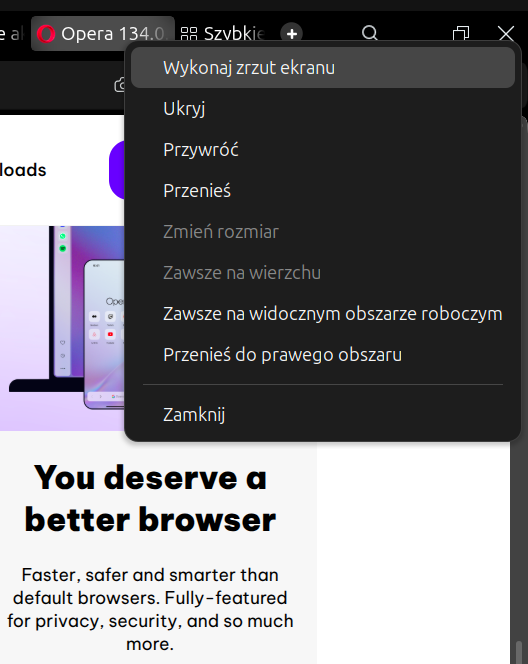
Right-click on the empty space at the top of the browser window (outside the tab bar).
Click on any item in the context menu that appears.
Expected result:
The menu action executes normally.Actual result:
Mouse input locks up completely. The cursor moves, but left and right clicks do not respond anywhere on the system.Workaround / Severity:
Sometimes pressing Alt+Tab (or Ctrl+Tab) to switch windows restores input focus, but often it requires a hard reboot using the power button. This issue has persisted across the last several Opera versions. -
RE: Opera 134.0.5954.56 Stable updateBlogs
@thelittlebrowserthatcould: I have the same issue on Ubuntu and OpenSuse with Opera installed via Snap.
When opening the menu, it locks my mouse—I can move the cursor, but clicks have no effect. Sometimes pressing
Ctrl + Taband switching to another window helps, but other times I have to hard-reboot the computer using the power button. I previously reported this problem, but received no response, and it has been happening across the last few versions. - Blogs
-
RE: Opera 134 StableBlogs
For quite some time now, clicking the right mouse button on Opera’s top bar, outside of the tabs area, causes mouse clicks to stop working across the entire system. Sometimes I can recover by pressing CTRL+Tab, but sometimes I have to use Alt+F1 to switch to the console and restart the system.
This issue has been present for at least several Opera releases.
And of course, I also tested it on a clean installation — the same problem occurs.
-
RE: Opera 133.0.5932.34 Stable updateBlogs
@ironbone: Sorry is about the
right clicking on the empty TAB bar -
RE: Opera 133.0.5932.34 Stable updateBlogs
Environment: Ubuntu LTS (Snap version). Note: Works perfectly on OpenSUSE.
Issues:
Critical Bug: Right-clicking anywhere in the browser causes Opera to completely freeze and become unresponsive.
Missing Feature: The old menu that allowed users to easily view and restore recently closed tabs is missing. I expect this functionality to be brought back.