Opera 134.0.5954.66 Stable update
-
andrew84 last edited by
- Restore the 2nd click for the 'scroll to top' feature.
- Restore the search engines creation by using right click.
- Disable the automated search engines adding.
- Fix the 'force dark pages' toggle not remembered state.
- In EasySetup and for the right split screen the scrollbar can't be grabbed when the cursor is far right (EesySetup closes, split screen has no reaction)
-
andrew84 last edited by andrew84
Why there's no toggle in EasySetup to enable/disable wallpaper? Disabling in Settings leaves the section in EasySetup without the ability to quickly enable it.
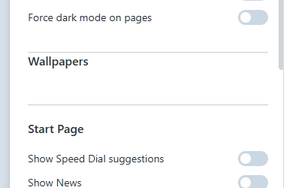
Previous (preOne version) Opera has the toggle.
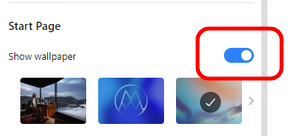
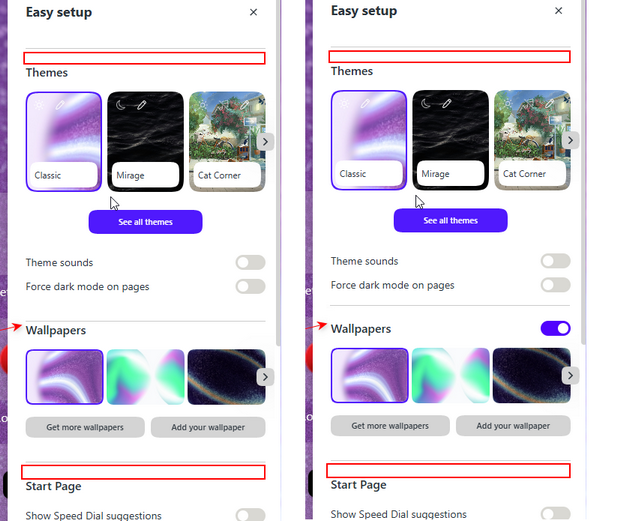
Also, there's no space above the Wallpaper section before the horizontal dividing line. Obviously the space should be the same as for the rest section and there should be the toggle.
-
andrew84 last edited by
When in collapsed mode the vertical tabs bar should have auto show/hide mode (option) like in Edge. It will solve many issues going from the 'hidden' tabs.
-
 thelittlebrowserthatcould last edited by thelittlebrowserthatcould
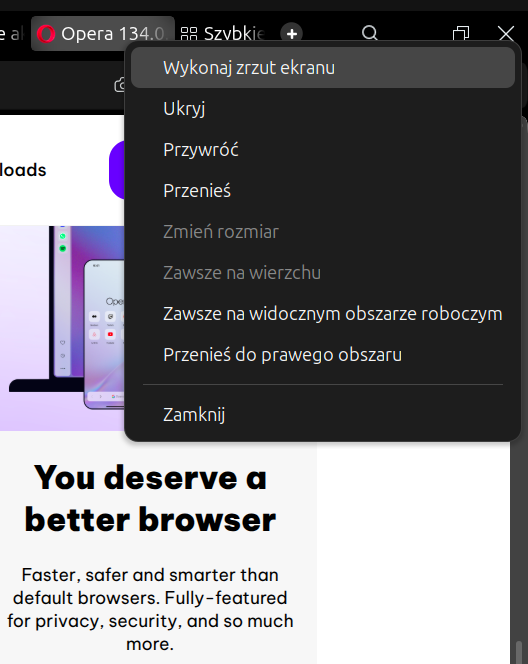
The "Always on top" dialog bug in Linux is mainly fixed, thanks, but still occurs with a right click at the top of the vertical tab strip.
Edit: Nope, still there with horizontal tabs.
-
ironbone last edited by
I’ve been using Opera for more then 25 years—since the days when it literally had an ad banner built into the UI—but I’ve finally reached my limit. I am reporting this exact bug for the 10th time with zero response from the team, and it’s time to find an alternative.
Environment:
OS: Ubuntu, openSUSE
Installation Method: Snap
Persists with clean profile: Yes (tested with opera --user-data-dir=$(mktemp -d) --disk-cache-dir=$(mktemp -d))
Steps to reproduce:
Right-click on the empty space at the top of the browser window (outside the tab bar).
Click on any item in the context menu that appears.
Expected result:
The menu action executes normally.Actual result:
Mouse input locks up completely. The cursor moves, but left and right clicks do not respond anywhere on the system.Workaround / Severity:
Sometimes pressing Alt+Tab (or Ctrl+Tab) to switch windows restores input focus, but often it requires a hard reboot using the power button. This issue has persisted across the last several Opera versions. -
 Opera-QA-Team Opera last edited by
@ironbone: Hi we understand your frustration. Tried reproducing your steps on our local linux machine and unfortunately the issue doesn't reproduce :(. Have you tried sending us a video?
-
Opera-QA-Team Opera last edited by
@thelittlebrowserthatcould: Could you please elaborate on this issue?
-
-
ironbone last edited by
@Opera-QA-Team
Here is the video:
https://streamable.com/zsa4spOn my computer I can all the time see the mouse cursor moving, on the video we do not see it.
Here is the output from the console:
opera --user-data-dir=$(mktemp -d) --disk-cache-dir=$(mktemp -d)
Gtk-Message: 16:49:40.008: Not loading module "atk-bridge": The functionality is provided by GTK natively. Please try to not load it.
[480669:480776:0820/164940.426829:ERROR:opera/opera_components/partner_bookmarks/partner_bookmarks_utils.cc:267] Unable to read partner speeddials file.
[480669:480760:0820/164941.208844:ERROR:extensions/browser/content_verifier/content_verify_job.cc:489] Content verify job failed for extension: ehlmjgafbankbokkgbjnalkgahahjgbd at path: index.html and for reason:1
WARNING: All log messages before absl::InitializeLog() is called are written to STDERR
E0000 00:00:1787237381.614424 480669 re2.cc:242] Error parsing '.?._x_ads_channel=(?!google).*': invalid perl operator: (?!
[480669:480760:0820/164941.633275:ERROR:extensions/browser/content_verifier/content_verify_job.cc:489] Content verify job failed for extension: ehlmjgafbankbokkgbjnalkgahahjgbd at path: index.js and for reason:1
[480669:480760:0820/164942.279893:ERROR:extensions/browser/content_verifier/content_verify_job.cc:489] Content verify job failed for extension: ehlmjgafbankbokkgbjnalkgahahjgbd at path: 5c970459e6839141139d.png and for reason:1
[480669:480760:0820/164942.309700:ERROR:extensions/browser/content_verifier/content_verify_job.cc:489] Content verify job failed for extension: ehlmjgafbankbokkgbjnalkgahahjgbd at path: 76319ed07df274653459.png and for reason:1
[480669:480760:0820/164942.341779:ERROR:extensions/browser/content_verifier/content_verify_job.cc:489] Content verify job failed for extension: ehlmjgafbankbokkgbjnalkgahahjgbd at path: b774f4633fe09bd8bd1f.svg and for reason:1
[480669:480760:0820/164942.344407:ERROR:extensions/browser/content_verifier/content_verify_job.cc:489] Content verify job failed for extension: ehlmjgafbankbokkgbjnalkgahahjgbd at path: b25893558c7f1ad49e5e.ttf and for reason:1
[480669:480760:0820/164942.344590:ERROR:extensions -
Locked by
 leocg
leocg