Opera 131 Stable
-
theory65 0 last edited by
@steeveboy: Hi, Thanks
Opera One(Version: 131.0.5877.5)
remove the entry "Retain tabs from previous session"= didn’t help
Modified Shortcut Target = mine is: "C:\Program Files\Opera\opera.exe"
Corrupt Session Files= tested: didn’t help
Bonus tip: i right click on Tab Icon and close it, but it comes back every time I start the program ?Thanks again
Theo -
burnout426 Volunteer last edited by burnout426
Long shot, but check anyway. Goto the URL
opera://flags/#policy, enable the "Show policy page" flag, restart Opera and goto the URLopera://policy. Does it show that any policies are set from the registry? -
burnout426 Volunteer last edited by
@theory65-0 Try uninstalling all extensions instead of just disabling them.
What extensions do you have installed?
-
 whisperer last edited by
Opera One (version: 131.0.5877.5) (Windows)
- Use 2 tabs, one for "Speed dial", the other for YouTube.
- Play a video on YouTube and while playing the video, press Ctrl+Tab (and release it) repeatedly.
After a number of times pressing Ctrl+Tab, Opera crashes and restarts.
(The Speed dial tab is just an example, can be any content and any number of tabs.)
-
 Opera-QA-Team Opera last edited by
@whisperer: By 2 tabs you mean split screen? Could you share a crash ID?
-
-
whisperer last edited by
By 2 tabs you mean split screen?
No, no split screen.
Could you share a crash ID?
No.
-
whisperer last edited by whisperer
@Opera-QA-Team said in Opera 131 Stable:
Could you share a crash ID?
Installed Opera on Windows Sandbox and reported there.
CRASH-14745
CrashID=bp-9238cc72-ca7c-4c47-899c-eb41d0260504
Does that help?Edit:
Switch to the tab playing the video with Ctrl+Tab. Wait long with releasing the Ctrl key. Then it seems to crash. -
NetSkyCZ last edited by
Bug:
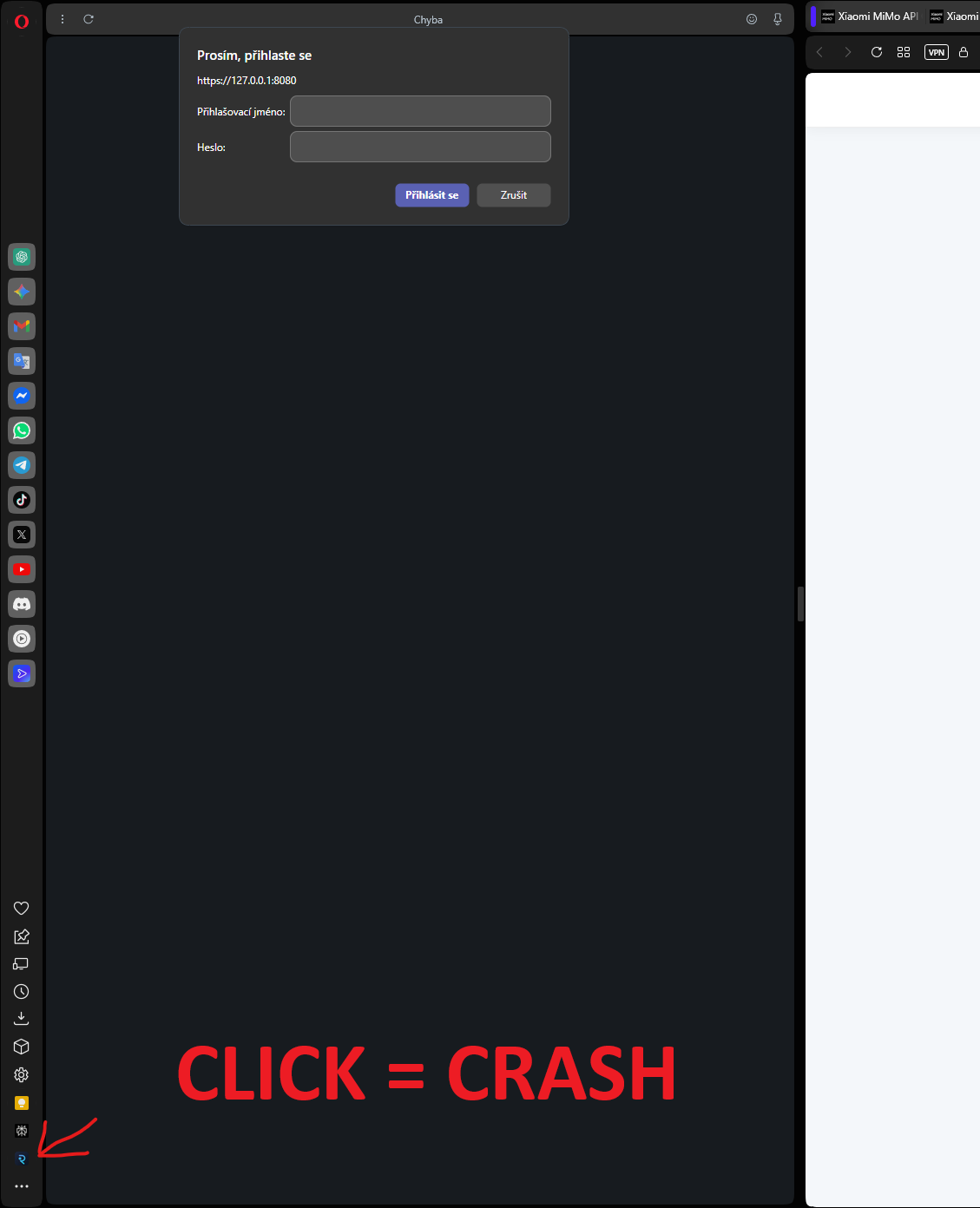
When a login modal is open, closing the bottom side tab causes the browser to crash.
Steps to reproduce:
Open a page where the login modal is displayed.
Keep the modal open.
Click on the bottom item in the left sidebar to close the side tab.
The browser crashes / the page stops responding.Expected behavior:
The side tab should close normally without affecting the modal or crashing the browser.Actual behavior:
Clicking to close the side tab while the modal is open causes the browser to crash.Note:
The issue only occurs when the modal window is open (see screenshot). -
whisperer last edited by
@whisperer said in Opera 131 Stable:
Switch to the tab playing the video with Ctrl+Tab. Wait long with releasing the Ctrl key. Then it seems to crash.*
Same thing happens when using the developer version Opera One (132.0.5889.0).
-
burnout426 Volunteer last edited by burnout426
@NetSkyCZ I couldn't reproduce it with https://authenticationtest.com/HTTPAuth/. Does it have to be on localhost like in your pic? I even tried with a custom site panel. Edit: Couldn't reproduce with a local server either.
-
Opera-QA-Team Opera last edited by
@whisperer: yes, it helps! thank you. I can see we don't have this crash reported so far. I reported it with your repro steps
-
max1c last edited by
Can we please get a way to use the 'search pop-up' feature only with a hotkey and some more customizability to the pop-up itself? It makes no sense that after all these years this feature is still so impractical.
-
Locked by Opera-QA-Team
