Opera 133.0.5932.60 Stable update
-
 Opera Comments Bot last edited by
Hello! We’ve rolled out a new Opera Stable release, version 133.0.5932.60, with a security boost for copied text and new Start Page image search feature landing in Early Bird. Paste Protect We’ve enabled #paste-protect on all streams! his feature checks copied text for malicious content before you paste it, helping keep you safe from clipboard-based […]
Read full blog post: Opera 133.0.5932.60 Stable update
-

-
andrew84 last edited by
Fix the search popup position. It appears in random place and has different shapes.
https://blogs.opera.com/desktop/2026/07/opera-135-developer/#comment-405965 -
 whisperer last edited by
@whisperer said in Opera 133 Stable:
Since version 132.0.5905.102 (tested with Windows versions), there is not hint at the bottom showing the url when hovering over an link in a second Opera Window.
The developer version (134.0.5945.0) has this issue as well.
Version 132.0.5905.73 and earlier worked OK.
Still not fixed.
-
whisperer last edited by
@whisperer said in Opera 131.0.5877.74 Stable update:
Crash when not using %s in site search definition (Opera for Windows)
Create a shortcut to go to the Opera website:Go to opera://settings/searchEngines
Click the Add button to add a site search
Enter these details: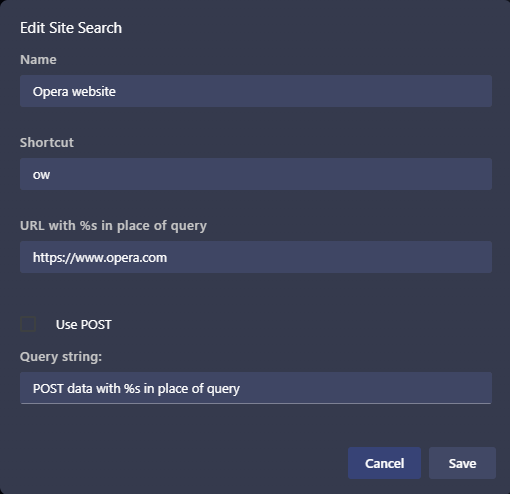
(Notice that no %s in used in the URL)
Click SaveNow test it:
Open a new tab (Ctrl+T)
Type "ow", then press Space, then press EnterOpera crashes.
(Tested with Opera 131.0.5877.97)Still not fixed.
-
raphaelbm last edited by
The Browser Assistant remains on the Windows 10 taskbar even after Opera is closed.
Kindly fix this resource bloat as soon as possible. The Assistant should close when the Browser closes.Opera Software - Browser Assistant version 133.0.5932.60
Opera Software - Internet Browser version 133.0.5932.60Operating System: Windows 10 Home (x64) Version 22H2 (build 19045.7548)
System Model: TOSHIBA SATELLITE C850D-12L PSCC2E-02L00JEN -
raphaelbm last edited by leocg
@raphaelbm: After careful checking I note that:
the Browser Assistant remains on the taskbar After An Update.
Kindly fix this resource bloat as soon as possible. The Assistant should close when the Browser closes.viz. ... Menu>Help>About Opera ...to manually enlist an update.
-
andrew84 last edited by andrew84
- restore the 2nd click for 'scroll to top' feature and restore the 'create search engines' functional. There are anough reports already reagrding this on forum.
The search engines auto creation and then activating is total rubbish. Stop the chaos among the habitual and proven features.
https://forums.opera.com/post/404101
https://forums.opera.com/topic/88922/search-engines-are-added-automatically-and-shown-in-search-with
https://forums.opera.com/topic/89066/duplicated-clicking-on-the-active-tab-2-times-no-longer-scrolls-down-to-a-previous-position- There's still gap between sidebar and panel and items in panel is misaligned https://forums.opera.com/post/404906
- restore the 2nd click for 'scroll to top' feature and restore the 'create search engines' functional. There are anough reports already reagrding this on forum.
-

-
 tastodd last edited by
@cookie-drummer I agree. It was a very convenient feature. I used it often. This was an exclusive feature of the Opera. But now it's broken and doesn't function properly ((
Please bring back this feature. -
andrew84 last edited by
@tastodd As was mentioned they also have broken the search engine creation using context menu.
In addition, now the search engines are collected automatically while you visit sites and the inactive search engines list increases without your knowledge.
Also, currently there's an additional bug that even inactive search engines are visible in right click > 'search with' list. -

-
andrew84 last edited by andrew84
@leocg Maybe. It seems the same on Edge.
But right now I installed Vivaldi (which is also on 150 version) and there is all like previously. Search engines still can be created manually (right click) and no engines are added automatically.So it doesn't matter if this is some chromium change or not if the habitual behavior can be kept.
-
albano23 last edited by
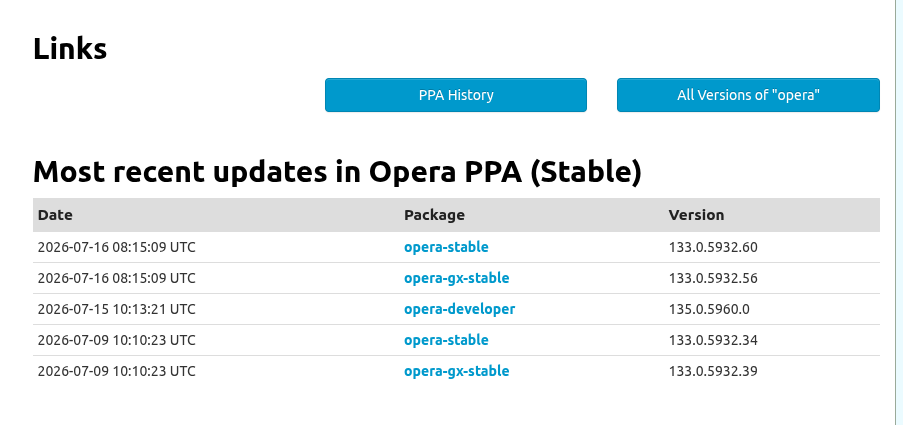
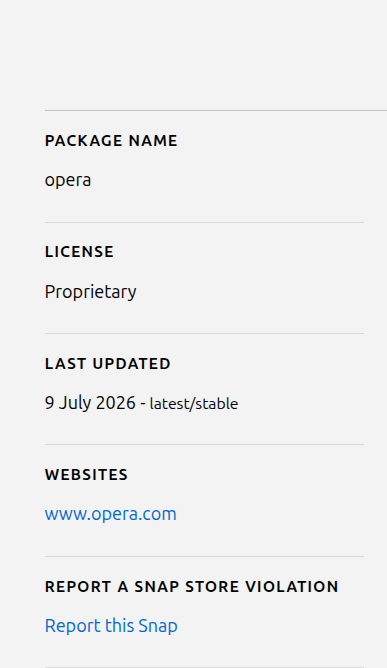
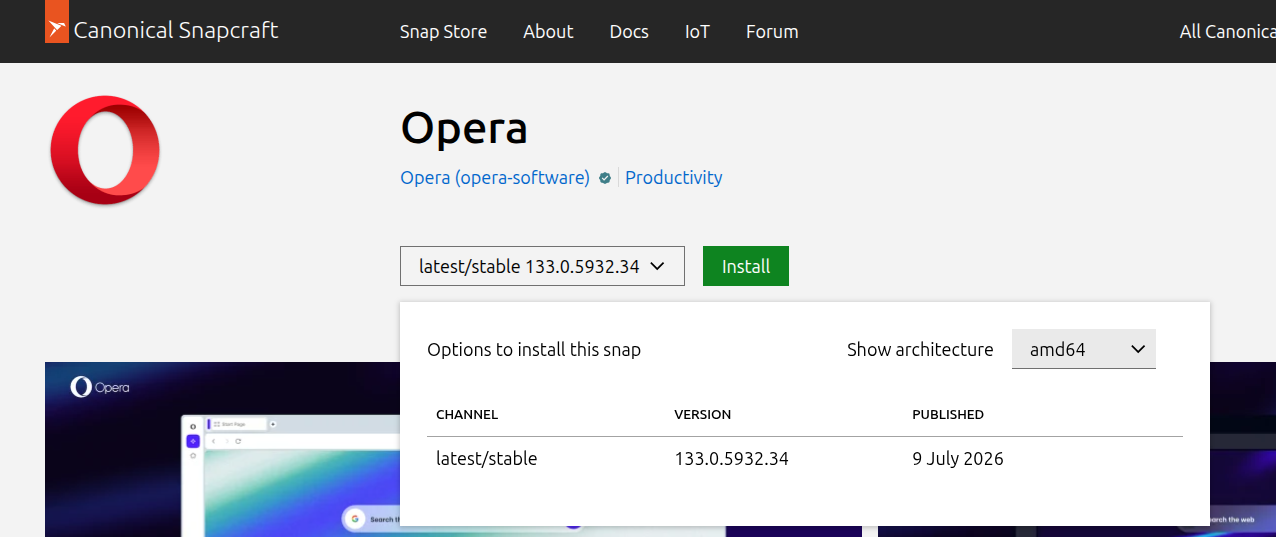
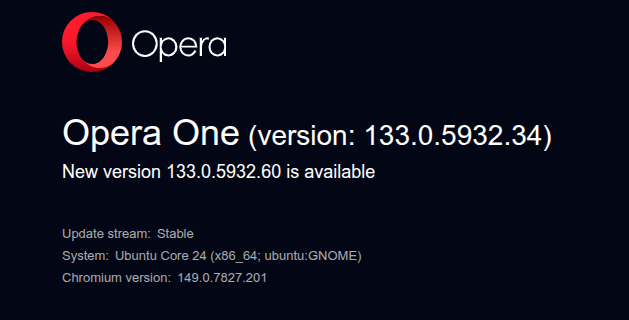
In Ubuntu Snap, update 133.0.5932.60 hasn't arrived, although it did arrive in the .deb format. Could you please fix this? I'm using the Snap version on Ubuntu 22.04.05 LTS. I've attached screenshots for reference.
-
andrew84 last edited by
Regarding the broken search popup position.
The bug uppears if page zoom is set to more or less than 100%.
https://forums.opera.com/post/406217 -
-
albano23 last edited by
@Opera-QA-Team Yes, I've successfully updated to version 133.0.5932.60. Thank you very much for your work. Best regards.
-
Referenced by
 Mormani
 -
Locked by leocg

