Opera 131.0.5877.74 Stable update
-
steeveboy last edited by leocg
@opera-qa-team: Hi, thanks for the reply. No, I don't have other apps open. Just Opera completely closed. Open it normally --> focus, you can type immediately. Then again close completely. Open via taskbar symbol right click then "New private window" --> no focus, you cannot type immediately. You have to click the omnibox to type e.g. "gmail".
Maybe it's just a special problem with my system. But it definitely worked until Opera version 130. Then some days ago it broke. So my assumption is update from Opera and/or Microsoft (new build, new Explorer focus problems).
I'll just try to see if further Opera updates and/or Microsoft cumulative updates restore the old and normal behaviour.
In the meantime I have a second Opera symbol right next to it with Developer White just for this function (opera.exe --private // WITH normal focus after opening it).
-
 whisperer last edited by
Still not fixed, nor confirmed:
@whisperer said in Opera 131.0.5877.24 Stable update:
When I log in on this forum, my browser gets logged in too with my Opera account. I then quickly log my browser off by clicking the icon at the top right and then clicking the button to log off. I then get this screen without a message:
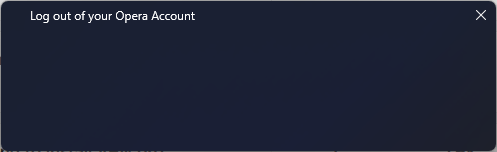
If I wait a little longer before trying to log out, or when I try again, the dialog does have text in it. -
andrew84 last edited by
- EasySetup and sidebar setup panels still don't reset scrolling position on open.
The EasySetup still doesn't allow to grab the scrollbar while the cursor is far right on the 1px border (the menu closes).
Also, the scrolling doesn't work if the cursor is on the left 1px content border (for example reddit web site).
- Not so critical anymore because Opera One is not my main browser but is it possible to know what's the secret of keeping the 'scroll to top' feature unfixed {page scrolls to top while moving tab) during ~3 years?
*The are other numerous bugs which stay unfixed for months or years, I just highlighted the ones related to scrolling.
- EasySetup and sidebar setup panels still don't reset scrolling position on open.
-
whisperer last edited by
Bug when changing position of bookmark in folder in boookmarks bar
(Opera for Windows 131.0.5877.97)- I have the bookmarks bar enabled. On it, I have a folder named "Bugs & Dev".
- On the bookmarks bar, I click the folder and the folder opens. Here's an image:
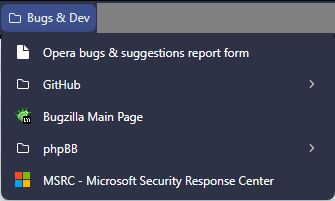
- I drag the entry "Bugzilla Main Page" (in the middle) to the top, to change its position.
- The entry "Bugzilla Main Page" is now moved to the top, but displayed at the bottom. When clicking the folder name "Bugs & Dev" twice to close it and open it again, the bookmark is shown in its correct place.
-
andrew84 last edited by andrew84
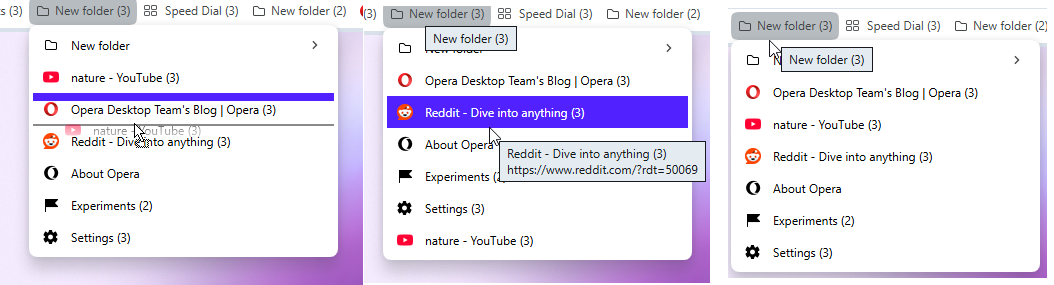
@whisperer It's not necessary to move to the top, the bug also occurs when moving items up/down. The positions of the moved items will be random (after reopening the folder the position will be correct). Also in Developer.
For a exmaple I'm moving 'yt nature' item and place it after the 'Opera desktop ..' item but it placed as the last one item, after reopening the folder the position is correct.
-
whisperer last edited by
@andrew84 said in Opera 131.0.5877.74 Stable update:
@whisperer It's not necessary to move to the top, the bug also occurs when moving items up/down.
Duh..
I wrote:Bug when changing position of bookmark in folder in boookmarks bar
And simply gave example steps to reproduce the issue.
-
raphaelbm last edited by leocg
Version 131.0.5877.97 - No Announcement
Hi again, Today 26May26 this version was installed via auto update. There is NO announcement or CHANGELOG on this blog.
nb. I do note an update comment here dated 22May talking about the Version 131.0.5877.97Question:
Should I expect to see a formal announcement for Version 131.0.5877.97 on the blog?
Should the Version 131.0.5877.97 appear in the changelog?Here is the Version 131.0.5877.97 on Opera Releases web page.
see https://get.geo.opera.com/pub/opera/desktop/Opera Releases
131.0.5877.97/ 22-May-2026 11:56 -
131.0.5877.74/ 20-May-2026 08:45 -Please fix this blog documentation bug asap. Thx Raphael
-
raphaelbm last edited by
@raphaelbm:
Windows 10 Home (x64) Version 22H2 (build 19045.7291)
TOSHIBA SATELLITE C850D-12L PSCC2E-02L00JEN -

-
raphaelbm last edited by leocg
@leocg I am not aware of any missed anouncements. I have been following the stable channel for many years now.
If it is true that you do not announce some updates how do you advise which bugs are fixed. It seems an extraordinary position.
Please now consider an announcement for this and All future stable updates.
Note: Even Microsoft and Twiiter "X" announce updates. Yes - it's an industry standard. Opera is the only major product that could behave this way.I apologise for wasting time in the .74 blog talking about .97. Please fix this documentation bug ASAP. Raphael
-
 thelittlebrowserthatcould last edited by
132.0.5905.7 Debian
Start Page > Hide search box is set "on" and can't be overridden.
In case it's of interest, it takes 3.5 minutes before a page is usable, after startup. I have 765 tabs sleeping via The Marvellous Suspender. Within the first 10 seconds there's an "Opera is not responding" dialogue, which soon disappears. -
leocg Moderator Volunteer last edited by
@raphaelbm Are you new to Opera? Silent updates are not uncommon.
Usually are updates with minor fixes.
-
genegold last edited by
131.0.5877.97 -- I'm finding problems with this version in two ways:
-
NYTimes.com articles disappear (blank page) with your ad blocker on (also happens with Adblock on or off)
-
Settings > Privacy > Manage Exceptions > Block Ads - exceptions shows shows none of the exceptions, just Site and Add. The existing exceptions don't show until a new site is actually added.
-
-
 Opera-QA-Team Opera last edited by
@raphaelbm: Hello, version .97 was released very shortly after .74 because of detecting the crash with bar handle. The blog post was updated the same day so actually it was announced.
-
whisperer last edited by
@Opera-QA-Team said in Opera 131.0.5877.74 Stable update:
@raphaelbm: Hello, version .97 was released very shortly after .74 because of detecting the crash with bar handle. The blog post was updated the same day so actually it was announced.
An announcement of a new version in the announcement of the previous version, is not an announcement of the new version, but an update to the announcement of the previous version.
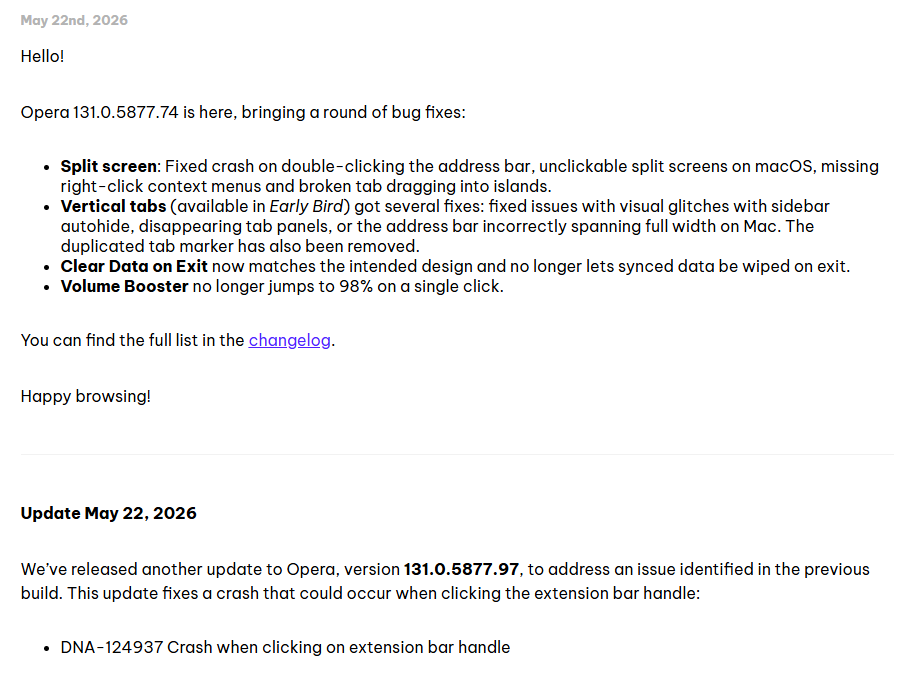
So actually no, version 131.0.5877.97 was not announced. It was merely mentioned somewhere.
It seems rather obvious that this is not clear for people and causing confusion among users.
-
Locked by Opera-QA-Team