Opera 127 developer
-
filbo last edited by
@filbo: Arghh, no, I really want Classic Tabs to work again. Its 'Open all tabs next to the active tab' is what I want.
Thing that isn't working now: right-click an item on my bookmarks bar > Open in new tab; it opens on the end of the tab bar.
Or middle-click, or Ctrl+click, a bookmark bar item. I want these all to open next to my current tab.
I tried right-click bookmark > Open in new tab [ while holding SHIFT, CTRL, or ALT ] -- these didn't change behavior. Maybe one of them could mean 'next to current'? (ALT made the right-click menu go away, but I was able to [ press-and-hold ALT; right-click bookmark > Open in new tab ]. Which made no difference.)
So what I really want is a setting like Classic Tabs's 'Open all tabs next to the active tab'.
Alternative things you could do that are at least somewhat helpful:
- default-blank shortcut for 'Open in new tab next to current'
- default-blank shortcut for 'Move out of tab island'
- shift/ctrl/alt modifier on open-a-tab actions which means 'next to current'
- shift/ctrl/alt modifier on open-a-tab actions which means 'in island [next to current]'
-
 Opera-QA-Team Opera last edited by
@andrew84: Hi, is the border appearing also for the new split screen (where you can have more than 2 screens)? I assume it is very random issue as I'm trying to reproduce but no success.
-
andrew84 last edited by andrew84
@Opera-QA-Team said in Opera 127 developer:
is the border appearing also for the new split screen
Here the new 'split screen' flag is enabled by default so yes, happens on the new as well.
@Opera-QA-Team said in Opera 127 developer:
it is very random issue
Yes, it's random. But not very. Happens quite often here. Win10x64.
I also reported that there's blue border randomly for the EasySetup button https://forums.opera.com/post/396381

Original post is one year old already
https://forums.opera.com/post/368744
So despite of multiple reports during the year the bug was not even reproduced on your side. -
andrew84 last edited by
Here while in split screen I can't scroll the right pane by grabbing the scrollbar when the cursor is far right.
-
 tastodd last edited by
@Opera-QA-Team A 1 year ago, I made a video showing the blue frame appearing. https://forums.opera.com/post/368908
I checked this again, and the problem persists.
System: Windows 11 25x2
CPU: Intel 14600K
Graphics: Intel UHD Graphics 770
 -
andrew84 last edited by
@tastodd A bit hard to believe that throughout the year they wasn't able to reproduce the bug, especially if now it happens not only after exiting split screen but also after entering and on both Win10/Win11.
Also, as was mentioned, here I see the border for the EasySetup button as well. -
andrew84 last edited by
-
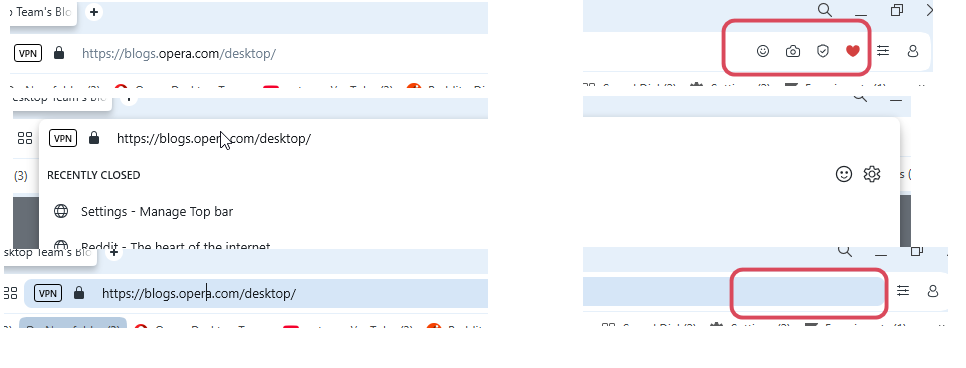
Is it correct behavior that after showing up the 'suggestion before typing' or address bar suggestion dropdown and closing it address bar icons stay hidden? Same in Stable.
-
Also, the address bar still stays highlighted.
https://forums.opera.com/post/396567
Seem ok in Stable but still not fixed in Dev.
-
-
Opera-QA-Team Opera last edited by
@andrew84: Hello, thanks for the reminder. The icons are not displaying due to the bug with highlighting the address bar, it will be fixed.
-
Locked by
 leocg
leocg