• Login
    • Search
    • Categories
    • Recent
    • Tags
    • Users
    • Groups
    • Rules
    • Help

    Do more on the web, with a fast and secure browser!

    Download Opera browser with:

    • built-in ad blocker
    • battery saver
    • free VPN
    Download Opera

    Opera 127 developer

    Blogs
    desktop blog comments
    12
    30
    925
    Loading More Posts
    • Oldest to Newest
    • Newest to Oldest
    • Most Votes
    Reply
    • Reply as topic
    Log in to reply
    This topic has been deleted. Only users with topic management privileges can see it.
    • ironbone
      ironbone last edited by ironbone

      Unfortunately, Opera still does not work correctly on Wayland, while it works fine on Xorg.
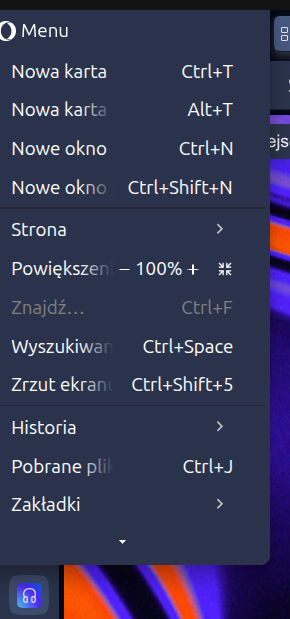
      The main menu is too small.
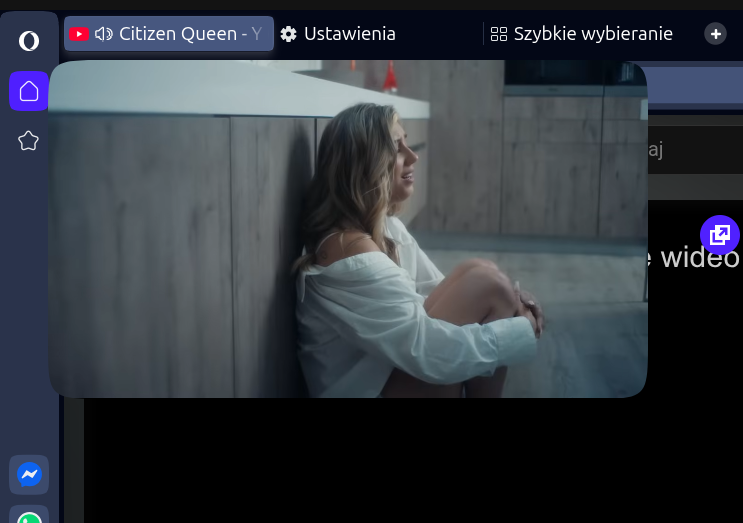
      The YouTube mini player (pop-up video / Picture-in-Picture) does not work properly — the window position is incorrect. Additionally, it does not stay in the foreground.
      Please see the attached images.
      6885424a-ae5c-4609-b12b-8f68dc9f54a2-Zrzut ekranu z 2026-01-14 17-05-27.png

      0eaa88ac-207b-480d-a62a-9f4a0e07091a-Zrzut ekranu z 2026-01-14 17-07-30.png

      Reply Quote 0
        1 Reply Last reply
      • ironbone
        ironbone @SiMcarD78 last edited by

        @simcard78: Try to switch to Xorg on the login page

        Reply Quote 0
          SiMcarD78 1 Reply Last reply
        • deathcat
          deathcat last edited by

          Why is the Chromium version so old again, and even lower than the version on the stable channel?

          Reply Quote 0
            1 Reply Last reply
          • filbo
            filbo last edited by

            Going from opera-developer 126.0.5748.0 to 127.0.5776.0, the old extension 'Classic Tabs' (https://addons.opera.com/en/extensions/details/classic-tabs) seems to stop working.

            What I want it for: Ctrl+T should open new tab next to current tab.

            Right-click tab > new tab, does do what I want. But my fingers are used to Ctrl+T!

            Best solution: please add a shortcut (blank by default) for 'new tab next to current tab'. Then I can clear 'New tab' shortcut, set 'New tab next to current' to Ctrl+T, and I don't need some funky old extension.

            Thanks!

            [ workaround: I set Ctrl+T to 'new tab in island', but this is not exactly what I want; it makes a new tab in the right place, that I have to de-island. um. Can you also add a 'Move out from tab island' shortcut (default blank)? ]

            Reply Quote 0
              filbo 1 Reply Last reply
            • filbo
              filbo @filbo last edited by

              @filbo: Arghh, no, I really want Classic Tabs to work again. Its 'Open all tabs next to the active tab' is what I want.

              Thing that isn't working now: right-click an item on my bookmarks bar > Open in new tab; it opens on the end of the tab bar.

              Or middle-click, or Ctrl+click, a bookmark bar item. I want these all to open next to my current tab.

              I tried right-click bookmark > Open in new tab [ while holding SHIFT, CTRL, or ALT ] -- these didn't change behavior. Maybe one of them could mean 'next to current'? (ALT made the right-click menu go away, but I was able to [ press-and-hold ALT; right-click bookmark > Open in new tab ]. Which made no difference.)

              So what I really want is a setting like Classic Tabs's 'Open all tabs next to the active tab'.

              Alternative things you could do that are at least somewhat helpful:

              • default-blank shortcut for 'Open in new tab next to current'
              • default-blank shortcut for 'Move out of tab island'
              • shift/ctrl/alt modifier on open-a-tab actions which means 'next to current'
              • shift/ctrl/alt modifier on open-a-tab actions which means 'in island [next to current]'
              Reply Quote 0
                1 Reply Last reply
              • SiMcarD78
                SiMcarD78 @ironbone last edited by

                @ironbone: Sorry, I forgot to mention I'm on Windows.
                Anyway, I read that it's an Instagram issue related to individual accounts. They haven't fixed it yet.

                Reply Quote 0
                  SiMcarD78 1 Reply Last reply
                • Opera-QA-Team
                  Opera-QA-Team Opera @andrew84 last edited by

                  @andrew84: Hi, is the border appearing also for the new split screen (where you can have more than 2 screens)? I assume it is very random issue as I'm trying to reproduce but no success.

                  Reply Quote 0
                    andrew84 tastodd 2 Replies Last reply
                  • andrew84
                    andrew84 @Opera-QA-Team last edited by andrew84

                    @Opera-QA-Team said in Opera 127 developer:

                    is the border appearing also for the new split screen

                    Here the new 'split screen' flag is enabled by default so yes, happens on the new as well.

                    @Opera-QA-Team said in Opera 127 developer:

                    it is very random issue

                    Yes, it's random. But not very. Happens quite often here. Win10x64.
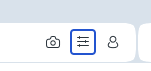
                    I also reported that there's blue border randomly for the EasySetup button https://forums.opera.com/post/396381
                    2025-12-11_232948.png

                    Original post is one year old already
                    https://forums.opera.com/post/368744
                    So despite of multiple reports during the year the bug was not even reproduced on your side.

                    Reply Quote 0
                      1 Reply Last reply
                    • andrew84
                      andrew84 last edited by

                      Here while in split screen I can't scroll the right pane by grabbing the scrollbar when the cursor is far right.

                      Reply Quote 0
                        1 Reply Last reply
                      • tastodd
                        tastodd @Opera-QA-Team last edited by

                        @Opera-QA-Team A 1 year ago, I made a video showing the blue frame appearing. https://forums.opera.com/post/368908

                        I checked this again, and the problem persists.

                        System: Windows 11 25x2
                        CPU: Intel 14600K
                        Graphics: Intel® UHD Graphics 770

                        Reply Quote 0
                          andrew84 1 Reply Last reply
                        • andrew84
                          andrew84 @tastodd last edited by

                          @tastodd A bit hard to believe that throughout the year they wasn't able to reproduce the bug, especially if now it happens not only after exiting split screen but also after entering and on both Win10/Win11.
                          Also, as was mentioned, here I see the border for the EasySetup button as well.

                          Reply Quote 0
                            1 Reply Last reply
                          • andrew84
                            andrew84 last edited by

                            I also believe that split tab should be pinnable as well.

                            Reply Quote 0
                              1 Reply Last reply
                            • SiMcarD78
                              SiMcarD78 @SiMcarD78 last edited by

                              @simcard78: Fixed today, finally.

                              Reply Quote 0
                                1 Reply Last reply
                              • andrew84
                                andrew84 last edited by
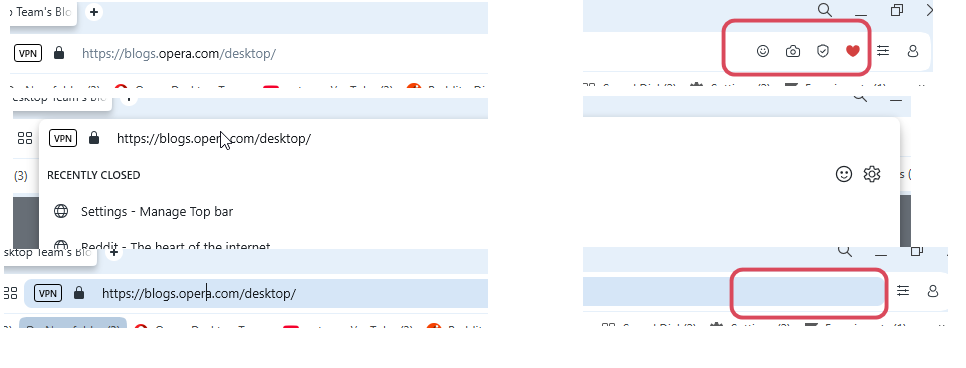
                                • Is it correct behavior that after showing up the 'suggestion before typing' or address bar suggestion dropdown and closing it address bar icons stay hidden? Same in Stable.
                                  2026-01-17_153528.png

                                • Also, the address bar still stays highlighted.
                                  https://forums.opera.com/post/396567
                                  Seem ok in Stable but still not fixed in Dev.

                                Reply Quote 0
                                  Opera-QA-Team 1 Reply Last reply
                                • Opera-QA-Team
                                  Opera-QA-Team Opera @andrew84 last edited by

                                  @andrew84: Hello, thanks for the reminder. The icons are not displaying due to the bug with highlighting the address bar, it will be fixed.

                                  Reply Quote 0
                                    1 Reply Last reply
                                  • First post
                                    Last post

                                  Computer browsers

                                  • Opera for Windows
                                  • Opera for Mac
                                  • Opera for Linux
                                  • Opera beta version
                                  • Opera USB

                                  Mobile browsers

                                  • Opera for Android
                                  • Opera Mini
                                  • Opera Touch
                                  • Opera for basic phones

                                  • Add-ons
                                  • Opera account
                                  • Wallpapers
                                  • Opera Ads

                                  • Help & support
                                  • Opera blogs
                                  • Opera forums
                                  • Dev.Opera

                                  • Security
                                  • Privacy
                                  • Cookies Policy
                                  • EULA
                                  • Terms of Service

                                  • About Opera
                                  • Press info
                                  • Jobs
                                  • Investors
                                  • Become a partner
                                  • Contact us

                                  Follow Opera

                                  • Opera - Facebook
                                  • Opera - Twitter
                                  • Opera - YouTube
                                  • Opera - LinkedIn
                                  • Opera - Instagram

                                  © Opera Software 1995-