Opera 126.0.5750.59 Stable update
-
sicu220 last edited by
-
When will Opera Ai synchronization be resolved? Between computer and mobile phone? I mean synchronization of chats.
-
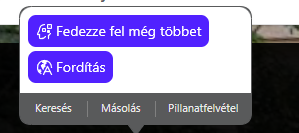
I don't like the white color of Opera AI's highlight menu and the color up there is not uniform. A black or dark theme would be better for it.
-
-
sicu220 last edited by
In the History menu: Search in history, the word "Search" is no longer available.

In dark system settings, the simple settings menu on the right does not switch to a dark theme. Now I see that the theme sounds, when forcing dark mode, the buttons are not visible.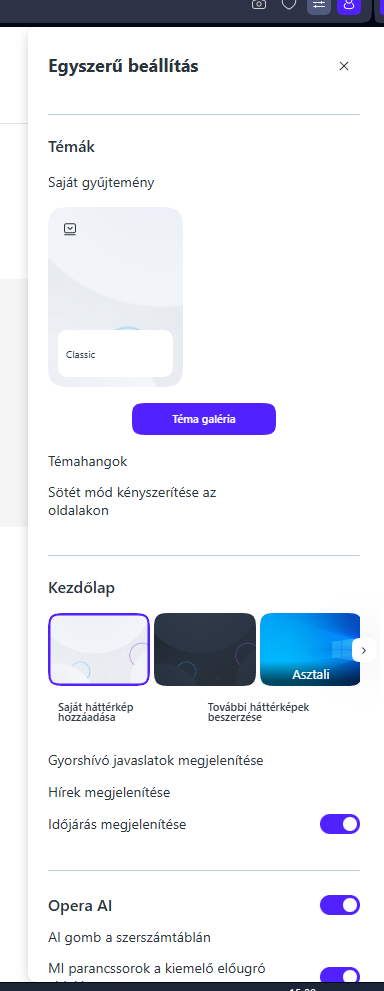
-
andrew84 last edited by andrew84
@sicu220 said in Opera 126.0.5750.59 Stable update:
In dark system settings, the simple settings menu on the right does not switch to a dark theme
Here it switches to dark.
- The issue I have is that theme tile's menus don't reset and after opening EasySetup the menus are open (if the EasySetup was closed without closing the menus first).
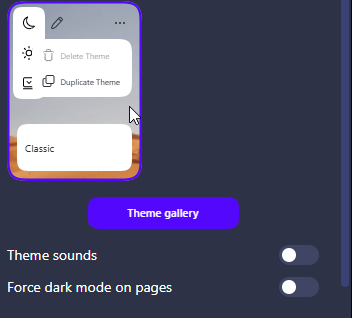
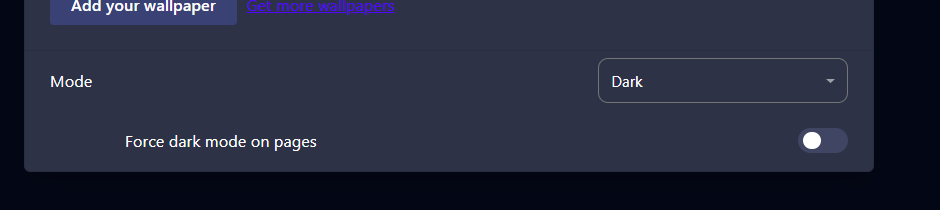
- Another one issue is the 'force dark pages' toggle resets each time and doesn't remember its state after switching the dark theme off/on.
Edit:
And yes the old bug in general Settings is still there.
After switching to dark mode the 'force dark pages' toggle not visible.
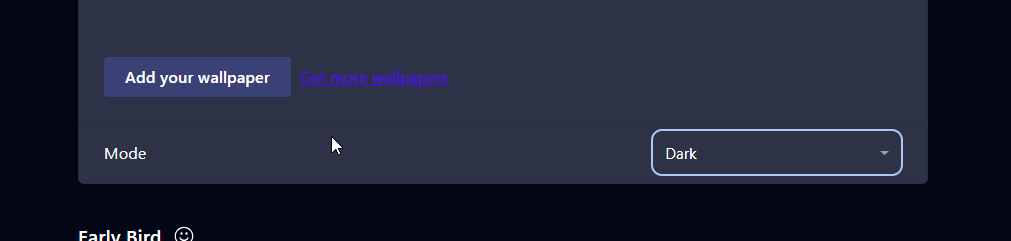
To see it is need to refresh the page.
-

-
-
-
 Opera-QA-Team Opera last edited by
@sicu220: Hello, thanks for the feedback. What OS is it? I checked and it's working fine in Win11. (system mode dark, default mode in Opera -> Easy Setup panel also changes to dark)
-
bbildman last edited by bbildman
New Opera One 126.0.5750.59 (Windows 11) won't log me in to my banking site, Chase. However Chrome will. I had this issue also with another bank site. Not happy, any advise, I have deleted cookies and cleared cache all to no avail. Previous Opera One 126.0.5750.43 worked fine.
-
jedi-am last edited by jedi-am
HI, after few version waiting for fixes for linux, here my feedback:
so my OS: ubuntu 24.04.3 (gnome version with wayland)
opera installer: snap version
opera version: Opera One(version: 126.0.5750.59)only issue i had for last two version was on, so call, easy setup > layout > sidebar, when selected autohide, the browser just crashed and close.
In this last version, so far seems fixed, no crashes anymore. ThanksAbout video, which in 2 version in the past,, failed, so far is working fine at least in last 3 or 4 versions.
For those using ubuntu or ubuntu flavor with snap, with wayland, if your opera is not starting,
like i mention in a post one version i wrote, just backup you bookmarks, if you are using wayland just enter in x11 opera mode,
then uninstall opera snap and install it again.@Opera-QA-Team lets keep going opera browser this way, stable and working well in linux based OS, at least in snap version.
Thanks you.

-
MjuGen last edited by
Hi, so Opera still crashes sometimes after you close tabs with ALT+MOUSE button. The worst thing is, that after crash or even after update (last update) Opera forgets islands in other contexts. The context 1 (default) is OK. That isa frustrating, after every update or almost crash I have to recreate all island in my contexts...
-
Opera-QA-Team Opera last edited by
@mjugen: Hi, could you check the crashID in opera://crashes and write it here?
-
MjuGen last edited by
@opera-qa-team:
not sure which one was the update and which one ALT+Mouse to close tabs. There is one thing interesting. Closing tabs with middle mouse button works without any crashes and does almost the same.
Selhání z: neděle 25. ledna 2026 v 14:44:12
Stav: Nahráno
ID nahrané zprávy o selhání: CrashID=bp-8ed60d07-66b9-428e-aae8-265240260125
Čas nahrání: neděle 25. ledna 2026 v 14:54:32
Selhání z: pátek 23. ledna 2026 v 17:02:46
Stav: Nahráno
ID nahrané zprávy o selhání: CrashID=bp-45ac48ff-8427-4802-9177-5c97e0260123
Čas nahrání: pátek 23. ledna 2026 v 17:13:07
Selhání z: sobota 17. ledna 2026 v 14:12:01
Stav: Nahráno
ID nahrané zprávy o selhání: CrashID=bp-a968b0d1-6e1b-4a2c-9bf1-361640260117
Čas nahrání: sobota 17. ledna 2026 v 14:27:03 -
Opera-QA-Team Opera last edited by
@mjugen: Thanks for checking. This crash is already reported and it's awaiting fix.
-
Opera-QA-Team Opera last edited by
@cgk1511: Regarding MS Teams we are working on the solution. For now, you can go directly to: https://teams.live.com/v2/