• Login
    • Search
    • Categories
    • Recent
    • Tags
    • Users
    • Groups
    • Rules
    • Help

    Do more on the web, with a fast and secure browser!

    Download Opera browser with:

    • built-in ad blocker
    • battery saver
    • free VPN
    Download Opera

    Opera 128 developer

    Blogs
    desktop blog comments
    9
    20
    298
    Loading More Posts
    • Oldest to Newest
    • Newest to Oldest
    • Most Votes
    Reply
    • Reply as topic
    Log in to reply
    This topic has been deleted. Only users with topic management privileges can see it.
    • jojo0587
      jojo0587 last edited by

      Where is the "Sharing Point" function?

      My proposals for changes in Opera (Google Document).
      - There are not enough signs to put all the links here.

      Reply Quote 0
        Opera-QA-Team 1 Reply Last reply
      • SiMcarD78
        SiMcarD78 @jojo0587 last edited by

        @jojo0587: Also in italian.

        Reply Quote 0
          1 Reply Last reply
        • jojo0587
          jojo0587 @jojo0587 last edited by

          @jojo0587: also in Polish.

          My proposals for changes in Opera (Google Document).
          - There are not enough signs to put all the links here.

          Reply Quote 0
            1 Reply Last reply
          • andrew84
            andrew84 last edited by andrew84

            Split screen improvements

            fix the right screen's scrolling by grabbing the scrollbar when the cursor is far right.

            *And still the 'open left links to the right' is missed. The option is quite obvious (for the two screens at least)

            Reply Quote 0
              1 Reply Last reply
            • ironbone
              ironbone last edited by

              Still the same problems on Wayland

              Reply Quote 0
                1 Reply Last reply
              • Opera-QA-Team
                Opera-QA-Team Opera @jojo0587 last edited by

                @jojo0587: Thanks for spotting!

                Reply Quote 0
                  1 Reply Last reply
                • Opera-QA-Team
                  Opera-QA-Team Opera @jojo0587 last edited by

                  @jojo0587: Hi, it is placed in the bottom part of the sidebar.

                  Reply Quote 0
                    burnout426 1 Reply Last reply
                  • andrew84
                    andrew84 last edited by

                    Sharing Point has been enabled

                    So the only purpose of the option is the popup to copy the predefined text ??

                    *btw, the popup won't open after clicking the button directly. Here I see the whole dimmed screen with an empty popup. To see the popup I first need to click some other button (bookmarks for example).
                    2026-01-20_131734.png
                    And why the icon is the same as one used for workspaces.

                    Reply Quote 0
                      burnout426 1 Reply Last reply
                    • burnout426
                      burnout426 Volunteer @Opera-QA-Team last edited by burnout426

                      @Opera-QA-Team I had to go into the sidebar setup and enable it for it to show. It wasn't on by default.

                      Reply Quote 0
                        1 Reply Last reply
                      • burnout426
                        burnout426 Volunteer @andrew84 last edited by

                        @andrew84 said in Opera 128 developer:

                        And why the icon is the same as one used for workspaces.

                        I think the icon should be one of the common share icons.

                        Reply Quote 1
                          Opera-QA-Team 1 Reply Last reply
                        • burnout426
                          burnout426 Volunteer last edited by burnout426

                          The share point could have an email button (that uses a mailto link that's automatically updated as you type/edit your message). Or, better yet, it could be like many social media apps where you have all kinds of share options. Guess it depends on how far you want to go with the little feature.

                          Reply Quote 0
                            andrew84 Opera-QA-Team 2 Replies Last reply
                          • andrew84
                            andrew84 @burnout426 last edited by andrew84

                            @burnout426 I think It was enough adding the share message inside the toolbar's account popup instead (where are already sync and share services and means no sidebar use is need).

                            2026-01-20_141009.png

                            Reply Quote 0
                              Opera-QA-Team 1 Reply Last reply
                            • Opera-QA-Team
                              Opera-QA-Team Opera @burnout426 last edited by

                              @burnout426: Thanks for the suggestions, they are really valuable.

                              Reply Quote 0
                                1 Reply Last reply
                              • Opera-QA-Team
                                Opera-QA-Team Opera @andrew84 last edited by

                                @andrew84: Thanks, we will consider this!

                                Reply Quote 0
                                  1 Reply Last reply
                                • Opera-QA-Team
                                  Opera-QA-Team Opera @burnout426 last edited by

                                  @burnout426: Thanks for the feedback – it's always great to hear what users have to say!

                                  Reply Quote 0
                                    1 Reply Last reply
                                  • andrew84
                                    andrew84 last edited by andrew84

                                    Another one suggestion regarding the islands feature (in addition to 'pin' an 'ungroup' options).

                                    Just now I noticed that in Edge there's 'Delete' and 'close' group. And after closing the 'recently closed' shows the closed tabs as island (group).
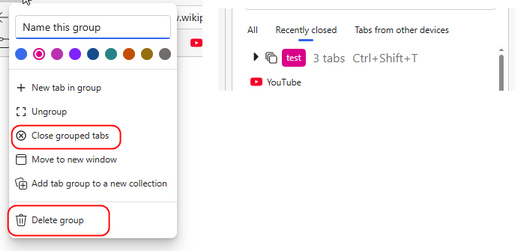
                                    2026-01-20_155936.png

                                    So the same should be in Opera (at least optionally).
                                    Now closed islands show recently closed as separate tabs.
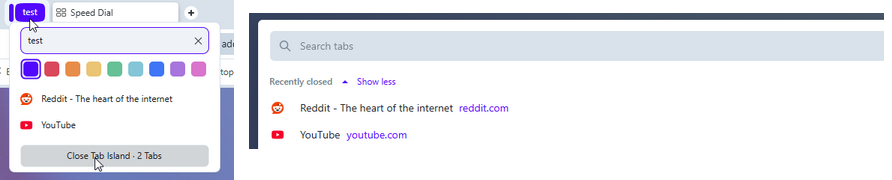
                                    2026-01-20_161033.png

                                    I guess it should show smth. like this

                                    2026-01-20_161243.png

                                    Reply Quote 0
                                      1 Reply Last reply
                                    • fuaim
                                      fuaim last edited by

                                      These update fixes are cool, but...
                                      I dare ask, what about https://opera.atlassian.net/servicedesk/customer/portal/9/BS-102001 (i've posted it back at 2024-dec-16). It's still here and is VERY annoying.
                                      Please, fix it already.

                                      Reply Quote 0
                                        1 Reply Last reply
                                      • donq
                                        donq @jojo0587 last edited by

                                        @jojo0587 said in Opera 128 developer:

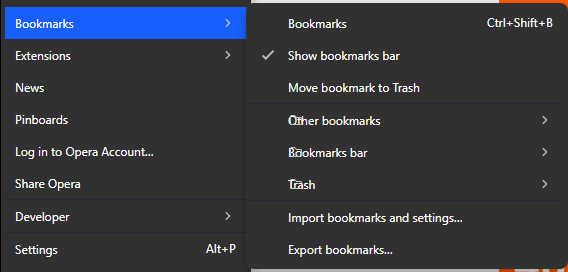
                                        Incorrect names of some options:

                                        • Other bookmarks
                                        • Bookmarks bar
                                        • Trash
                                          obraz_2026-01-19_160412513.png

                                        It's actually folder icons overlaying text, reported by support system also.

                                        Reply Quote 1
                                          1 Reply Last reply
                                        • First post
                                          Last post

                                        Computer browsers

                                        • Opera for Windows
                                        • Opera for Mac
                                        • Opera for Linux
                                        • Opera beta version
                                        • Opera USB

                                        Mobile browsers

                                        • Opera for Android
                                        • Opera Mini
                                        • Opera Touch
                                        • Opera for basic phones

                                        • Add-ons
                                        • Opera account
                                        • Wallpapers
                                        • Opera Ads

                                        • Help & support
                                        • Opera blogs
                                        • Opera forums
                                        • Dev.Opera

                                        • Security
                                        • Privacy
                                        • Cookies Policy
                                        • EULA
                                        • Terms of Service

                                        • About Opera
                                        • Press info
                                        • Jobs
                                        • Investors
                                        • Become a partner
                                        • Contact us

                                        Follow Opera

                                        • Opera - Facebook
                                        • Opera - Twitter
                                        • Opera - YouTube
                                        • Opera - LinkedIn
                                        • Opera - Instagram

                                        © Opera Software 1995-