• Login
    • Search
    • Categories
    • Recent
    • Tags
    • Users
    • Groups
    • Rules
    • Help

    Do more on the web, with a fast and secure browser!

    Download Opera browser with:

    • built-in ad blocker
    • battery saver
    • free VPN
    Download Opera

    Opera 123.0.5669.47 Stable update

    Blogs
    desktop blog comments
    14
    27
    2498
    Loading More Posts
    • Oldest to Newest
    • Newest to Oldest
    • Most Votes
    Reply
    • Reply as topic
    Log in to reply
    This topic has been deleted. Only users with topic management privileges can see it.
    • andrew84
      andrew84 @Guest last edited by

      @businidotaf As seen from the section name it refers to the address bar, not to the search box. And it refers the suggestions before typing, when you click on the address bar not when typing.

      Reply Quote 0
        A Former User 1 Reply Last reply
      • A Former User
        A Former User @andrew84 last edited by

        @andrew84
        opera.jpg
        Everything related to pop-up suggestions is disabled. I didn't have these issues in Opera 122 or earlier. I need to disable them.

        Reply Quote 0
          andrew84 1 Reply Last reply
        • leocg
          leocg Moderator Volunteer @Guest last edited by

          @businidotaf What is not working? Do you want to disable search suggestions?

          Reply Quote 0
            A Former User 1 Reply Last reply
          • A Former User
            A Former User @leocg last edited by

            @leocg
            Yes, I need to disable search suggestions, but I don’t see such a setting in Opera 123. In Opera 122, search suggestions were not offered, the settings did not change.

            Reply Quote 0
              leocg 1 Reply Last reply
            • leocg
              leocg Moderator Volunteer @Guest last edited by

              @businidotaf The option used to be under privacy and security

              Reply Quote 0
                A Former User 1 Reply Last reply
              • A Former User
                A Former User @leocg last edited by

                @leocg
                Since this is unacceptable for me, I was forced to reinstall Opera 122.

                Reply Quote 0
                  1 Reply Last reply
                • andrew84
                  andrew84 @Guest last edited by

                  @businidotaf said in Opera 123.0.5669.47 Stable update:

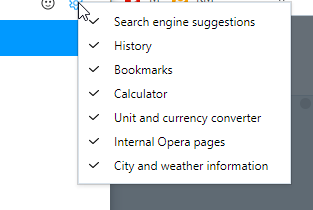
                  Everything related to pop-up suggestions is disabled. I didn't have these issues in Opera 122 or earlier. I need to disable them.

                  The toggles don't refer to the search engine suggestions. Maybe is need to check Google's settings.

                  *there was a flag some time ago to turn off unnecessary search suggestions category items. But later it was removed and the suggestions can't be turned off (as far as I know). https://forums.opera.com/post/363768
                  alt text

                  Reply Quote 0
                    A Former User 1 Reply Last reply
                  • A Former User
                    A Former User @andrew84 last edited by

                    @andrew84
                    Starting from version 123, search suggestions can only be disabled by adding a prohibition rule to the firewall: *google.com/complete/search *

                    Reply Quote 0
                      1 Reply Last reply
                    • P1tzO
                      P1tzO last edited by

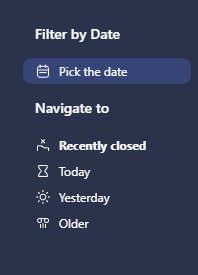
                      I like the history update. hope it feels less clunky to use
                      i also like how you can see more tabs on this screen compared to previous versions
                      9e989981-9572-43e2-b7ce-86cdda2844c8-image.png

                      Reply Quote 0
                        Opera-QA-Team 1 Reply Last reply
                      • Urby938
                        Urby938 last edited by

                        Youtube notifications not working even when enabled win 11 25 H2 please fix it allready

                        Reply Quote 0
                          Opera-QA-Team 1 Reply Last reply
                        • Opera-QA-Team
                          Opera-QA-Team Opera @P1tzO last edited by

                          @p1tzo: Thanks for the feedback - we are happy you like the new design!

                          Reply Quote 0
                            1 Reply Last reply
                          • sicu220
                            sicu220 last edited by

                            The bug is still not fixed. The long strip is not needed for the background image.

                            Reply Quote 0
                              1 Reply Last reply
                            • Opera-QA-Team
                              Opera-QA-Team Opera @Urby938 last edited by

                              @urby938: Thank you for the feedback - we will investigate it. Was it working for you on the previour Opera version?

                              Reply Quote 0
                                Urby938 1 Reply Last reply
                              • Urby938
                                Urby938 @Opera-QA-Team last edited by

                                @opera-qa-team: Nope.. i reported this many times but nothing changed

                                Reply Quote 0
                                  1 Reply Last reply
                                • bbildman
                                  bbildman last edited by bbildman

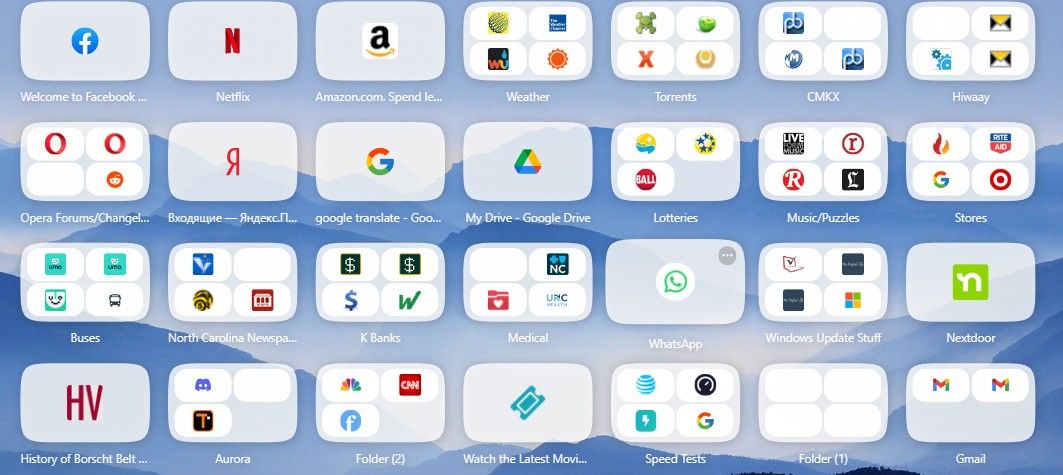
                                  Since O123 was released, when I install it over O122, launching it gives me a total grey screen. No way to use it, it was posted that I I changed OpenGL to to D3D11, it would solve the problem. But when I do that, Opera open correctly, grey screen is gone, but on my Speed Dial page, many of the Speed Dial icons/groups are greyed out. I have disabled all extensions to make sure this is not the problem.

                                  This is a BIG deal, can someone from the Opera team help me, I posted this before in the previous version of 123 discussion along with a screen capture, and I got no response as far as any solution. Help

                                  Below is an image of the Speed Dial with blank icons withinpic.jpg

                                  Reply Quote 0
                                    bbildman 1 Reply Last reply
                                  • agungriadi
                                    agungriadi last edited by

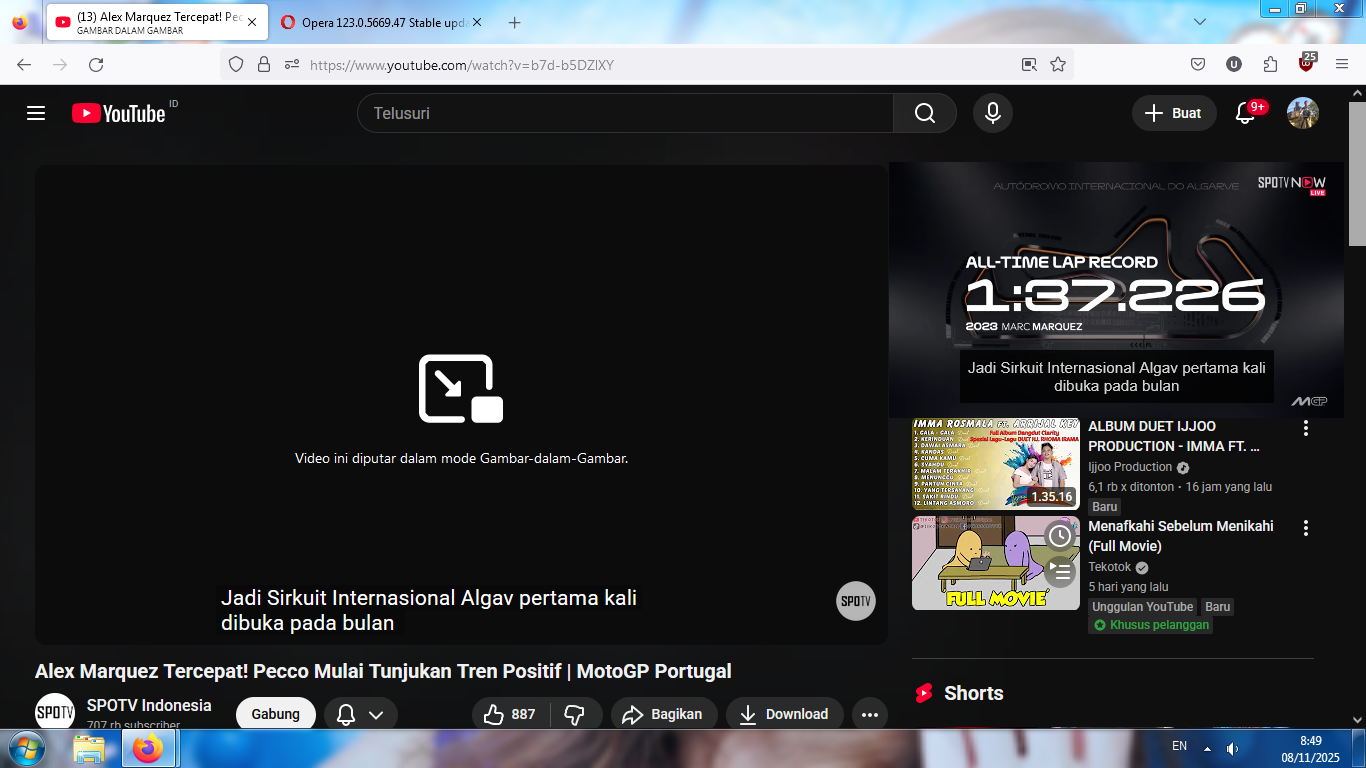
                                    ![alt text]73f7be5c-6bb5-48cc-8fda-6b1a9f1ccda0-gambar.png (image url) please bring subtitles to the picture in picture feature like in firefox

                                    Reply Quote 0
                                      Opera-QA-Team 1 Reply Last reply
                                    • bbildman
                                      bbildman @bbildman last edited by

                                      @bbildman: No one has anything like this??

                                      Reply Quote 0
                                        1 Reply Last reply
                                      • jim97219
                                        jim97219 last edited by

                                        I'm finding ctrl-enter is still not working properly. It should autocomplete a typed URL by adding "www." and ".com" to the address. Instead, it's doing a Google search. If I type "CNN in the search box in the address bar then hit ctrl-enter, I expect Opera will take me to https://www.cnn.com/. Instead, it takes me to https://www.google.com/search?client=opera&q=cnn&sourceid=opera&ie=UTF-8&oe=UTF-8
                                        Am I the only one to whom this is happening?

                                        Reply Quote 0
                                          Opera-QA-Team 1 Reply Last reply
                                        • yuseijaden
                                          yuseijaden last edited by

                                          @Opera-QA-Team said in Opera 123.0.5669.47 Stable update:

                                          Opera-QA-Team

                                          Thanks for the update Team !
                                          Would it be possible to get a changelog for Aria AI? I saw that it's now version 6.12.0.7

                                          Reply Quote 0
                                            1 Reply Last reply
                                          • sgrandin
                                            sgrandin last edited by

                                            At the site below, in Opera I can't get rid of the strong password. Works with Edge.

                                            https://www.audiogon.com/users/password/edit?reset_password_token=zVZyCb1ZJhsf9XtQTNjg&utm_campaign=website&utm_medium=email&utm_source=sendgrid

                                            Reply Quote 0
                                              Opera-QA-Team 1 Reply Last reply
                                            • First post
                                              Last post

                                            Computer browsers

                                            • Opera for Windows
                                            • Opera for Mac
                                            • Opera for Linux
                                            • Opera beta version
                                            • Opera USB

                                            Mobile browsers

                                            • Opera for Android
                                            • Opera Mini
                                            • Opera Touch
                                            • Opera for basic phones

                                            • Add-ons
                                            • Opera account
                                            • Wallpapers
                                            • Opera Ads

                                            • Help & support
                                            • Opera blogs
                                            • Opera forums
                                            • Dev.Opera

                                            • Security
                                            • Privacy
                                            • Cookies Policy
                                            • EULA
                                            • Terms of Service

                                            • About Opera
                                            • Press info
                                            • Jobs
                                            • Investors
                                            • Become a partner
                                            • Contact us

                                            Follow Opera

                                            • Opera - Facebook
                                            • Opera - Twitter
                                            • Opera - YouTube
                                            • Opera - LinkedIn
                                            • Opera - Instagram

                                            © Opera Software 1995-