Opera 131.0.5877.24 Stable update
-
andrew84 last edited by andrew84
@whisperer Do you have auto video pop-out option turned on?
I didn't mange to reproduce the crash here on Win10 following your description.
But I easily can reproduce the bug (crash) if the auto PiP option is enabled.
Open YT and start playing video > create new tab (PiP should appear) > now using Ctrl+tab (holding Ctrl a bit longer) crashes the browser. -
 whisperer last edited by
@andrew84 said in Opera 131.0.5877.24 Stable update:
@whisperer Do you have auto video pop-out option turned on?
yes, I did not disable it like you did.
-
whisperer last edited by
@andrew84 said in Opera 131.0.5877.24 Stable update:
@whisperer So after disabling it still crashing?
Yes, after disabling it and enabling it again, it's still crashing

-
andrew84 last edited by
@whisperer said in Opera 131.0.5877.24 Stable update:
after disabling it and enabling it again, it's still crashing
I meant that while the option is disabled the browser crashes too?
-
whisperer last edited by
@andrew84 said in Opera 131.0.5877.24 Stable update:
I meant that while the option is disabled the browser crashes too?
Undoubtedly. There are numerous bugs in Opera.
-
steeveboy last edited by
Hello Opera Team,
I am writing to provide feedback regarding the latest UI changes in Opera One (Version: 131.0.5877.24).
In previous versions, there was a very helpful small purple notification dot (a mini-circle) on the top-right of the download arrow icon whenever a download was completed. This allowed users to see at a glance that their file was ready without having to click the icon or wait for the pop-up.
In the current version, this indicator is gone. Currently, there is no visual feedback on the toolbar icon itself after a download finishes. This is a significant downgrade in terms of usability and "Quality of Life."
My request:
Please bring back the notification dot or provide a toggle in the settings to re-enable "Download Completion Indicators" on the toolbar icon. It was a subtle but essential part of the workflow.Is this a known bug in the current build, or was this a deliberate design choice?
-
rick2 last edited by
@raphaelbm: Releases are usually posted before the announcement so it's available when people read the announcement.
It takes a while for the update to propagate to mirrors, etc, and you don't want people complaining that they don't receive the update that was just announced
This was probably just a fluke, someone published an update they shouldn't have and you got (un)lucky enough to have updated during that time window.
-
 Opera-QA-Team Opera last edited by
@otoswald: Hello, this thread is for Opera Desktop. For Opera Mini, please go to 'Mobile' tab
-
Urby938 last edited by
Hi i run opera with parameter C:\Users\burzu\AppData\Local\Programs\Opera\opera.exe -disable-features=NativeNotifications to have classic browser notifications istead of native windows ones this worked on opera 130.... And now in Opera 131 only desktop notifications working.... can you fix this?
-
 javiermontana last edited by
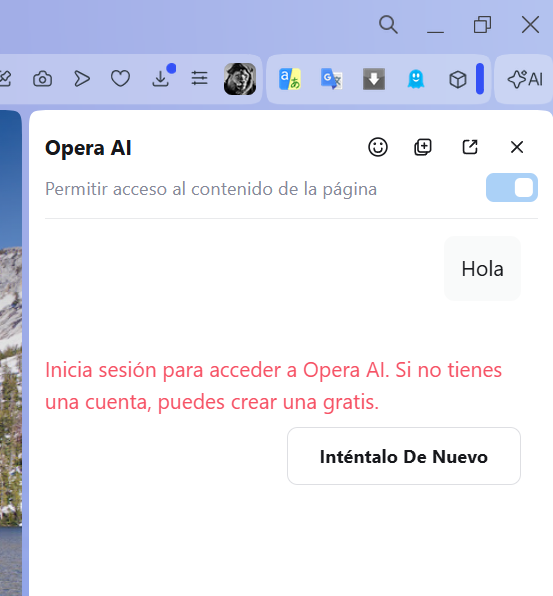
After this update, Opera AI isn't working. It tells me I need to log in with an OpenAI account, even though I'm already logged in with my Opera account.
-
A Former User last edited by
I was pleasantly surprised to find uBlock-filter lists to be turned on manually in the ad blocker preferences. I'm not sure, when this feature appeared but it's a very good thing not to have to download and install the respective extension any longer.
I think Opera should promote this feature more openly, actually. -
 thelittlebrowserthatcould last edited by
@himmelsschlingel: uBlock Origin is still useful, for blocking webpage elements. The header of this page, for example, could otherwise spoil it, if saved as a PDF.
-
andrew84 last edited by
@whisperer said in Opera 131.0.5877.24 Stable update:
There are numerous bugs in Opera
Usually Opera was 2 Chromium versions behind actual version (if comparing to Edge for example). There were multiple complaints regarding this.
Now I see that Edge and Opera both on 147.
So it seems that instead of increasing/enforcing the testing/quality they just decided to deprecate Beta channel ( came up with the doubtful EarlyBird feature) and promote Stable almost directly from Developer to keep actual chrome version with all the ensuing consequences. -
Opera-QA-Team Opera last edited by
@steeveboy: Hello, thank you for spotting the issue. It is reported as RNA-3261 and it's awaiting fix.
-
-
Opera-QA-Team Opera last edited by
@javiermontana: Hi, for me it's working fine, maybe it was some temporary issue? Can you check again?
-
thelittlebrowserthatcould last edited by
@Stealthlink67 reloading the page works for me, but I'm now trying it with the in-built blocker disabled and relying on the uBlock Origin extension.
-
javiermontana last edited by
@opera-qa-team:
Hi, It started working again yesterday, but today I'm getting the same error. -
burnout426 Volunteer last edited by
@Urby938 I would test in Chrome to see if that command-line switch still works.

