• Login
    • Search
    • Categories
    • Recent
    • Tags
    • Users
    • Groups
    • Rules
    • Help

    Do more on the web, with a fast and secure browser!

    Download Opera browser with:

    • built-in ad blocker
    • battery saver
    • free VPN
    Download Opera

    Opera 131.0.5877.24 Stable update

    Blogs
    desktop blog comments
    20
    44
    1706
    Loading More Posts
    • Oldest to Newest
    • Newest to Oldest
    • Most Votes
    Reply
    • Reply as topic
    Log in to reply
    This topic has been deleted. Only users with topic management privileges can see it.
    • whisperer
      whisperer @andrew84 last edited by

      @andrew84 said in Opera 131.0.5877.24 Stable update:

      I meant that while the option is disabled the browser crashes too?

      Undoubtedly. There are numerous bugs in Opera. 😉

      Reply Quote 1
        A 1 Reply Last reply
      • S
        steeveboy last edited by

        Hello Opera Team,

        I am writing to provide feedback regarding the latest UI changes in Opera One (Version: 131.0.5877.24).

        In previous versions, there was a very helpful small purple notification dot (a mini-circle) on the top-right of the download arrow icon whenever a download was completed. This allowed users to see at a glance that their file was ready without having to click the icon or wait for the pop-up.

        In the current version, this indicator is gone. Currently, there is no visual feedback on the toolbar icon itself after a download finishes. This is a significant downgrade in terms of usability and "Quality of Life."

        My request:
        Please bring back the notification dot or provide a toggle in the settings to re-enable "Download Completion Indicators" on the toolbar icon. It was a subtle but essential part of the workflow.

        Is this a known bug in the current build, or was this a deliberate design choice?

        Reply Quote 0
          Opera-QA-Team 1 Reply Last reply
        • rick2
          rick2 @raphaelbm last edited by

          @raphaelbm: Releases are usually posted before the announcement so it's available when people read the announcement.
          It takes a while for the update to propagate to mirrors, etc, and you don't want people complaining that they don't receive the update that was just announced 🙂

          This was probably just a fluke, someone published an update they shouldn't have and you got (un)lucky enough to have updated during that time window.

          Reply Quote 0
            1 Reply Last reply
          • Opera-QA-Team
            Opera-QA-Team Opera @otoswald last edited by

            @otoswald: Hello, this thread is for Opera Desktop. For Opera Mini, please go to 'Mobile' tab 🙂

            Reply Quote 0
              1 Reply Last reply
            • U
              Urby938 last edited by

              Hi i run opera with parameter C:\Users\burzu\AppData\Local\Programs\Opera\opera.exe -disable-features=NativeNotifications to have classic browser notifications istead of native windows ones this worked on opera 130.... And now in Opera 131 only desktop notifications working.... can you fix this?

              Reply Quote 0
                Opera-QA-Team burnout426 2 Replies Last reply
              • javiermontana
                javiermontana last edited by

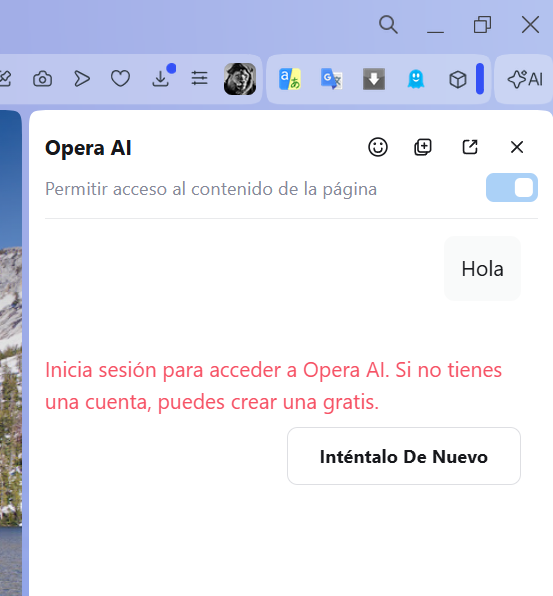
                After this update, Opera AI isn't working. It tells me I need to log in with an OpenAI account, even though I'm already logged in with my Opera account.
                2105b722-35ea-4170-af34-2867fe750545-image.png

                Reply Quote 0
                  Opera-QA-Team 1 Reply Last reply
                • Himmelsschlingel
                  Himmelsschlingel last edited by

                  I was pleasantly surprised to find uBlock-filter lists to be turned on manually in the ad blocker preferences. I'm not sure, when this feature appeared but it's a very good thing not to have to download and install the respective extension any longer.
                  I think Opera should promote this feature more openly, actually.

                  Reply Quote 0
                    thelittlebrowserthatcould 1 Reply Last reply
                  • thelittlebrowserthatcould
                    thelittlebrowserthatcould @Himmelsschlingel last edited by

                    @himmelsschlingel: uBlock Origin is still useful, for blocking webpage elements. The header of this page, for example, could otherwise spoil it, if saved as a PDF.

                    Reply Quote 0
                      1 Reply Last reply
                    • A
                      andrew84 @whisperer last edited by

                      @whisperer said in Opera 131.0.5877.24 Stable update:

                      There are numerous bugs in Opera

                      Usually Opera was 2 Chromium versions behind actual version (if comparing to Edge for example). There were multiple complaints regarding this.

                      Now I see that Edge and Opera both on 147.
                      So it seems that instead of increasing/enforcing the testing/quality they just decided to deprecate Beta channel ( came up with the doubtful EarlyBird feature) and promote Stable almost directly from Developer to keep actual chrome version with all the ensuing consequences.

                      Reply Quote 1
                        1 Reply Last reply
                      • Opera-QA-Team
                        Opera-QA-Team Opera @steeveboy last edited by

                        @steeveboy: Hello, thank you for spotting the issue. It is reported as RNA-3261 and it's awaiting fix.

                        Reply Quote 0
                          S 1 Reply Last reply
                        • Opera-QA-Team
                          Opera-QA-Team Opera @Urby938 last edited by

                          @urby938: Hi, thanks for reporting, we will investigate this!

                          Reply Quote 0
                            1 Reply Last reply
                          • Opera-QA-Team
                            Opera-QA-Team Opera @javiermontana last edited by

                            @javiermontana: Hi, for me it's working fine, maybe it was some temporary issue? Can you check again?

                            Reply Quote 0
                              javiermontana 1 Reply Last reply
                            • thelittlebrowserthatcould
                              thelittlebrowserthatcould @Stealthlink67 last edited by

                              @Stealthlink67 reloading the page works for me, but I'm now trying it with the in-built blocker disabled and relying on the uBlock Origin extension.

                              Reply Quote 0
                                1 Reply Last reply
                              • javiermontana
                                javiermontana @Opera-QA-Team last edited by

                                @opera-qa-team:
                                Hi, It started working again yesterday, but today I'm getting the same error.

                                Reply Quote 0
                                  1 Reply Last reply
                                • burnout426
                                  burnout426 Volunteer @Urby938 last edited by

                                  @Urby938 I would test in Chrome to see if that command-line switch still works.

                                  Reply Quote 0
                                    U 1 Reply Last reply
                                  • burnout426
                                    burnout426 Volunteer @Stealthlink67 last edited by

                                    @Stealthlink67 After you disable your adblockers, you often need to clear cookies for youtube.com and google.com. Then, clear your cache.

                                    Reply Quote 0
                                      1 Reply Last reply
                                    • S
                                      steeveboy @Opera-QA-Team last edited by steeveboy

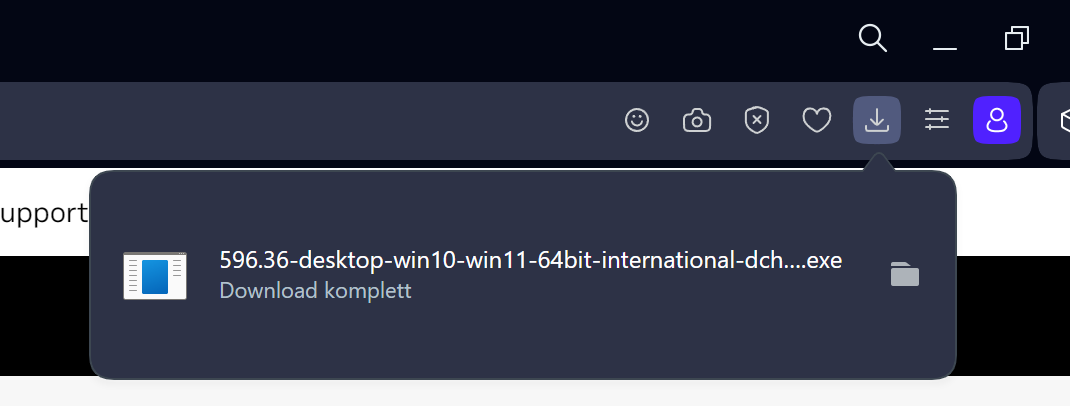
                                      @opera-qa-team: Thanks for the reply. As an update to RNA-3261: Even with large files like NVIDIA drivers, the notification dot is missing despite the popup showing 'Download complete'. It seems very inconsistent. Waiting for a fix. Thanks again. 🙂
                                      NVIDIA.png

                                      Reply Quote 0
                                        1 Reply Last reply
                                      • korol78
                                        korol78 last edited by korol78 This post is deleted!
                                        Reply Quote 0
                                          1 Reply Last reply
                                        • U
                                          Urby938 @burnout426 last edited by

                                          @burnout426: yeah it works in every browser except Opera

                                          Reply Quote 1
                                            1 Reply Last reply
                                          • First post
                                            Last post

                                          Computer browsers

                                          • Opera for Windows
                                          • Opera for Mac
                                          • Opera for Linux
                                          • Opera beta version
                                          • Opera USB

                                          Mobile browsers

                                          • Opera for Android
                                          • Opera Mini
                                          • Opera Touch
                                          • Opera for basic phones

                                          • Add-ons
                                          • Opera account
                                          • Wallpapers
                                          • Opera Ads

                                          • Help & support
                                          • Opera blogs
                                          • Opera forums
                                          • Dev.Opera

                                          • Security
                                          • Privacy
                                          • Cookies Policy
                                          • EULA
                                          • Terms of Service

                                          • About Opera
                                          • Press info
                                          • Jobs
                                          • Investors
                                          • Become a partner
                                          • Contact us

                                          Follow Opera

                                          • Opera - Facebook
                                          • Opera - Twitter
                                          • Opera - YouTube
                                          • Opera - LinkedIn
                                          • Opera - Instagram

                                          © Opera Software 1995-