• Login
    • Search
    • Categories
    • Recent
    • Tags
    • Users
    • Groups
    • Rules
    • Help

    Do more on the web, with a fast and secure browser!

    Download Opera browser with:

    • built-in ad blocker
    • battery saver
    • free VPN
    Download Opera

    Opera 127 Stable

    Blogs
    desktop blog comments
    16
    33
    1518
    Loading More Posts
    • Oldest to Newest
    • Newest to Oldest
    • Most Votes
    Reply
    • Reply as topic
    Log in to reply
    This topic has been deleted. Only users with topic management privileges can see it.
    • ironbone
      ironbone @Opera-QA-Team last edited by

      @opera-qa-team: Just what happend one minute ago. The main language of Opera is set to "Polish"
      I was reading the article
      https://www.edziecko.pl/starsze_dziecko/7,79351,32576128,matka-szkoly-powinny-byc-otwarte-do-pracy-tez-nie-pojde-bo.html#s=BoxMMtImg1

      Then in opera AI I pressed the button for summary. So I can see the polish prompt:
      Streszczenie - Wydobądź kluczowe punkty z tej strony

      Then I get the summary in english.

      BUT when I just write my prompt in polih (different to the one given frm thr button) the summary is in polish.

      Reply Quote 0
        Opera-QA-Team 1 Reply Last reply
      • Opera-QA-Team
        Opera-QA-Team Opera @ironbone last edited by

        @ironbone: OK thank you! We will investigate it deeply and check why the first answer was in english.

        Reply Quote 0
          1 Reply Last reply
        • sicu220
          sicu220 last edited by

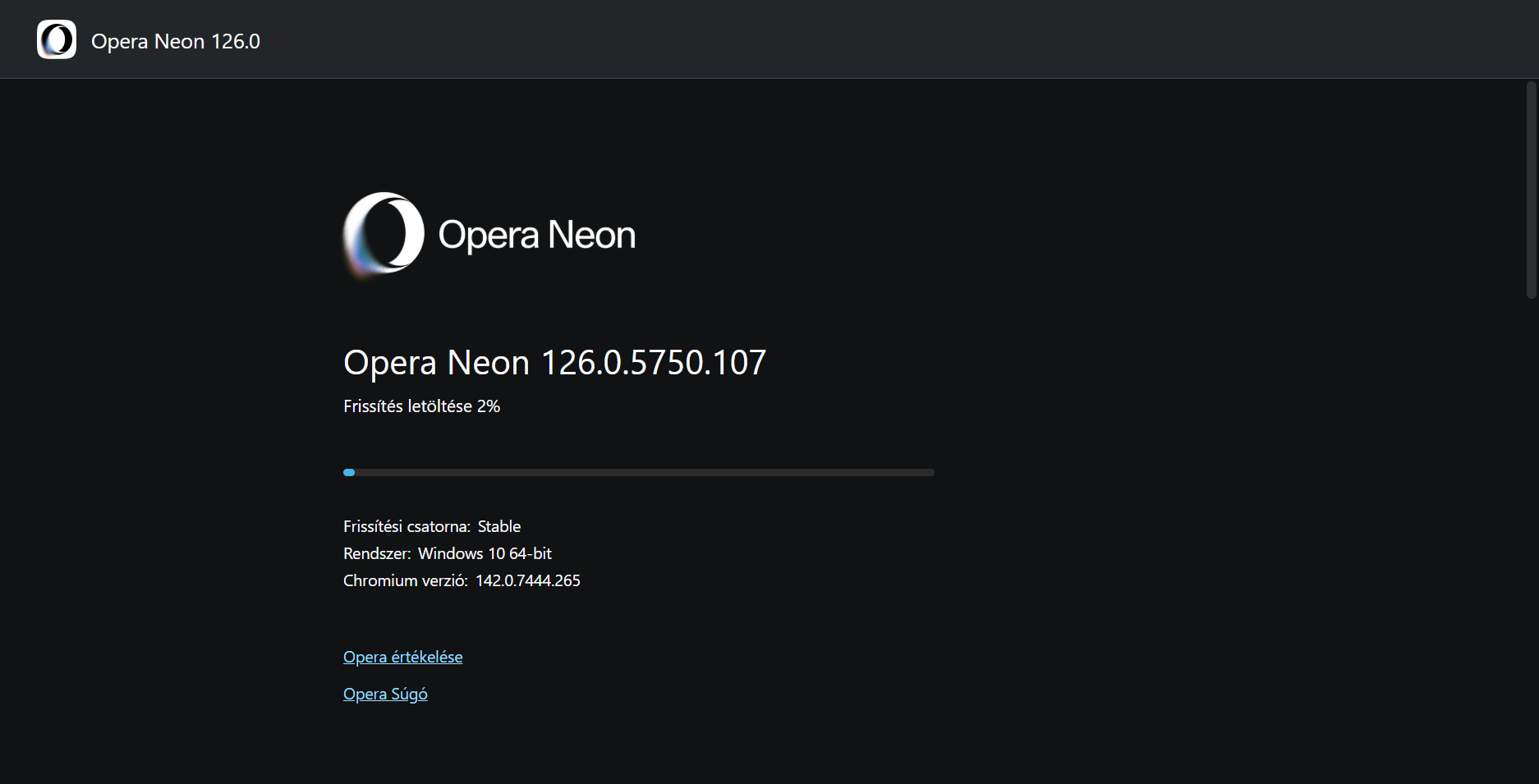
          Opera Neon won't update anymore, it's stuck here. What could be wrong?
          1c7502ef-44a0-4d9a-b048-afc07fc69962-image.png

          Reply Quote 0
            leocg Opera-QA-Team 2 Replies Last reply
          • red
            red last edited by

            In Fedora Linux Mate 43, I have a problem with video on opera-stable-0:127.0.5778.14-0.x86_64.
            Videos work intermittently, in the sense that sometimes a video fully works, and maybe just a few seconds later, the very same video only shows as a black screen (with intact audio). Anybody has the same problem?

            Reply Quote 0
              1 Reply Last reply
            • leocg
              leocg Moderator Volunteer @sicu220 last edited by

              @sicu220 Just updated to version 127.

              Reply Quote 0
                1 Reply Last reply
              • cbermudv
                cbermudv last edited by This post is deleted!
                Reply Quote 0
                  leocg 1 Reply Last reply
                • leocg
                  leocg Moderator Volunteer @cbermudv last edited by

                  @cbermudv English here please

                  Reply Quote 0
                    1 Reply Last reply
                  • whisperer
                    whisperer last edited by whisperer

                    I have Bookmarks Bar enabled.
                    When I click a folder in the Bookmarks Bar with the scroll button on my mouse, it opens all bookmarks in the folder. But there is a bug in recent Opera versions, where 1 bookmark is opened in a new tab at the right and the rest in new tabs at the left.
                    (I use Opera for Windows)

                    Reply Quote 0
                      whisperer Opera-QA-Team 2 Replies Last reply
                    • whisperer
                      whisperer @whisperer last edited by

                      @whisperer said in Opera 125 Stable:

                      I work with Opera for Windows and have the sidebar disabled. I use a user defined hotkey to enable/disable the sidebar whenever I want. When marking a test on a webpage, several option appear (Search , Copy, Snapshot) and the option to use Opera AI to translate and other options. When selecting to use Opera AI in the popup options, the sidebar gets enabled, which should not happen.

                      @Opera-QA-Team said in Opera 125 Stable:

                      @whisperer: Hi, thanks for sharing - the problem was reported and it's awaiting fix. : )

                      How many years will it take?

                      Reply Quote 0
                        Opera-QA-Team 1 Reply Last reply
                      • sgrandin
                        sgrandin last edited by

                        For some reason, a search for cantaloupe or cantaloupe melon runs on and on at Safeway.com with Opera, but not other browsers or even at Safeway's twin, Albertson's. This has been going on for some time. https://www.safeway.com/shop/search-results.html?q=cantaloupe melon&tab=products

                        Reply Quote 0
                          Opera-QA-Team 1 Reply Last reply
                        • Fildefer
                          Fildefer last edited by

                          lots of stuff messed up on 127
                          just reinstalled my computer and sync lost all my bookmarks but 1, really sux, been asking for a 'sync now' button since long, but no luck, would have prevented this
                          since update the vpn button is nowhere to be found in the toolbar and vpn can only be activated in private browsing window, why ?
                          sidebar apps, like whatsapp and gmail just collaps each time you change tab en they have to be resised to be able to read the content, really not handy, so i'll be reverting back to old ways since not usable this way
                          when reinstalling, lots of settings and extensions are missing and not being backed up, what's the use of sync then? if it doesnt take everything in consideration one had to make his own backup anyway making the sync function completely useless ....
                          pity but with each updat there are tons of problems, maybe it's time to move on to another browser that really does sync and works without problems

                          Reply Quote 0
                            burnout426 2 Replies Last reply
                          • IbrahimKhalil786
                            IbrahimKhalil786 last edited by

                            Nice to see the stable release rolling out, especially with the Chromium update included. Good to know the known issues are already acknowledged too, looking forward to the fixes in the next updates.

                            Reply Quote 0
                              Opera-QA-Team 1 Reply Last reply
                            • thelittlebrowserthatcould
                              thelittlebrowserthatcould last edited by

                              I wanted to use tab emojis.
                              First problem: remembering what they're called. Labels and icons as alternative search terms would have helped.
                              Main problem: the selection dialog disappears when I mouse towards it.
                              Debian build.

                              Reply Quote 0
                                Opera-QA-Team 1 Reply Last reply
                              • burnout426
                                burnout426 Volunteer @Fildefer last edited by

                                @Fildefer said in Opera 127 Stable:

                                just reinstalled my computer and sync lost all my bookmarks but 1, really sux, been asking for a 'sync now' button since long, but no luck, would have prevented this

                                For Sync to work the best:

                                • To avoid having authenticaiton isues with other services, when you create an Opera account at https://auth.opera.com/, don't choose any of the "Continue with" options. Instead, type in the email address you want associated with your Opera account (can still be a gmail.com or a icloud.com email address for example), click "Continue", type the password you want for yor Opera account and click "Create account".

                                • To avoid issues with not being able to access your data on the Sync server, on the opera://settings/syncSetup page, don't choose to set a custom passphrase.

                                • After you choose what things to sync on the opera://settings/syncSetup page, you need to close that tab to start syncing.

                                • To manually trigger a sync, you can goto the URL opera://sync-internals and trigger an update and see the status of the syncing.

                                • When you think syncing is all done, you need to goto https://www.sync.opera.com/ to confirm your data is there.

                                Even with all that, you cannot rely on Sync as your only backup. You still need to export your passwords at the URL opera://password-manager/settings, export your bookmarks at the URL opera://bookmarks and put those 2 exported files on a USB stick or something just in, case something goes wrong with Sync.

                                Reply Quote 1
                                  Fildefer 1 Reply Last reply
                                • burnout426
                                  burnout426 Volunteer @Fildefer last edited by

                                  @Fildefer said in Opera 127 Stable:

                                  since update the vpn button is nowhere to be found in the toolbar and vpn can only be activated in private browsing window, why ?

                                  The VPN button missing is a known issue. You can goto the URL opera://settings/vpn to turn it on and off.

                                  Reply Quote 0
                                    1 Reply Last reply
                                  • Opera-QA-Team
                                    Opera-QA-Team Opera @whisperer last edited by

                                    @whisperer: Hello, thanks for the feedback. We already know this issue (it's RNA-2153) and it's awaiting fix.

                                    Reply Quote 0
                                      Fildefer 1 Reply Last reply
                                    • Opera-QA-Team
                                      Opera-QA-Team Opera @whisperer last edited by

                                      @whisperer: Not so long, as it's already under investigation. Thanks you for your patience.

                                      Reply Quote 0
                                        1 Reply Last reply
                                      • Opera-QA-Team
                                        Opera-QA-Team Opera @sicu220 last edited by

                                        @sicu220: Hello, this thread is about Opera One, for Opera Neon please reach "AI" section on the blog.

                                        Reply Quote 0
                                          1 Reply Last reply
                                        • Opera-QA-Team
                                          Opera-QA-Team Opera @IbrahimKhalil786 last edited by

                                          @ibrahimkhalil786: Thanks for the feedback and for your patience : )

                                          Reply Quote 0
                                            1 Reply Last reply
                                          • Opera-QA-Team
                                            Opera-QA-Team Opera @sgrandin last edited by

                                            @sgrandin: Hi, for me it works OK. Is the behaviour only for this two phrases or is it for general searching?
                                            Reply Quote 0
                                              1 Reply Last reply
                                            • First post
                                              Last post

                                            Computer browsers

                                            • Opera for Windows
                                            • Opera for Mac
                                            • Opera for Linux
                                            • Opera beta version
                                            • Opera USB

                                            Mobile browsers

                                            • Opera for Android
                                            • Opera Mini
                                            • Opera Touch
                                            • Opera for basic phones

                                            • Add-ons
                                            • Opera account
                                            • Wallpapers
                                            • Opera Ads

                                            • Help & support
                                            • Opera blogs
                                            • Opera forums
                                            • Dev.Opera

                                            • Security
                                            • Privacy
                                            • Cookies Policy
                                            • EULA
                                            • Terms of Service

                                            • About Opera
                                            • Press info
                                            • Jobs
                                            • Investors
                                            • Become a partner
                                            • Contact us

                                            Follow Opera

                                            • Opera - Facebook
                                            • Opera - Twitter
                                            • Opera - YouTube
                                            • Opera - LinkedIn
                                            • Opera - Instagram

                                            © Opera Software 1995-