• Login
    • Search
    • Categories
    • Recent
    • Tags
    • Users
    • Groups
    • Rules
    • Help

    Do more on the web, with a fast and secure browser!

    Download Opera browser with:

    • built-in ad blocker
    • battery saver
    • free VPN
    Download Opera

    Opera 125 Stable

    Blogs
    desktop blog comments
    24
    61
    4158
    Loading More Posts
    • Oldest to Newest
    • Newest to Oldest
    • Most Votes
    Reply
    • Reply as topic
    Log in to reply
    This topic has been deleted. Only users with topic management privileges can see it.
    • raphaelbm
      raphaelbm @fitzydj last edited by

      @fitzydj: @fitzydj: Thank you for the installer link. IT DOES NOT work...

      Instead it merely installs the OLD Opera version 124.0.5705.65
      I was expecting to find Stable 125.0.5729.12 – 2025-12-04 - duh!

      I am in UK Windows 10 Home (x64) Version 22H2 (build 19045.6575)
      "You can only post once every 120 second(s) - please wait before posting again"

      Reply Quote 0
        fitzydj 1 Reply Last reply
      • whisperer
        whisperer last edited by whisperer

        Using the Windows version of Opera in dark mode, go to password manager (opera://password-manager/passwords) and click the Add button. There is no visible cursor..

        Reply Quote 0
          1 Reply Last reply
        • fitzydj
          fitzydj @raphaelbm last edited by

          @raphaelbmThe updater worked for me and I was going from 124..0.5705.42. I updated yesterday to 124..0.5705.65 but didn't like the Purple Holiday Widget that kept popping up so I went to the old version.
          I downloaded the Opera Setup File for 125 today and it updated no issues. I had disabled Auto Update after yesterday.
          Winget maybe another option to update.

          Reply Quote 0
            1 Reply Last reply
          • leocg
            leocg Moderator Volunteer @raphaelbm last edited by

            @raphaelbm Updates to a new major version may take some time to propagate.

            Reply Quote 0
              1 Reply Last reply
            • leocg
              leocg Moderator Volunteer @raphaelbm last edited by

              @raphaelbm You can only upload images from the forum.

              Reply Quote 0
                1 Reply Last reply
              • leocg
                leocg Moderator Volunteer @raphaelbm last edited by

                @raphaelbm Yes, people from Opera check the release posts.

                Reply Quote 0
                  1 Reply Last reply
                • raphaelbm
                  raphaelbm @raphaelbm last edited by

                  @raphaelbm: I have filed the bug. see
                  https://opera.atlassian.net/servicedesk/customer/portal/52/BUG-17976

                  Reply Quote 0
                    1 Reply Last reply
                  • sgrandin
                    sgrandin last edited by sgrandin

                    Win 11 Pro x64, 25H2. This release is not handling the top articles on the home page at fasterskier.com correctly, cutting them off the upper half of the images. Look fine in Edge, Chrome, FF.
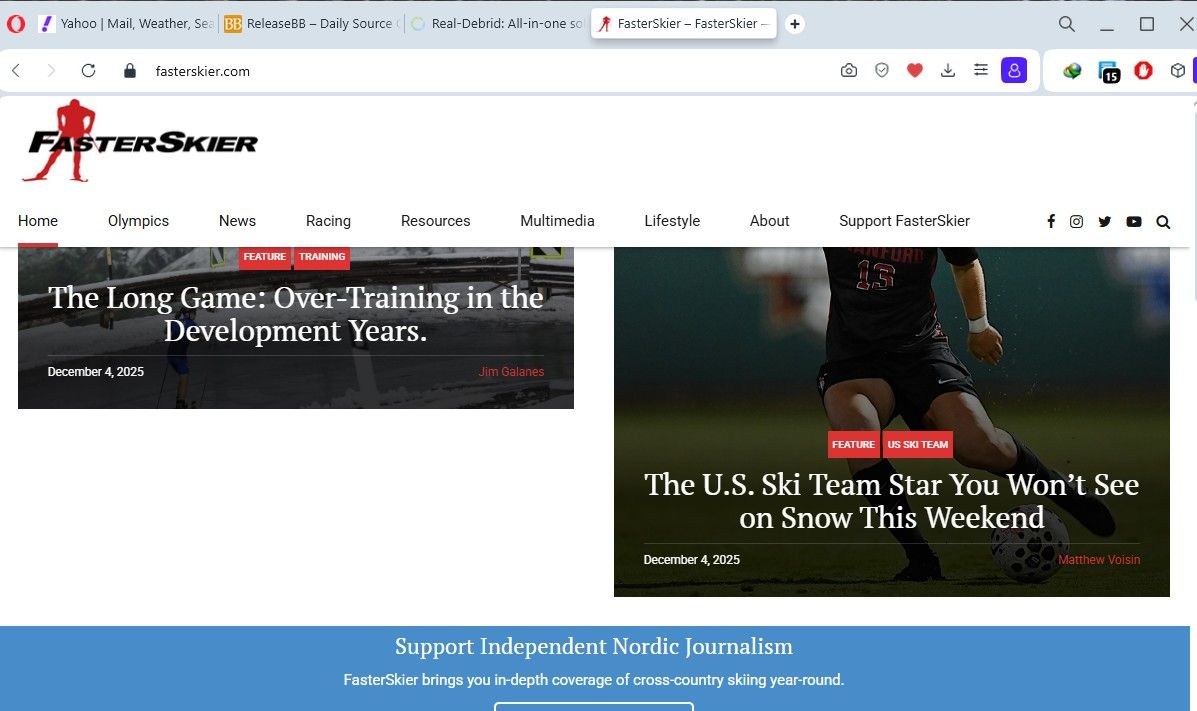
                    FasterSkier in Opera 12-4-25.jpg

                    Reply Quote 0
                      Opera-QA-Team 1 Reply Last reply
                    • gmiazga
                      gmiazga Opera @botspot last edited by

                      @botspot: hey we are aware of issue on Linux distributions using KDE. Do you have KDE or perhaps you have some other issue?

                      Reply Quote 0
                        krteq botspot 2 Replies Last reply
                      • Opera-QA-Team
                        Opera-QA-Team Opera @fitzydj last edited by

                        @fitzydj: Hello, yes it was already fixed two days ago as it didn't require a standard release.

                        Reply Quote 0
                          1 Reply Last reply
                        • tprockow
                          tprockow Opera last edited by

                          A bug in the update rollout resulted in MV2 extensions being unavailable. This was not intentional, and we stopped the rollout immediately in order to address the bug. Nothing has changed since our latest blog post regarding supporting MV2 extensions - if we reach a point where we can no longer support them, we will inform users accordingly. Please stay tuned for a fix. Thank you for your patience!

                          Reply Quote 1
                            1 Reply Last reply
                          • krteq
                            krteq @gmiazga last edited by

                            @gmiazga: Same here, SIGSEGV on Arch based distro with KDE

                            Reply Quote 1
                              zibi1981 1 Reply Last reply
                            • zibi1981
                              zibi1981 @krteq last edited by zibi1981

                              @krteq The same here on CachyOS.

                              Temporary workaround:

                              mkdir -p /tmp/opera-clean
                              env XDG_CURRENT_DESKTOP=GNOME XDG_SESSION_DESKTOP=GNOME XDG_SESSION_TYPE=x11 \
                                opera-stable --ozone-platform=x11 --user-data-dir=/tmp/opera-clean --no-first-run --disable-gpu about:blank
                              
                              
                              Reply Quote 0
                                krteq 1 Reply Last reply
                              • TomaszStawarz
                                TomaszStawarz Opera @red last edited by

                                @red: Hi, no we are not deprecating MW2. Please find the detailed explanation here - https://forums.opera.com/topic/87362/opera-125-stable/41

                                Reply Quote 0
                                  1 Reply Last reply
                                • TomaszStawarz
                                  TomaszStawarz Opera @fitzydj last edited by

                                  @fitzydj: Hi, we are still going to support it, please find detailed explanation here - https://forums.opera.com/topic/87362/opera-125-stable/41

                                  Reply Quote 0
                                    1 Reply Last reply
                                  • TomaszStawarz
                                    TomaszStawarz Opera @mathias87 last edited by

                                    @mathias87: Yes, the update was stopped. Please find explanation here - https://forums.opera.com/topic/87362/opera-125-stable/41

                                    Reply Quote 1
                                      1 Reply Last reply
                                    • filbo
                                      filbo last edited by

                                      The changelog for 125.0.5729.12 lists almost all of the bugs mentioned for 125.0.5720.0; plus a few more. Contrast to none of the bugs from 125.0.5707.0 being repeated. Was there some glitch in assembling the list for 5729?

                                      Reply Quote 0
                                        Opera-QA-Team 1 Reply Last reply
                                      • botspot
                                        botspot @gmiazga last edited by

                                        @gmiazga Yes. Fedora KDE.

                                        Reply Quote 0
                                          1 Reply Last reply
                                        • TomaszStawarz
                                          TomaszStawarz Opera @fitzydj last edited by

                                          @fitzydj: Hi, we are still going to support it, please find detailed explanation here - https://forums.opera.com/topic/87362/opera-125-stable/41

                                          Reply Quote 2
                                            1 Reply Last reply
                                          • Opera-QA-Team
                                            Opera-QA-Team Opera @sgrandin last edited by

                                            @sgrandin: Hello, thanks for reporting. I checked on the same OS and the images are fine for me. Please check if it can be broken by some extension -> temporarily disable your extensions and check again.

                                            Reply Quote 0
                                              1 Reply Last reply
                                            • First post
                                              Last post

                                            Computer browsers

                                            • Opera for Windows
                                            • Opera for Mac
                                            • Opera for Linux
                                            • Opera beta version
                                            • Opera USB

                                            Mobile browsers

                                            • Opera for Android
                                            • Opera Mini
                                            • Opera Touch
                                            • Opera for basic phones

                                            • Add-ons
                                            • Opera account
                                            • Wallpapers
                                            • Opera Ads

                                            • Help & support
                                            • Opera blogs
                                            • Opera forums
                                            • Dev.Opera

                                            • Security
                                            • Privacy
                                            • Cookies Policy
                                            • EULA
                                            • Terms of Service

                                            • About Opera
                                            • Press info
                                            • Jobs
                                            • Investors
                                            • Become a partner
                                            • Contact us

                                            Follow Opera

                                            • Opera - Facebook
                                            • Opera - Twitter
                                            • Opera - YouTube
                                            • Opera - LinkedIn
                                            • Opera - Instagram

                                            © Opera Software 1995-