Opera 136 Stable
-
burnout426 Volunteer last edited by
@burnout426 said in Opera 136 Stable:
Or, you can install https://addons.opera.com/en/extensions/details/classic-tabs/. It has an option to focus tabs when opening a link in a new tab. Unfortunately, the options page in the extension is broken in Opera 136 due to some JS error.
Made a fixed version of the extension to work with Opera 136. See https://forums.opera.com/post/409871 for the link.
-
andrew84 last edited by
Return the categorized suggestion settings in address bar.
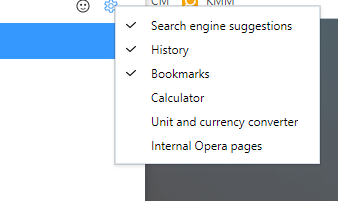

From time to time there are complaints regarding the unnecessary turned on by default things like calculator for example. -
andrew84 last edited by
- Restore the 2nd click for the 'scroll to top' feature.
- Restore the search engines creation by using right click.
- Disable the automated search engines adding.
-
 ddvddv last edited by
@burnout426: Meanwhile I installed this Chrome extension https://chromewebstore.google.com/detail/tabs-to-front-v2/iiojfifkpjkhcdjfgekmfobhfdohlecg and it work for now. Thanks for help.
-
 Opera-QA-Team Opera last edited by
@ddvddv: You can also do CTRL + SHIFT + click (or SHIFT + mouse scroll) -> this will open the link and focus on the new tab.
-

-
sxzdfadsfsaf last edited by leocg
Could you make it so the "Extensions need additional permissions" actually tells you which extensions so that we can fix them.
-
Locked by leocg
