Opera 133.0.5932.34 Stable update
-
 cookie-drummer last edited by
Why are you so quiet regarding "2nd cick on tab" issue? Are you gonna fix it or not?
-
 whisperer last edited by
@whisperer said in Opera 133 Stable:
Since version 132.0.5905.102 (tested with Windows versions), there is not hint at the bottom showing the url when hovering over an link in a second Opera Window.
The developer version (134.0.5945.0) has this issue as well.
Version 132.0.5905.73 and earlier worked OK.
Still not fixed.
-
whisperer last edited by
@whisperer said in Opera 131.0.5877.24 Stable update:
Still crash when switching to a tab with playing youtube video using Ctrl+Tab and releasing Ctrl late.
This major bug is still not fixed.
-
whisperer last edited by
@whisperer said in Opera 131.0.5877.74 Stable update:
Crash when not using %s in site search definition (Opera for Windows)
Create a shortcut to go to the Opera website:Go to opera://settings/searchEngines
Click the Add button to add a site search
Enter these details: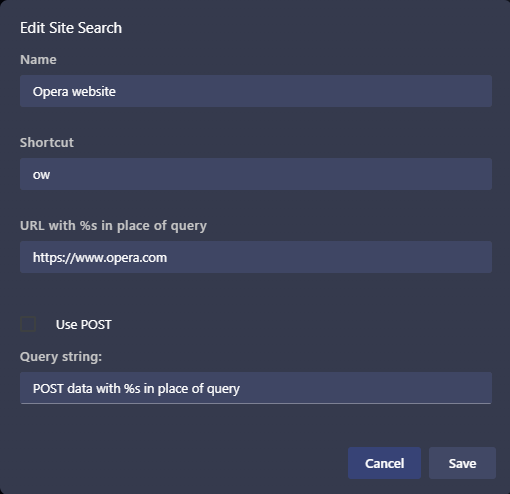
(Notice that no %s in used in the URL)
Click SaveNow test it:
Open a new tab (Ctrl+T)
Type "ow", then press Space, then press EnterOpera crashes.
(Tested with Opera 131.0.5877.97)Still not fixed.
-
jojo0587 last edited by
I still have little visual bug. I write about him here
https://forums.opera.com/post/405392My proposals for changes in Opera (Google Document).
- There are not enough signs to put all the links here. -

-
 Opera-QA-Team Opera last edited by
@jojo0587: Hello, can you check if this is depending on the display resolution/scaling? I cannot reproduce it so it can be some edge case. Please write what OS you have and if it happens for all themes.
-
andrew84 last edited by andrew84
@Opera-QA-Team The particular bug is not so important comparing vs the features recent changes and long playing bugs but I can reproduce it easily here on Win 10 (according to the bug reporter's link responsees he's on win 11).
-
-
andrew84 last edited by andrew84
Restore the 2nd click for the ''scroll to top' feature and restore the 'create search engine' option for search fields https://forums.opera.com/post/404101
Restore the option to delete unnecessary themes in EasySetup.
'force dark page' toggle still doesn't remember its state (most probably because of the toggle in Settings vs toggle in EasySetup are not synchronised) .
-
-
jojo0587 last edited by jojo0587
@opera-qa-team: I have Windows 11 Home. I checked a few and I perform on: Aurora, Obsidian, Sonic. In all the dark ones it seems. Probably occurs in the blinds. This "crosshair" is white, so maybe it is simply difficult to see on light motifs. I set the theme Classic white to blue with blue stripes and I don't see the effect. So maybe there are dark motives after all.
I will also add that you need to hover the cursor over the Opera Menu several times to make it visible. If you want, I can record a video and show the Opera version, check different themes, etc.My proposals for changes in Opera (Google Document).
- There are not enough signs to put all the links here. -
karen-arzumanyan last edited by
The bug BUG-21893 is also present in version 133.0.5932.34 !!!
PS: The problem very is old, and by BUG-21893 it's any months old (06/03/26), and it's still not fixed
-
andrew84 last edited by andrew84
It seems that along with other chromium based browsers Opera's MV2 extensions support will be lost starting from 151 version. Looks like all the workarounds flags will be removed
Especially sensitive to uBlock support.https://www.techspot.com/news/112722-end-ublock-origin-chrome-now-weeks-away-not.html
-
ironbone last edited by
Environment: Ubuntu LTS (Snap version). Note: Works perfectly on OpenSUSE.
Issues:
Critical Bug: Right-clicking anywhere in the browser causes Opera to completely freeze and become unresponsive.
Missing Feature: The old menu that allowed users to easily view and restore recently closed tabs is missing. I expect this functionality to be brought back.
-
whisperer last edited by
@whisperer said in Opera 133.0.5932.34 Stable update:
@whisperer said in Opera 131.0.5877.24 Stable update:
Still crash when switching to a tab with playing youtube video using Ctrl+Tab and releasing Ctrl late.
This major bug is still not fixed.
Fixed in 133.0.5932.60.
-
whisperer last edited by
@burnout426 said in Opera 133.0.5932.34 Stable update:
@whisperer File DNA-125315 for this so someone can look at it.
What exactly does that mean?
-
karen-arzumanyan last edited by
About he bug BUG-21893 it's any months old (06/03/26)
A miracle happened with this bug!
It looks like you finally solved the problem by setting a fixed window size in 133.0.5932.60.
I can't believe it.
But why didn't you describe this in the changelog?
