Opera 131.0.5877.74 Stable update
-
Sopronman last edited by
Horizontal tabs are OK, but verticals are always jumping. The same also by Developer version. Vertical tabs are in Chrome and Firefox without problems.
-
stebot65 last edited by
When I press the tab island on the right side, to expand my addons, opera crashes every single time, after this latest update.
-
 thelittlebrowserthatcould last edited by
What improvement does the slower startup time exhibited over recent releases achieve?
-
 Opera-QA-Team Opera last edited by
@stebot65: Thanks for letting us know. It is already fixed, the fix should be released with the new version.
-
steeveboy last edited by
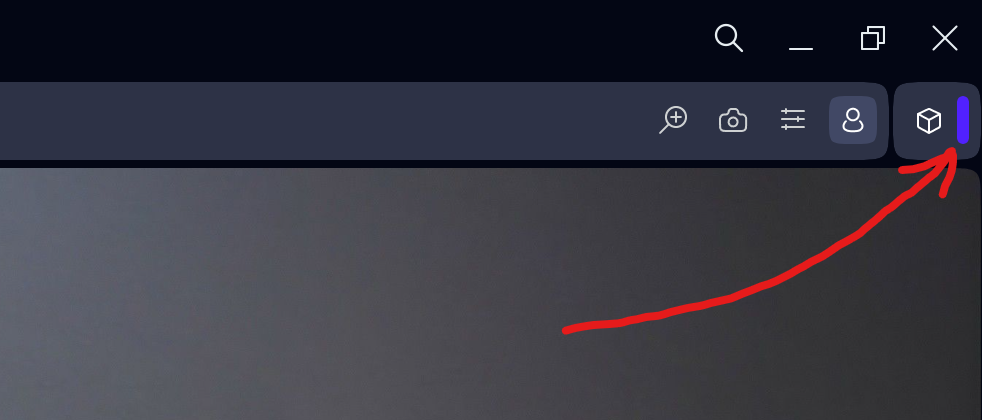
Found a very strange bug... Opera crashes if you click this purple line here right after the extensions symbol...
-
Opera-QA-Team Opera last edited by
@steeveboy: Hi, yes, it's already fixed, will be released with the new update.
-
andrew84 last edited by
his update fixes a crash that could occur when clicking the extension bar handle:
Why the crash in split screen is still not fixed.
-
steeveboy last edited by
@opera-qa-team: Thank you very much for the quick fix and update! I appreciate it!
 Already downloaded Version: 131.0.5877.97 fromt FTP-server. Great job, it's fixed. It collapses as it should without crashing. Have a great and sunny weekend guys!
 -
albano23 last edited by albano23
The stable versions of Opera 131, from version 54 to the current one ending in 97, have several serious bugs in their snap (Ubuntu 22.04.05 LTS in my case) that should be fixed: 1) They fill the GNOME logs with thousands of messages with the error "Invalid RE2 repetition size, invalid perl operator"; 2) This causes a large amount of disk space to be consumed in a single session, as can be seen with the commands
sudo journalctl --disk-usageandsudo ls -lh /var/log/journal/*/*.journal; and 3) In version 74, a very serious error occurred when updating the chromium-ffmpeg snap: "at least file with resources (.pak) is corrupted, please reinstall opera". Luckily, shutting down and restarting my PC fixed it for me. // In version 131 ending in 24, none of these bugs were present. I don't recommend usingsudo journalctl --vacuum-time=1dto fix the issue of thousands of messages mentioned in point 1, because it could break your current session. I would like these problems to be reviewed by both you and the Snap Opera packagers. I hope all these issues will be resolved in version 132, which will use Chrome's 148 engine. -
steeveboy last edited by leocg
Hi Opera team,
i just had a chat with ChatGPT and it thinks it has to be an Opera Problem (focus lost when starting a new private window from taskbar right click Opera then "New private window"). If you cannot reproduce it at all, it's alright. It happened to me by upgrading to version 131. If on your system everything's fine, then I'll wait for a Microsoft cumulative patch, see if this fixes the broken focus handling. So if that's the case, never mind. Just wanted to mention it after asking ChatGPT for a text which I can copy-paste for you devs. Maybe it helps, if not it's ok. So the following is the text from ChatGPT...
I found a reproducible focus issue with private windows on Windows 11 and wanted to provide a clean reproduction case.
Environment
- Opera One: version 131.x
- Windows 11
- Issue reproducible consistently
Problem
When opening a private window via the Windows taskbar jump list:
Right click Opera taskbar icon
→ "New private window"
the new private window opens correctly, but the address bar / omnibox does NOT receive keyboard focus.
Result:
- typing immediately after opening does nothing
- user must click the address bar manually
- sometimes TAB or CTRL+L restores focus
Important observation
The problem ONLY occurs when launching the private window from the Windows taskbar jump list.
The following methods work correctly and DO focus the omnibox:
Works correctly
Keyboard shortcut:
Ctrl + Shift + NDirect command line launch:
opera.exe --privateOpening private windows from inside Opera menus also appears to work normally.
Additional testing already done
The issue persists after:
- creating a fresh Opera profile
- disabling extensions
- disabling hardware acceleration
- restarting Windows
- reinstalling Opera
So this does not appear to be profile corruption or an extension issue.
Likely cause
This looks specifically related to:
- Windows 11 taskbar jump list integration
- AppUserModelID / ShellExecute launch path
- missing focus handoff to the omnibox after private window creation
The direct
opera.exe --privatelaunch path works correctly, which suggests the bug exists specifically in the jump-list-triggered private window handler.Hope this helps narrow it down.
-
steeveboy last edited by leocg
Opera One 131.x on Windows 11 (HDR is always ON):
I found a reproducible YouTube video rendering bug related to hardware acceleration.
Issue
While watching YouTube videos, opening UI overlays (especially the notification bell/menu) causes the video black levels / gamma to briefly change:
- video becomes brighter for a moment
- then returns to normal
This only happens with hardware acceleration enabled.
Important findings
- Disabling hardware acceleration completely fixes the issue.
- Disabling MPO (Multiplane Overlay) does NOT fix it.
- Enabling Lucid Mode stabilizes the video completely.
Current workaround:
I enable Lucid Mode permanently on the lowest setting (Level 1/5). With Lucid Mode active:- black levels stay stable
- no brightness/gamma flicker occurs
- opening YouTube notification overlays no longer affects video rendering
This strongly suggests the issue is inside the Opera/Chromium GPU video rendering or HDR/tone-mapping pipeline, possibly related to compositor repainting during UI overlay updates.
The Lucid Mode workaround may help narrow down the rendering path involved.
-
 leocg Moderator Volunteer last edited by
@steeveboy Couldn't reproduce it here in Opera One Developer. Opening a private window using the right click menu on the task bar doesn't make the focus to be out of the address bar.
-
leocg Moderator Volunteer last edited by
@steeveboy Did you try removing the shortcut and adding it again?
-
-
 whisperer last edited by
@whisperer said in Opera 131.0.5877.24 Stable update:
Still crash when switching to a tab with playing youtube video using Ctrl+Tab and releasing Ctrl late.
Still crashing in version 131.0.5877.74 and 131.0.5877.97.
-
whisperer last edited by
Crash when not using %s in site search definition (Opera for Windows)
Create a shortcut to go to the Opera website:
- Go to opera://settings/searchEngines
- Click the Add button to add a site search
- Enter these details:
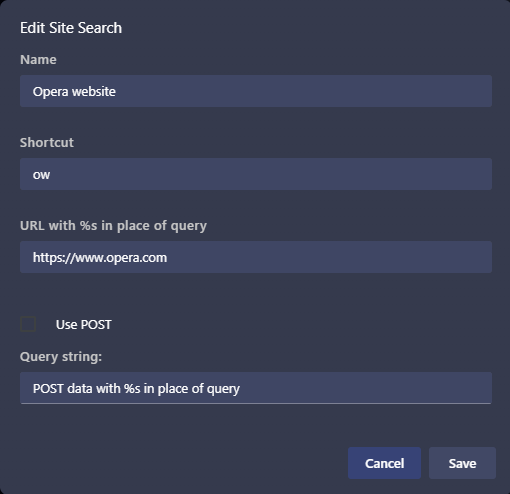
(Notice that no %s in used in the URL) - Click Save
Now test it:
- Open a new tab (Ctrl+T)
- Type "ow", then press Space, then press Enter
Opera crashes.
(Tested with Opera 131.0.5877.97)
-
burnout426 Volunteer last edited by
@whisperer Yep.
CrashID=bp-ff60d95d-7118-48f9-b80c-4467b0260523 (from Opera Developer)
