• Login
    • Search
    • Categories
    • Recent
    • Tags
    • Users
    • Groups
    • Rules
    • Help

    Do more on the web, with a fast and secure browser!

    Download Opera browser with:

    • built-in ad blocker
    • battery saver
    • free VPN
    Download Opera

    Opera 130 Stable

    Blogs
    desktop blog comments
    12
    33
    2049
    Loading More Posts
    • Oldest to Newest
    • Newest to Oldest
    • Most Votes
    Reply
    • Reply as topic
    Log in to reply
    This topic has been deleted. Only users with topic management privileges can see it.
    • S
      sicu220 last edited by

      In the History menu: Search through history. The word between does not fit completely.

      dc0cd1bf-f28e-4250-9ec9-253acb0634ac-image.png

      Reply Quote 0
        1 Reply Last reply
      • cookie-drummer
        cookie-drummer last edited by

        Is there a way to permanently hide a VPN icon from the address bar? Seems like on macOS build this is not possible anymore.

        Reply Quote 0
          Opera-QA-Team burnout426 2 Replies Last reply
        • Opera-QA-Team
          Opera-QA-Team Opera @cookie-drummer last edited by

          @cookie-drummer: Currently, the VPN badge is always displayed at the address bar.

          Reply Quote 0
            A 1 Reply Last reply
          • burnout426
            burnout426 Volunteer @cookie-drummer last edited by

            @cookie-drummer Not via the UI.

            Goto the URL opera://settings/vpn, turn the free VPN on and fully exit Opera. Then, start Opera and make sure the VPN is off and fully exit Opera again.

            Then, in "/Users/yourusername/Library/Application Support/com.operasoftware.Opera/Default", you'll want to edit the "Preferneces" file (a JSON file without the json extension) in a JSON editor like https://jsonav.com/ or in a text editor. Either way, under root/freedom/proxy_switcher, you want to change the ui_visible boolean value from true to false and save your changes.

            Reply Quote 0
              1 Reply Last reply
            • A
              andrew84 @Opera-QA-Team last edited by

              @Opera-QA-Team said in Opera 130 Stable:

              VPN badge is always displayed at the address bar

              The logic is not correct at all.
              If the VPN feature is disabled, then no badge should be displayed. If enabled, then the badge should allow to turn VPN on/off. Like it worked before.

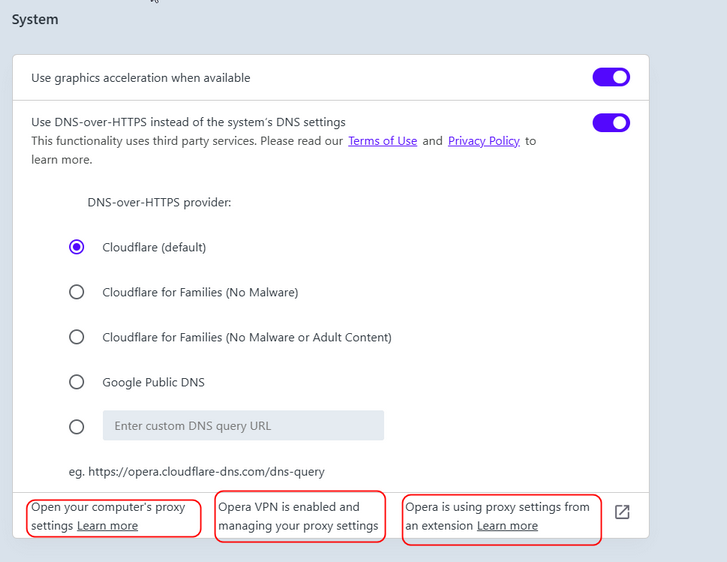
              I also noticed that System section in Settings looks a bit weird (but maybe it's intended)
              2026-04-10_231107.png

              I guess the items should be viewed as rows.
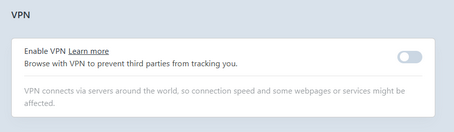
              Also, it tells me that VPN is enabled even if the VPN feature is off.
              2026-04-10_231735.png

              Reply Quote 1
                A Opera-QA-Team 2 Replies Last reply
              • A
                andrew84 @andrew84 last edited by

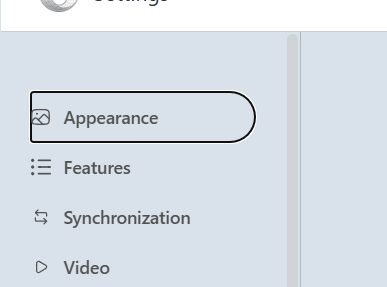
                @andrew84 Also, as was mentioned earlier, there's no indication for the currently active section (highlighting box or bold text).

                *There's some indication in Developer but it looks weird as well (I don't even know how to call such indication)
                2026-04-10_233532.png

                And there should be button to show all the categories at once.

                *I still have a strong opinion the the redesigned Settings page should be inside EarlyBird because of being still quite raw.

                Reply Quote 0
                  1 Reply Last reply
                • S
                  steeveboy last edited by steeveboy

                  Fullscreen black crush / incorrect gamma in Opera 130 (Windows 11 HDR ON, NVIDIA RTX 40 series)
                  I noticed a regression in Opera 130:
                  YouTube windowed mode = correct black levels
                  YouTube fullscreen mode = heavy black crush (too dark)
                  This only happens when ANGLE uses D3D11 (default).
                  Workaround:

                  • Setting opera://flags → ANGLE graphics backend → D3D9 fixes the issue completely.
                  • OpenGL is not available in Opera 130.
                    System:
                  • Windows 11
                  • HDR always ON
                  • NVIDIA RTX 4070 Ti Super
                    Looks like a swapchain / HDR tone‑mapping issue in the D3D11 ANGLE path.
                    Other Chromium browsers (Chrome/Edge) do not show this problem.
                    Please check — fullscreen video should not change black levels.
                    Thanks!
                  Reply Quote 0
                    1 Reply Last reply
                  • gi9vanni
                    gi9vanni last edited by

                    Thank you for removing the blue text at opera://update/ which was unreadable with the dark theme.

                    Reply Quote 0
                      1 Reply Last reply
                    • A
                      andrew84 last edited by

                      Despite of multiple reports the Stable version still has bugs while editing workspaces (no direct possibility to edit using the sidebar or false information visible to user when editing)
                      https://forums.opera.com/post/398368

                      Reply Quote 0
                        1 Reply Last reply
                      • Opera-QA-Team
                        Opera-QA-Team Opera @andrew84 last edited by

                        @andrew84: Thank you, we will check the issues.

                        Reply Quote 0
                          1 Reply Last reply
                        • korol78
                          korol78 last edited by korol78

                          doesn't work

                          Снимок экрана 2026-04-15 075715.jpg

                          Reply Quote 0
                            tastodd 1 Reply Last reply
                          • korol78
                            korol78 last edited by

                            How can you release a program as a stable version if it has many problems and flaws??? !!! ))) .i.

                            Reply Quote 0
                              1 Reply Last reply
                            • tastodd
                              tastodd @korol78 last edited by

                              @korol78 said in Opera 130 Stable:

                              doesn't work

                              Everything works for me. Check your extensions, maybe they're interfering.

                              Reply Quote 0
                                korol78 2 Replies Last reply
                              • korol78
                                korol78 @tastodd last edited by

                                @tastodd said:

                                @korol78 said in Opera 130 Stable:

                                doesn't work

                                Everything works for me. Check your extensions, maybe they're interfering.

                                What's the point of checking? It worked before the update, but now it doesn't!!!

                                Reply Quote 0
                                  1 Reply Last reply
                                • korol78
                                  korol78 @tastodd last edited by

                                  @tastodd said:

                                  @korol78 said in Opera 130 Stable:

                                  doesn't work

                                  Everything works for me. Check your extensions, maybe they're interfering.

                                  Log into your Google account and the button won't work!!!

                                  Reply Quote 0
                                    1 Reply Last reply
                                  • First post
                                    Last post

                                  Computer browsers

                                  • Opera for Windows
                                  • Opera for Mac
                                  • Opera for Linux
                                  • Opera beta version
                                  • Opera USB

                                  Mobile browsers

                                  • Opera for Android
                                  • Opera Mini
                                  • Opera Touch
                                  • Opera for basic phones

                                  • Add-ons
                                  • Opera account
                                  • Wallpapers
                                  • Opera Ads

                                  • Help & support
                                  • Opera blogs
                                  • Opera forums
                                  • Dev.Opera

                                  • Security
                                  • Privacy
                                  • Cookies Policy
                                  • EULA
                                  • Terms of Service

                                  • About Opera
                                  • Press info
                                  • Jobs
                                  • Investors
                                  • Become a partner
                                  • Contact us

                                  Follow Opera

                                  • Opera - Facebook
                                  • Opera - Twitter
                                  • Opera - YouTube
                                  • Opera - LinkedIn
                                  • Opera - Instagram

                                  © Opera Software 1995-