
• Login
    • Search
    • Categories
    • Recent
    • Tags
    • Users
    • Groups
    • Rules
    • Help

    Do more on the web, with a fast and secure browser!

    Download Opera browser with:

    • built-in ad blocker
    • battery saver
    • free VPN
    Download Opera

    Opera 128 Stable

    Blogs
    desktop blog comments
    14
    23
    599
    Loading More Posts
    • Oldest to Newest
    • Newest to Oldest
    • Most Votes
    Reply
    • Reply as topic
    Log in to reply
    This topic has been deleted. Only users with topic management privileges can see it.
    • tastodd
      tastodd last edited by tastodd

      When loading a page, sometimes a "pink flash" appears

      This has already been discussed here
      https://forums.opera.com/post/399037

      Reply Quote 0
        A 1 Reply Last reply
      • A
        andrew84 last edited by

        Here (Portable version on Win 10 x64) it doesn't autoupdate.
        I clicked refresh button many times while on About page and it still shows Opera is up to date
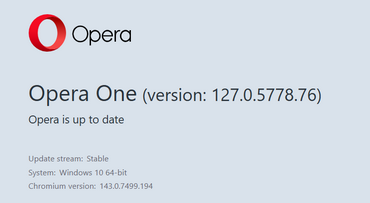
        2026-02-27_141605.png

        Reply Quote 0
          Opera-QA-Team 1 Reply Last reply
        • A
          andrew84 @tastodd last edited by

          @tastodd Yes. It also appears when opening bookmarks (SD tiles or bookmarks bar). Reported several times but got a zero attention regarding this.

          Reply Quote 0
            1 Reply Last reply
          • U
            Urby938 last edited by

            Cant autopdate even fresh reinstall stays on 127 version...

            Reply Quote 0
              Opera-QA-Team 1 Reply Last reply
            • Opera-QA-Team
              Opera-QA-Team Opera last edited by

              Update 2/27/2026: Distribution of the latest version on hold due to issues

              We would like to inform you that due to some issues, we are temporarily suspending the distribution of the latest version of the Opera browser. Our team is currently working to resolve the errors, and we will notify you as soon as the updated version is available.

              Thank you for your understanding and patience.

              Reply Quote 0
                O 1 Reply Last reply
              • Opera-QA-Team
                Opera-QA-Team Opera @Urby938 last edited by

                @urby938: Hi there! Thanks for reaching out. We just updated our blog with the latest information regarding this issue.

                Reply Quote 0
                  1 Reply Last reply
                • Opera-QA-Team
                  Opera-QA-Team Opera @andrew84 last edited by

                  @andrew84: Hi! Thanks for sharing the details. We've just updated our blog with the latest information regarding this issue.

                  Reply Quote 0
                    1 Reply Last reply
                  • KenedSF
                    KenedSF @Opera-QA-Team last edited by

                    @opera-qa-team: Sorry. I only saw your message now.

                    Reply Quote 0
                      1 Reply Last reply
                    • A
                      achhid last edited by

                      Installing Opera 128.0.5807.25 will show "Page crashed" in every page, using Installer.exe in the 128.0.5807.25 folder downgrades to 127 🙂

                      Reply Quote 0
                        1 Reply Last reply
                      • S
                        Sopronman last edited by

                        By a lot of tabs tabs jumping left, right....very disturbing

                        Reply Quote 0
                          1 Reply Last reply
                        • O
                          oP2 @Opera-QA-Team last edited by

                          @opera-qa-team: should we expect the update to ship with the latest compiler? Or we'd have to wait for Chromium 147 for Google to update it?

                          Reply Quote 0
                            1 Reply Last reply
                          • whisperer
                            whisperer last edited by

                            Can you stop doing things like this:
                            79383114-ae3d-4081-b4a3-c0e3e0ecefa9-image.png

                            I think it's bad behavior doing things like that.

                            Reply Quote 0
                              1 Reply Last reply
                            • G
                              genegold last edited by

                              This is not particular to 128, but is a longstanding problem across many sites. Of Opera, FF, Edge & Chrome, Opera is the only one that can't print the following article, as an example, w/o the overlays blocking the article text. Wish Opera would fix it.
                              https://www.theguardian.com/books/2024/mar/20/wandering-stars-by-tommy-orange-review-wounds-of-history

                              Reply Quote 0
                                1 Reply Last reply
                              • First post
                                Last post

                              Computer browsers

                              • Opera for Windows
                              • Opera for Mac
                              • Opera for Linux
                              • Opera beta version
                              • Opera USB

                              Mobile browsers

                              • Opera for Android
                              • Opera Mini
                              • Opera Touch
                              • Opera for basic phones

                              • Add-ons
                              • Opera account
                              • Wallpapers
                              • Opera Ads

                              • Help & support
                              • Opera blogs
                              • Opera forums
                              • Dev.Opera

                              • Security
                              • Privacy
                              • Cookies Policy
                              • EULA
                              • Terms of Service

                              • About Opera
                              • Press info
                              • Jobs
                              • Investors
                              • Become a partner
                              • Contact us

                              Follow Opera

                              • Opera - Facebook
                              • Opera - Twitter
                              • Opera - YouTube
                              • Opera - LinkedIn
                              • Opera - Instagram

                              © Opera Software 1995-