• Login
    • Search
    • Categories
    • Recent
    • Tags
    • Users
    • Groups
    • Rules
    • Help

    Do more on the web, with a fast and secure browser!

    Download Opera browser with:

    • built-in ad blocker
    • battery saver
    • free VPN
    Download Opera

    Opera 125 Stable

    Blogs
    desktop blog comments
    32
    82
    10059
    Loading More Posts
    • Oldest to Newest
    • Newest to Oldest
    • Most Votes
    Reply
    • Reply as topic
    Log in to reply
    This topic has been deleted. Only users with topic management privileges can see it.
    • botspot
      botspot @gmiazga last edited by

      @gmiazga Yes. Fedora KDE.

      Reply Quote 0
        1 Reply Last reply
      • TomaszStawarz
        TomaszStawarz Opera @fitzydj last edited by

        @fitzydj: Hi, we are still going to support it, please find detailed explanation here - https://forums.opera.com/topic/87362/opera-125-stable/41

        Reply Quote 2
          1 Reply Last reply
        • Opera-QA-Team
          Opera-QA-Team Opera @sgrandin last edited by

          @sgrandin: Hello, thanks for reporting. I checked on the same OS and the images are fine for me. Please check if it can be broken by some extension -> temporarily disable your extensions and check again.

          Reply Quote 0
            sgrandin 1 Reply Last reply
          • krteq
            krteq @zibi1981 last edited by

            @zibi1981: I won't use xorg in any way

            Reply Quote 0
              1 Reply Last reply
            • rick2
              rick2 last edited by rick2

              Fedora KDE here, same issues as reported by others.

              I downgraded manually but the broken update is still available in the repos:

              $ LANG=C sudo dnf --disable-repo=\* --enable-repo=opera check-upgrade
              Updating and loading repositories:
              Repositories loaded.
              opera-stable.x86_64 125.0.5729.12-0 opera
              
              Reply Quote 0
                1 Reply Last reply
              • Opera-QA-Team
                Opera-QA-Team Opera last edited by

                Hello everyone,

                We want to share an important update regarding the recent issue affecting MV2 extensions.

                A bug in the update rollout caused these extensions to become temporarily unavailable. This was not intentional, and we halted the rollout immediately once the problem was identified. Thanks to your quick feedback, we were able to catch the issue early. We truly appreciate your vigilance, support, and patience. We’re happy to let you know that we have now released a fixed version: 125.0.5729.15. This update restores proper MV2 extension support. We also want to reassure you that nothing has changed regarding our support for MV2 extensions. If we ever reach a point where we can no longer support them, we will communicate that clearly and in advance.

                Thank you for your understanding and please let us know if you encounter any further problems.

                Reply Quote 2
                  rick2 1 Reply Last reply
                • Opera-QA-Team
                  Opera-QA-Team Opera @filbo last edited by

                  @filbo: Thanks for checking the changelog so closely! The reason it looks this way is that 124 was our last stable release, so the changelog for 125.0.5729.x includes all changes accumulated since that last stable version, not only the fixes from the most recent 125 build.

                  Because of that, the changelog for 5729 shows a broader set of updates, it reflects everything from the previous stable release to the current one, which is why it may appear to repeat or include more items than expected.

                  Hope that clarifies things, and thanks again for keeping an eye on the details!

                  Reply Quote 0
                    filbo 1 Reply Last reply
                  • andrew84
                    andrew84 last edited by andrew84

                    The bug regarding the broken sidebar setup panel's scale when 'page zoom' in Settings is other than 100% has leaked to Stable anyway (despite of multiple reports)
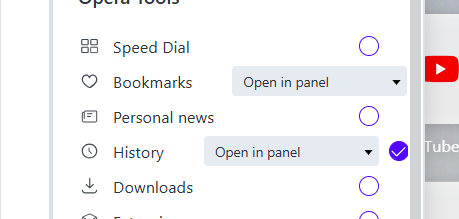
                    2025-12-05_162541.png

                    And the invisible bar at ahe SD's bottom wasn't fixed as well.

                    Reply Quote 0
                      1 Reply Last reply
                    • aswinsanthosh
                      aswinsanthosh last edited by

                      opera on Linux under wayland session runs as unknown app, no icon(show default app icon from system), Therefore it runs as different from pinned icon if that make sense. From what i understand Opera do not provide an application ID, thereby this behavior. it isn't a new bug it existed for years i think, whenever we run opera by setting ozone platform to auto or wayland this used to happen. Now Opera deaults to Wayland its great that it does, Major distros have move to wayland by default. I think its time opera to fix this aged bug

                      Reply Quote 0
                        aswinsanthosh 1 Reply Last reply
                      • aswinsanthosh
                        aswinsanthosh @aswinsanthosh last edited by

                        @aswinsanthosh: There is also a bug, Opera crashes if set Sidebar to autohide.

                        kindly address these two issues.

                        Opera running as Unknown App.
                        Crash on setting sidebar to Autohide

                        both on opera running in native wayland

                        i know the workaround is to set ozone platform to X11, but i think its time to fix it for native wayland

                        Reply Quote 0
                          1 Reply Last reply
                        • ironbone
                          ironbone last edited by

                          The opera menu is still too small
                          https://ibb.co/pj6VkZ3t
                          I use Ubuntu + Gnome - the newest versions

                          Reply Quote 0
                            ironbone 1 Reply Last reply
                          • ironbone
                            ironbone last edited by

                            The pop windows with videos (for example YouTube) still do not work well. The position is on the left top of the display. Additionally, they do not stay in foreground

                            Reply Quote 0
                              ironbone Opera-QA-Team 2 Replies Last reply
                            • ironbone
                              ironbone @ironbone last edited by

                              @ironbone:
                              This is connected with Wayland. On X11 it works well

                              Reply Quote 0
                                1 Reply Last reply
                              • ironbone
                                ironbone @ironbone last edited by

                                @ironbone:
                                This is connected with Wayland. On X11 it works well

                                Reply Quote 0
                                  1 Reply Last reply
                                • rick2
                                  rick2 @Opera-QA-Team last edited by

                                  @Opera-QA-Team
                                  Hello,
                                  The new update 125.0.5729.15 is still broken on Linux under Wayland, it crahses and won't open.

                                  $ kinfo
                                  Operating System: Fedora Linux 43
                                  KDE Plasma Version: 6.5.3
                                  KDE Frameworks Version: 6.20.0
                                  Qt Version: 6.10.1
                                  Kernel Version: 6.17.10-300.fc43.x86_64 (64-bit)
                                  Graphics Platform: Wayland
                                  Processors: 12 × AMD Ryzen 5 5600H with Radeon Graphics
                                  Memory: 16 GiB of RAM (15.0 GiB usable)
                                  Graphics Processor: AMD Radeon Graphics
                                  
                                  Reply Quote 1
                                    zibi1981 1 Reply Last reply
                                  • zibi1981
                                    zibi1981 @rick2 last edited by

                                    Opera still crashes on my CachyOS with KDE. Here is a portion of the error code (forum rules won't let me post whole)

                                    opera
                                    [1206/095137.272067:ERROR:third_party/crashpad/crashpad/util/file/directory_reader_posix.cc:43] opendir /home/cardiozibi/.config/opera/Crash Reports/attachments/ae163632-27b2-43cf-8fe7-053fe6f2814f: No such file or directory (2)
                                    [7503:7503:1206/095137.702299:ERROR:extensions/common/url_pattern_set.cc:298] Invalid url pattern: chrome://startpage/*
                                    [7503:7503:1206/095137.702402:ERROR:extensions/common/url_pattern_set.cc:298] Invalid url pattern: chrome://startpage/*
                                    [7503:7503:1206/095137.702417:ERROR:extensions/common/url_pattern_set.cc:298] Invalid url pattern: chrome://startpage/*
                                    [7503:7503:1206/095137.702438:ERROR:extensions/common/url_pattern_set.cc:298] Invalid url pattern: chrome://startpage/*
                                    [7503:7503:1206/095137.755955:ERROR:cc/paint/skottie_wrapper_impl.cc:46] [Skottie] "Failed to parse JSON input.
                                    "
                                    (...)
                                    [7686:7686:1206/095138.461044:ERROR:chrome/browser/process_singleton_posix.cc:231] read() failed: Połączenie zerwane przez drugą stronę (104)
                                    fish: Job 1, 'opera' terminated by signal SIGSEGV (Address boundary error)
                                    
                                    ~
                                    ❯ [7686:7686:1206/095138.727061:ERROR:extensions/common/url_pattern_set.cc:298] Invalid url pattern: chrome://startpage/*
                                    [7686:7686:1206/095138.727125:ERROR:extensions/common/url_pattern_set.cc:298] Invalid url pattern: chrome://startpage/*
                                    [7686:7686:1206/095138.727134:ERROR:extensions/common/url_pattern_set.cc:298] Invalid url pattern: chrome://startpage/*
                                    [7686:7686:1206/095138.727146:ERROR:extensions/common/url_pattern_set.cc:298] Invalid url pattern: chrome://startpage/*
                                    [7686:7686:1206/095138.780731:ERROR:cc/paint/skottie_wrapper_impl.cc:46] [Skottie] "Failed to parse JSON input.
                                    "
                                    
                                    Reply Quote 0
                                      1 Reply Last reply
                                    • sgrandin
                                      sgrandin @Opera-QA-Team last edited by

                                      @Opera-QA-Team Website fixed it

                                      Reply Quote 0
                                        1 Reply Last reply
                                      • filbo
                                        filbo @Opera-QA-Team last edited by

                                        @opera-qa-team: I understand what you're saying, but it is self-inconsistent (there was a release in between those two, which mentioned only two bugs). And it is negative to the viewer of the changelogs. I checked the similarity because as I was scanning the newer list, it seemed hauntingly familiar.

                                        If you didn't expect anyone to look at the changelogs, there is no point in posting them. On the other hand, if you do expect people to look at them, please curate them so that they present only new, useful information. It is ok (i.e.: highly encouraged) to say something like 'this release includes all of the fixes mentioned in the changelog for prior release (123.456.whatev)'.

                                        Reply Quote 0
                                          1 Reply Last reply
                                        • Urby938
                                          Urby938 last edited by

                                          youtube notifications still not working on windows 11 25 H2... an progress on that?..

                                          Reply Quote 0
                                            Opera-QA-Team 1 Reply Last reply
                                          • whisperer
                                            whisperer last edited by

                                            I work with Opera for Windows and have the sidebar disabled. I use a user defined hotkey to enable/disable the sidebar whenever I want. When marking a test on a webpage, several option appear (Search , Copy, Snapshot) and the option to use Opera AI to translate and other options. When selecting to use Opera AI in the popup options, the sidebar gets enabled, which should not happen.

                                            Reply Quote 0
                                              Opera-QA-Team 1 Reply Last reply
                                            • First post
                                              Last post

                                            Computer browsers

                                            • Opera for Windows
                                            • Opera for Mac
                                            • Opera for Linux
                                            • Opera beta version
                                            • Opera USB

                                            Mobile browsers

                                            • Opera for Android
                                            • Opera Mini
                                            • Opera Touch
                                            • Opera for basic phones

                                            • Add-ons
                                            • Opera account
                                            • Wallpapers
                                            • Opera Ads

                                            • Help & support
                                            • Opera blogs
                                            • Opera forums
                                            • Dev.Opera

                                            • Security
                                            • Privacy
                                            • Cookies Policy
                                            • EULA
                                            • Terms of Service

                                            • About Opera
                                            • Press info
                                            • Jobs
                                            • Investors
                                            • Become a partner
                                            • Contact us

                                            Follow Opera

                                            • Opera - Facebook
                                            • Opera - Twitter
                                            • Opera - YouTube
                                            • Opera - LinkedIn
                                            • Opera - Instagram

                                            © Opera Software 1995-