Opera 133.0.5932.85 Stable update
-
-
andrew84 last edited by andrew84
@korol78 Exactly the same issue like used to be in 130 version.
https://blogs.opera.com/desktop/2026/04/opera-130-stable/#comment-401790Not Opera fault. I have the same in Edge.
While in Opera developer it works fine.
I'm on Win 10.Edit: btw, I tried right now in Opera 133.0.5932.85 Portable and here it works fine.
-
korol78 last edited by
@andrew84 said:
@korol78 Exactly the same issue like used to be in 130 version.
https://blogs.opera.com/desktop/2026/04/opera-130-stable/#comment-401790Not Opera fault. I have the same in Edge.
While in Opera developer it works fine.
I'm on Win 10.Edit: btw, I tried right now in Opera 133.0.5932.85 Portable and here it works fine.
Okay, then maybe you can tell me what and where to change in my Google account settings?
-
 thelittlebrowserthatcould last edited by thelittlebrowserthatcould
This Linux dialog should be dismissible by clicking elsewhere in the application.
In the current deb build I have to open the dialog in another application and dismiss it there, to also dismiss it in Opera.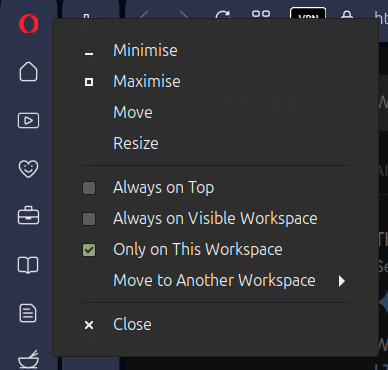
-
 whisperer last edited by
@whisperer said in Opera 133 Stable:
Since version 132.0.5905.102 (tested with Windows versions), there is not hint at the bottom showing the url when hovering over an link in a second Opera Window.
The developer version (134.0.5945.0) has this issue as well.
Version 132.0.5905.73 and earlier worked OK.
Still not fixed.
Note that when a feature is missing in a second window (or consecutive windows), that obviously hinders usability. -
whisperer last edited by
@whisperer said in Opera 131.0.5877.74 Stable update:
Crash when not using %s in site search definition (Opera for Windows)
Create a shortcut to go to the Opera website:Go to opera://settings/searchEngines
Click the Add button to add a site search
Enter these details: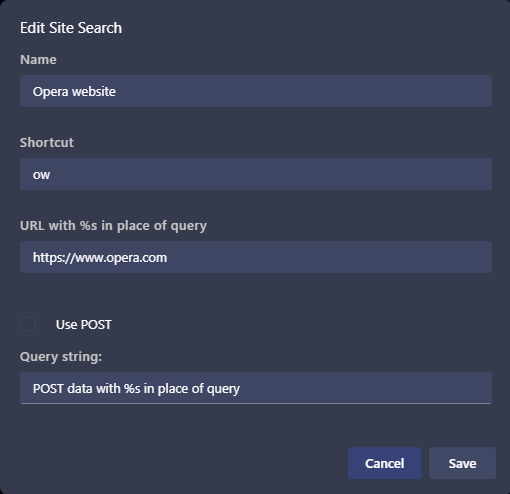
(Notice that no %s in used in the URL)
Click SaveNow test it:
Open a new tab (Ctrl+T)
Type "ow", then press Space, then press EnterOpera crashes.
(Tested with Opera 131.0.5877.97)Still not fixed.
-
thelittlebrowserthatcould last edited by
@thelittlebrowserthatcould:
The dialog appears when vertical tabs are used and there's a right-click in the address bar. -
andrew84 last edited by andrew84
Another one bug (quite serious) regarding the vertical tabs.
https://forums.opera.com/topic/89178/i-cannot-paste-an-address-into-the-address-bar-with-the-new-vertical-tabs-turned-onHere I dont see the context menu (I see the tabstrip's menu instead) at all so address can't be copied/pasted and so on.
-
thelittlebrowserthatcould last edited by
@andrew84 that is related to the bug in Linux I've reported, above, caused by a right-click in the address-bar.
-
andrew84 last edited by
@thelittlebrowserthatcould I'm on Win 10.
The same bug is in Developer.
Taking into account the two blog articles hyping the vertical tabs it's quite surprising that such sensitive bug wasn't detected at the level of developing. Maybe there are not so many people who really needs the vertical tabs feature and who use it.
On the other hand it seems like the quality of testing and feedback become worse especially after Beta channel deprecation and replacing with the EarlyBird options. -
thelittlebrowserthatcould last edited by thelittlebrowserthatcould
@andrew84 I always roll my eyes when something like 20 tabs is given as an example of an extreme user. Disappointing when features like Tab Emojis are left unfinished or of limited use to me, when they could be really useful if feedback was acted on.
I tried the vertical tab layout due to a ask requiring multiple tabs, which all have long titles beginning with the same six words. Tab Emojis could've helped, but I ended up using an extension to rename each tab (none of the ones I tried worked perfectly).
-
 Opera-QA-Team Opera last edited by
@andrew84: Hello, thank you, it is reported as RNA-4154 and will be fixed.
-
andrew84 last edited by
I'm quite sure that vertical tabs and horizontal tabs management way should be the same (or very close).
Currently we have.
-
tab island's tabs have the colored accent in vertical mode but don't have in horizontal mode.
-
in horizontal mode islands can be crated by dragging tabs but in vertical mode it can't (btw, there should option for creating island by overlapping tabs or not, like in Edge)

-
in horizontal mode tabs aren't auto named but in vertical mode they are.
-
I already mentioned the different 'pill' design
-
in horizontal mode there's one click button to create new tab in island but in vertical mode it can't (need to use context menu).
-
in horizontal mode the edit menu appears on hover but in vertical need to use context menu.
*the last two options are well organized in Edge so it could be the same in opera
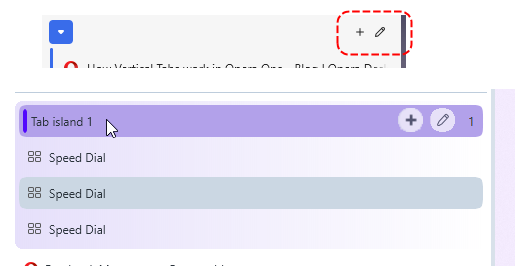
Also. there should option whether to hide the title bar like in Edge.

-
-
andrew84 last edited by
One more bug
as an example
-
turn on vertical mode
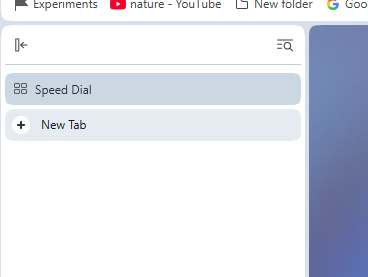
-
add some new tabs, 2 tabs more for example. Select 1st and 2nd tab and creat tab island.
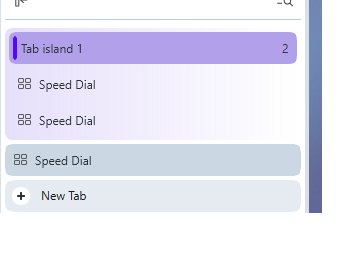
-
Now move the island below the last tab.
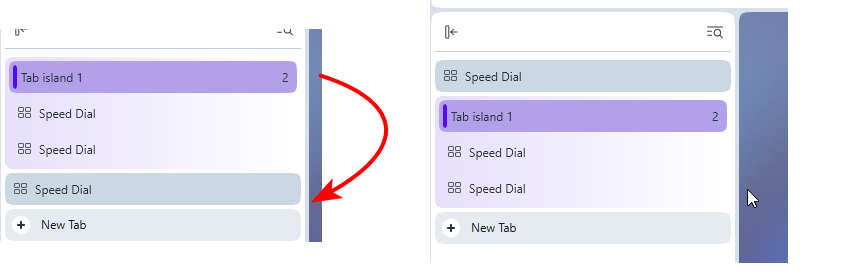
-
turn on horizontal mode.
the island will be after the new tab button

After closing tabs in the island there can be such case that the single tab will be after the new tab button and can't be closed being the last one tab.

5.Maybe ther are other anomalies regarding the moving tabs/island and then switching horizontal/vetical mode but I have no wish checking more.
-
-
-
Opera-QA-Team Opera last edited by
@whisperer: Hi, thank you for the reminder. The bug is awaiting fix.
-
andrew84 last edited by andrew84
To better understand that tab island is expanded in vertical mode I'd suggest shifting the island's tabs and background bubble shifted to the right a bit.
Smth. like this.
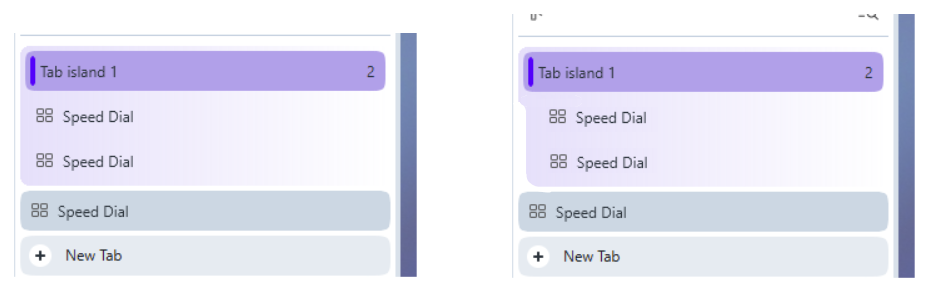
Also, tab islands should be pinnable!
So is it really logical that some single tab can be pinned but multiple categorized tabs cannot?
-
andrew84 last edited by
@andrew84 said in Opera 133.0.5932.85 Stable update:
vertical tabs and horizontal tabs management way should be the same (or very close)
Another ones mismathes I read on forum.
In collapsed mode(favicons only) inactive tabs can't be closed (no 'x' appearing on hover), no vlume booster in the tooltip, no sound indicators.
https://forums.opera.com/post/406887 -
andrew84 last edited by andrew84
Another one bug I noticed is that in horizontal mode the 'scroll to top' feature doesn't work at all.
And it's logical to assume that even if it'll be fixed for the expanded panel, for the collapsed panel the feature can't be even fixed because the tab (only icon visible) will close instead.
The solution could be smth. between the autohide and pinned (collapsed) mode. Like it works in Edge.
When pinned it shows icons only (like in Opera currently) but after hovering it expands to previously predefined width.
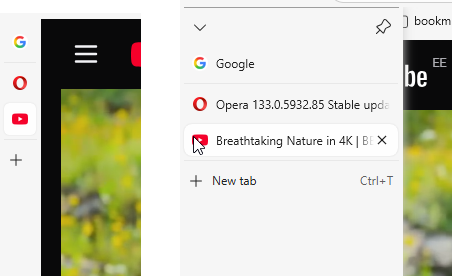
So 3 modes in total> expanded/collapsed/auto-expand.
*There could be also the 4th option when the panel is not visible at all and appears only when touching the edge of the screen (like sidebar) but it's a bit more complicated option to implement as it needs option to move the vertical tabs panel to the right (otherwise the both sidebar and vertical tabs will appear).
As fo me, the vertical tabs are introduced a bit too early if the functional is cut vs horizontal mode.
