Opera 133.0.5932.20 Stable update
-
 whisperer last edited by
@whisperer said in Opera 131.0.5877.24 Stable update:
Still crash when switching to a tab with playing youtube video using Ctrl+Tab and releasing Ctrl late.
Still not fixed.
-
whisperer last edited by
@whisperer said in Opera 131.0.5877.74 Stable update:
Crash when not using %s in site search definition (Opera for Windows)
Create a shortcut to go to the Opera website:Go to opera://settings/searchEngines
Click the Add button to add a site search
Enter these details: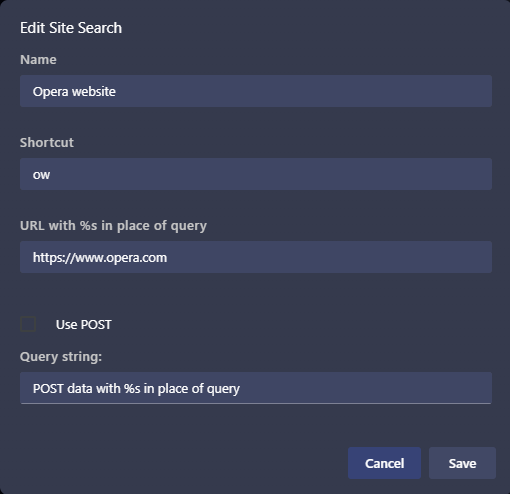
(Notice that no %s in used in the URL)
Click SaveNow test it:
Open a new tab (Ctrl+T)
Type "ow", then press Space, then press EnterOpera crashes.
(Tested with Opera 131.0.5877.97)Still not fixed.
-
whisperer last edited by
@whisperer said in Opera 131.0.5877.74 Stable update:
Bug when changing position of bookmark in folder in boookmarks bar
(Opera for Windows 131.0.5877.97)I have the bookmarks bar enabled. On it, I have a folder named "Bugs & Dev".
On the bookmarks bar, I click the folder and the folder opens. Here's an image:
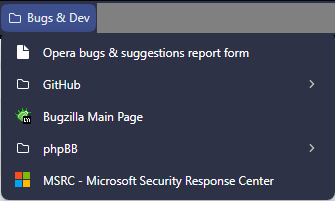
I drag the entry "Bugzilla Main Page" (in the middle) to the top, to change its position.
The entry "Bugzilla Main Page" is now moved to the top, but displayed at the bottom. When clicking the folder name "Bugs & Dev" twice to close it and open it again, the bookmark is shown in its correct place.Still not fixed.
-
bbildman last edited by
@andrew84::"Restore the 2nd click for the ''scroll to top' feature and restore the 'create search engine' option for search fields https://forums.opera.com/post/404101"
AMEN, this was/is a necessary function, and is an unforgiveable change if it was removed by intention. These "small" changes are making Opera more and more useless. Seems as if my beloved Opera (for decades now) is going to lose the browser war, it is becoming more and more "vanilla"
-
-
burnout426 Volunteer last edited by
@whisperer I can confirm that in Opera Stable and Opera Developer.
Opera Developer CrashID=bp-293d4687-1697-4a7f-a02b-bf00e0260705
-
whisperer last edited by
@Opera-QA-Team said in Opera 133.0.5931.0 developer update:
@andrew84: Not returning back to the previous position on 2nd click was dropped within task RNA-3332, which was introduced few versions ago, so it is intended change.
This sounds very much like:
We introduced the bug in "RNA-3332", so it is intended change.
It's a dismissive statement with an argument that doesn't make sense.
The addition of the feature was officially announced in the announcement of the stable version Opera 51
We’ve added a new trick to help you quickly scroll up and down a web page. When you need to scroll to the top of a web page, simply click the page’s tab and the page will jump up to the beginning. Clicking the tab again will bring you back to where you were before, so you can continue reading or exploring content.
The removal of the feature was apparently announced by this Opera Developer changelog entry :
- RNA-3332 Clean up “scroll to top of active tab” and make it work on more sites
It says nothing about removal of the feature and looks more like a bad fix.
-
andrew84 last edited by andrew84
@whisperer Yes, I agree with everything you said.
The addition of the feature was officially announced in the announcement of the stable version Opera 51
But I believe currently it being developed by other people with different worldview.
I also can provide an example where they hype the sections borders removal (Opera R3 introduction).
https://blogs.opera.com/desktop/2019/02/opera-r-3-developer/The main function of a frame of a picture or painting is to enhance the viewer’s experience of the work it houses, not to distract from it. We believe a browser should provide such a frame for the web. With R3, we’ve put web content at center stage. We’ve removed dividing lines between sections so you can browse without borders and unhindered by unnecessary distractions.
And later they introduce the modular design full of borders. So it's logical to assume that it was implemented to bring the 'unnecessary distractions'. And it really distracts a lot.
Of course, it refers not only Opera but other software developers as well.
Personally, I almost fully switched to Edge currently. All the browsers currently are full off AI stuff and similar things but the features I liked in Opera are unique. But if the features don't work correctly there's no difference for me to use other browser without such features. The main bad thing in Edge currently is that it doesn't have built in speed dial page and recently they removed the flag to disable the ugly (even more uglier than in Opera) thick content border. It's still possible to remove the border by using switch in shortcut but it's unclear how long the workaround will be actual.
-
 leocg Moderator Volunteer last edited by
@whisperer The solution for that issue was to remove the "go back to where you were before" function, that's what it seems to me.
-
andrew84 last edited by
@leocg said in Opera 133.0.5932.20 Stable update:
The solution for that issue was to remove the "go back to where you were before" function
What issue do you mean? The 'scroll to top' not working on some sites? Maybe it's true but it doesn't excuse breaking one part of the feature to fix another one.
Taking into account that another one issue (when moving tabs) stays unfixed during years and there's no feedback why. It would be enough just saying that 'we can't fix it and not going to do in near feature'. But of course, it'd sound funny that nowadys with all these modular designs and AI such simple things that worked before can't be fixed or adopted.
-
-
jojo0587 last edited by jojo0587
My proposals for changes in Opera (Google Document).
- There are not enough signs to put all the links here. -
burnout426 Volunteer last edited by
@jojo0587 That theme is not available for me, so I can't personally test.
-
andrew84 last edited by
@burnout426 Here on Win 10 I see the mentioned artifacs on Classic theme as well. It's just a bit hard to notice first but as was said these small parts after each hover over/hover out become brighter. Also. the effect disappears after interacting with other buttons.
-

-
-
jojo0587 last edited by
@burnout426: I have W11.
My proposals for changes in Opera (Google Document).
- There are not enough signs to put all the links here. -
raphaelbm last edited by
133.0.5932.24 has arived unnanounced. Is it safe to use?
Why has it been released and yet is unnaounced???
I see there is no changelog for it but it has been placed on the website.see the website: https://get.geo.opera.com/pub/opera/desktop/
133.0.5932.24 03-Jul-2026 08:53 <----???
133.0.5932.20 02-Jul-2026 07:53
133.0.5932.10 29-Jun-2026 09:55 -