• Login
    • Search
    • Categories
    • Recent
    • Tags
    • Users
    • Groups
    • Rules
    • Help

    Do more on the web, with a fast and secure browser!

    Download Opera browser with:

    • built-in ad blocker
    • battery saver
    • free VPN
    Download Opera

    Opera 132.0.5905.37 Stable update

    Blogs
    desktop blog comments
    8
    20
    494
    Loading More Posts
    • Oldest to Newest
    • Newest to Oldest
    • Most Votes
    Reply
    • Reply as topic
    Log in to reply
    This topic has been deleted. Only users with topic management privileges can see it.
    • rick2
      rick2 @andrew84 last edited by

      @andrew84: I think it got even worse, now when you click on a tab it goes up but when I click it again it never goes back to the original position

      Reply Quote 0
        A 1 Reply Last reply
      • K
        karen-arzumanyan @andrew84 last edited by leocg

        @andrew84 said:

        @karen-arzumanyan said in Opera 132.0.5905.37 Stable update:
        ... and stay unfixed during ~3 years.
        So your bug is very young.

        My problem has been going on for years too. I created this bug three months ago, hoping it would be fixed.
        Briefly, steps to reproduce the issue:

        1. Create multiple folders with several nesting levels (I have three).
        2. Open the dialog box for adding a new folder or page to a third-level folder.
        3. Then, you can try opening several more tree levels in this dialog box without collapsing them.
        4. Click "Save" or "Inter."
        5. After this, subsequent Add dialogs will always display the tree structure as it was when you last saved it. However, the dialog window extends beyond the screen, so much so that even collapsing all the branches doesn't help. You can only click Escape to close it.
          The issue is 100% reproducible.
          On different PCs and different OS (Windows 11, Ubuntu 24.04).
          I also attached a video demonstrating this. So far, I've only managed to draw attention to the bug.
        Reply Quote 0
          A 1 Reply Last reply
        • A
          andrew84 @rick2 last edited by

          @rick2 Thanks. Yes, you right. I didn't notice/check it.
          I have no polite words to respond.

          Reply Quote 1
            1 Reply Last reply
          • A
            andrew84 @karen-arzumanyan last edited by

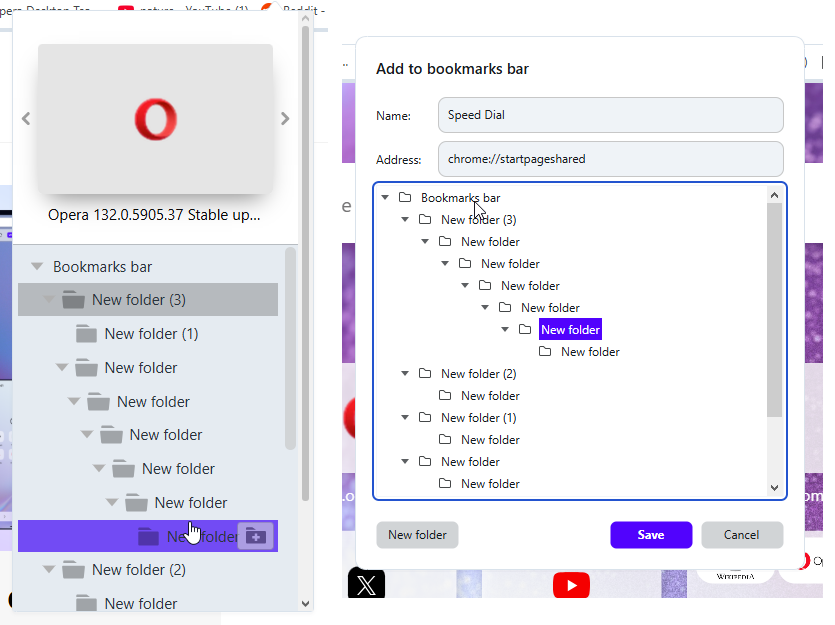
            @karen-arzumanyan Sorry, I wasn't able to reproduce it here on Win 10. Maybe I'm missing smth. in reproducing steps or it depends on screen size/scaling.
            I checked2026-06-11_112143.png the heart and add site dialogs.
            Reply Quote 0
              K 1 Reply Last reply
            • Opera-QA-Team
              Opera-QA-Team Opera @ironbone last edited by

              @ironbone: Thanks for the report.

              Reply Quote 0
                1 Reply Last reply
              • Opera-QA-Team
                Opera-QA-Team Opera @andrew84 last edited by

                @andrew84: Hi! Yes, this is a known issue on our side. We have it logged in our backlog as RNA-214.

                Reply Quote 0
                  1 Reply Last reply
                • M
                  mtopek @Opera-QA-Team last edited by

                  @Opera-QA-Team split mode on linux (flatpak) still doesn't work

                  Reply Quote 0
                    1 Reply Last reply
                  • K
                    karen-arzumanyan @andrew84 last edited by

                    @andrew84: It looks like you have only folders and no bookmarks in them.

                    Reply Quote 0
                      A 1 Reply Last reply
                    • A
                      andrew84 @karen-arzumanyan last edited by

                      @karen-arzumanyan said in Opera 132.0.5905.37 Stable update:

                      only folders and no bookmarks in them.

                      No. I first created the tree of folders (6 levels, using copy paste bookmarks) for test.
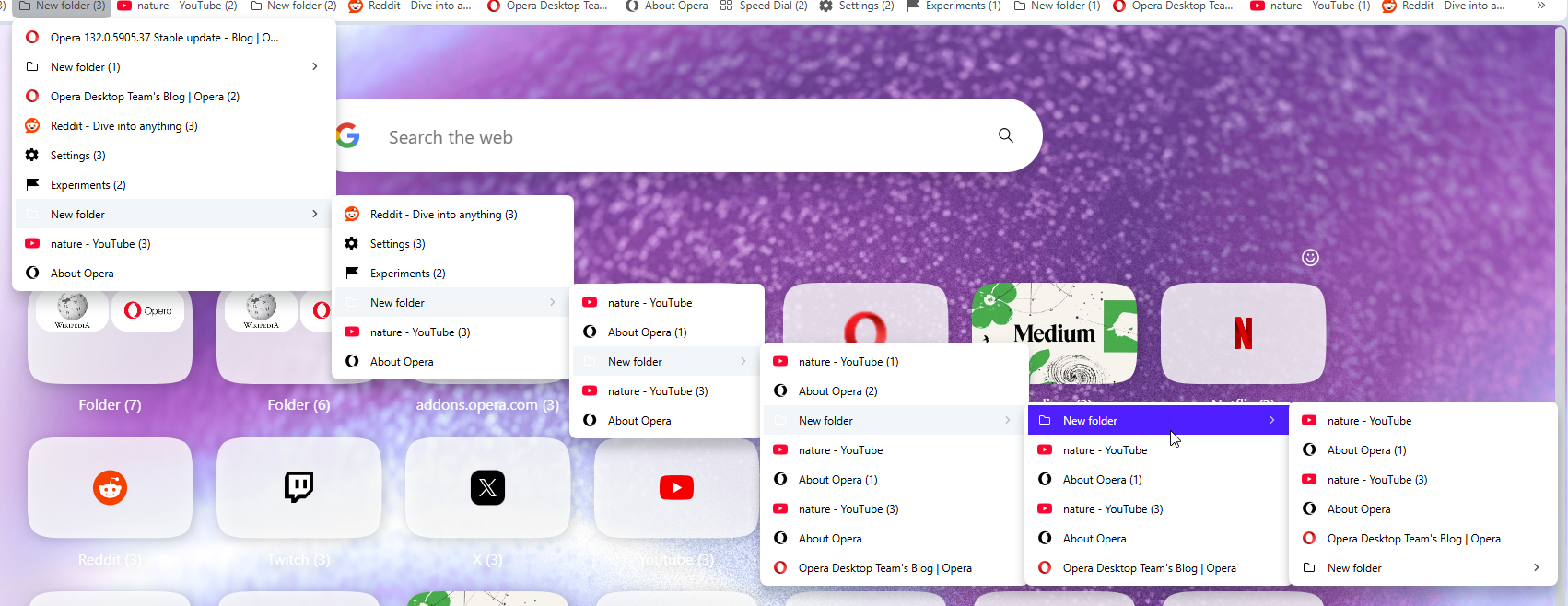
                      2026-06-14_153704.png

                      Reply Quote 0
                        K 1 Reply Last reply
                      • A
                        andrew84 last edited by
                        • Again the 'force dark pages' toggle doesn't remember its state.
                          After disabling the toggle and enabling the dark mode the toggle is on.

                        • also, the theme switching icons are white for some light wallpapers (Orbit for example) and thus are barely visible.
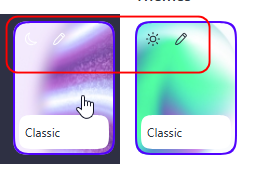
                          2026-06-14_154907.png

                        Reply Quote 0
                          1 Reply Last reply
                        • K
                          karen-arzumanyan @andrew84 last edited by

                          @andrew84: OK, Try import my test bookmarks, and add site to Folder Name->Folder Name 5-> Folder Name 515
                          Bookmarks:
                          https://www.upload.ee/files/19443593/bookmarks_6_14_26.html.html
                          Video demonstraion:
                          https://www.upload.ee/files/19443596/Video_2026-06-14_202306.wmv.html
                          Screenshot:
                          https://www.upload.ee/files/19443603/2026-06-14_202714.png.html

                          Reply Quote 1
                            A 1 Reply Last reply
                          • A
                            andrew84 @karen-arzumanyan last edited by andrew84

                            @karen-arzumanyan Ok, I managed to reproduce it here using my own bookmark folders (simply created more empty folders).
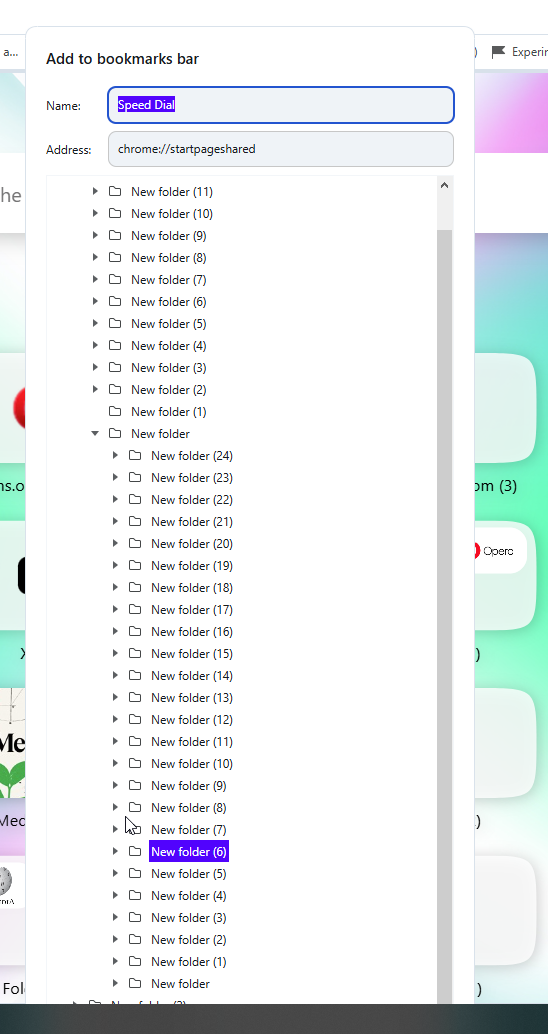
                            2026-06-14_213635.png

                            Reply Quote 0
                              K 1 Reply Last reply
                            • K
                              karen-arzumanyan @andrew84 last edited by

                              @andrew84: Well, that's great! Q.E.D.

                              Reply Quote 0
                                1 Reply Last reply
                              • First post
                                Last post

                              Computer browsers

                              • Opera for Windows
                              • Opera for Mac
                              • Opera for Linux
                              • Opera beta version
                              • Opera USB

                              Mobile browsers

                              • Opera for Android
                              • Opera Mini
                              • Opera Touch
                              • Opera for basic phones

                              • Add-ons
                              • Opera account
                              • Wallpapers
                              • Opera Ads

                              • Help & support
                              • Opera blogs
                              • Opera forums
                              • Dev.Opera

                              • Security
                              • Privacy
                              • Cookies Policy
                              • EULA
                              • Terms of Service

                              • About Opera
                              • Press info
                              • Jobs
                              • Investors
                              • Become a partner
                              • Contact us

                              Follow Opera

                              • Opera - Facebook
                              • Opera - Twitter
                              • Opera - YouTube
                              • Opera - LinkedIn
                              • Opera - Instagram

                              © Opera Software 1995-
