Opera 128 Stable
-
 Opera Comments Bot last edited by
Hello! We’re happy to announce the release of Opera 128 Stable! This update includes a Chromium upgrade to version 144.0.7559.173 and a broad set of stability and quality fixes, with a strong focus on Enhanced Split Screen reliability (restoring, workspaces/tab islands interactions, and crash fixes). Key highlights: Known issues: For a complete rundown, take a look at the […]
Read full blog post: Opera 128 Stable
-

-

-
-

-
-
 deathcat last edited by deathcat
Myflow isn't working. The QR code doesn't appear at opera.com/connect, the circle keeps spinning.
-
raphaelbm last edited by
I have reported Opera Hangs in Update.
see https://opera.atlassian.net/servicedesk/customer/portal/52/BUG-21422 -
-
tastodd last edited by tastodd
When loading a page, sometimes a "pink flash" appears
This has already been discussed here
https://forums.opera.com/post/399037 -
andrew84 last edited by
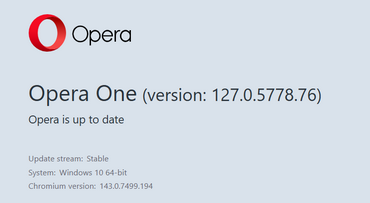
Here (Portable version on Win 10 x64) it doesn't autoupdate.
I clicked refresh button many times while on About page and it still shows Opera is up to date
-
Opera-QA-Team Opera last edited by
Update 2/27/2026: Distribution of the latest version on hold due to issues
We would like to inform you that due to some issues, we are temporarily suspending the distribution of the latest version of the Opera browser. Our team is currently working to resolve the errors, and we will notify you as soon as the updated version is available.
Thank you for your understanding and patience.
-
Opera-QA-Team Opera last edited by
@urby938: Hi there! Thanks for reaching out. We just updated our blog with the latest information regarding this issue.
-
Opera-QA-Team Opera last edited by
@andrew84: Hi! Thanks for sharing the details. We've just updated our blog with the latest information regarding this issue.
-
-
achhid last edited by
Installing Opera 128.0.5807.25 will show "Page crashed" in every page, using Installer.exe in the 128.0.5807.25 folder downgrades to 127

