• Login
    • Search
    • Categories
    • Recent
    • Tags
    • Users
    • Groups
    • Rules
    • Help

    Do more on the web, with a fast and secure browser!

    Download Opera browser with:

    • built-in ad blocker
    • battery saver
    • free VPN
    Download Opera

    Opera 127.0.5778.76 Stable update

    Blogs
    desktop blog comments
    12
    24
    1134
    Loading More Posts
    • Oldest to Newest
    • Newest to Oldest
    • Most Votes
    Reply
    • Reply as topic
    Log in to reply
    This topic has been deleted. Only users with topic management privileges can see it.
    • Opera-QA-Team
      Opera-QA-Team Opera @rick2 last edited by

      @rick2: Hello, thanks for spotting. Moving tabs between windows is already reported. No focus on address bar after opening new window - we will look into that!
      And regarding clicking in address bar - it works fine as I checked. Maybe some of your extensions is interfering?

      Reply Quote 0
        rick2 2 Replies Last reply
      • Opera-QA-Team
        Opera-QA-Team Opera @KenedSF last edited by

        @kenedsf: Hi, thanks for spotting, it is already known bug and will be fixed when possible.

        Reply Quote 0
          KenedSF 1 Reply Last reply
        • KenedSF
          KenedSF @Opera-QA-Team last edited by

          @opera-qa-team: Thank you.

          Reply Quote 0
            1 Reply Last reply
          • M
            metana last edited by

            this bug still presists after many updates: @Opera-QA-Team
            https://forums.opera.com/topic/87321/opera-linux-ubuntu-snap-124-0-5705-70-413-dev-tools

            Reply Quote 0
              1 Reply Last reply
            • M
              MehrzadS @KenedSF last edited by

              @kenedsf: You can Ctrl+Space and then "Always on top"

              Reply Quote 0
                KenedSF 1 Reply Last reply
              • A
                acriim last edited by

                This update was one big fail. Updated automaticaly yesterday on background. Today started opera, your opera was updated, closed "updated" tab. Then opened to one of my tabs, click inside and it switched to clean context even in case there is only 1! all opened tabs switched. So I switched back. OK all tabs (91) are here. Again clicked to one of my pages, again it switched to clean context. Tried it 2 more times. Still the same. So switched to normal context and turned opera off, it tells me don't worry all your tabs will be there (usual message). OK.
                Started again and? All tabs are gone! Thank you very much Opera programmers to your amazing work that leads to lost all opened tabs. Stupidity top level! And none of the opened tabs are in history. It is about 1 month back when I tested working with contexts and it did the same shit. Killed all opened tabs in basic context and opened all clean without any tab. So I left context at default and avoid using it any way. And bang there is update and it did the same without using it. Thank you. Crap "stable" updates

                Reply Quote 0
                  1 Reply Last reply
                • KenedSF
                  KenedSF @MehrzadS last edited by

                  @MehrzadS I gonna try it. Thanks.

                  Reply Quote 0
                    M 1 Reply Last reply
                  • M
                    MehrzadS @KenedSF last edited by

                    @kenedsf: Sorry, it was Alt+Space that opened the menu

                    Reply Quote 0
                      KenedSF 1 Reply Last reply
                    • M
                      MehrzadS last edited by

                      Opera crashes when opening a file from the sidebar. Zorin OS 17.

                      Reply Quote 0
                        1 Reply Last reply
                      • KenedSF
                        KenedSF @MehrzadS last edited by

                        @mehrzads: OK.

                        Reply Quote 0
                          1 Reply Last reply
                        • rick2
                          rick2 @Opera-QA-Team last edited by

                          @Opera-QA-Team thanks for replying.

                          About clicking in address bar, on my mini PC with latest Opera Stable 127.0.5778.76 (Fedroa KDE 43, installed from RPM) I don't experience this issue.
                          So it might be an extension on my notebook (also Fedroa KDE 43, installed from RPM), will check it out later.

                          Reply Quote 0
                            1 Reply Last reply
                          • korol78
                            korol78 last edited by korol78

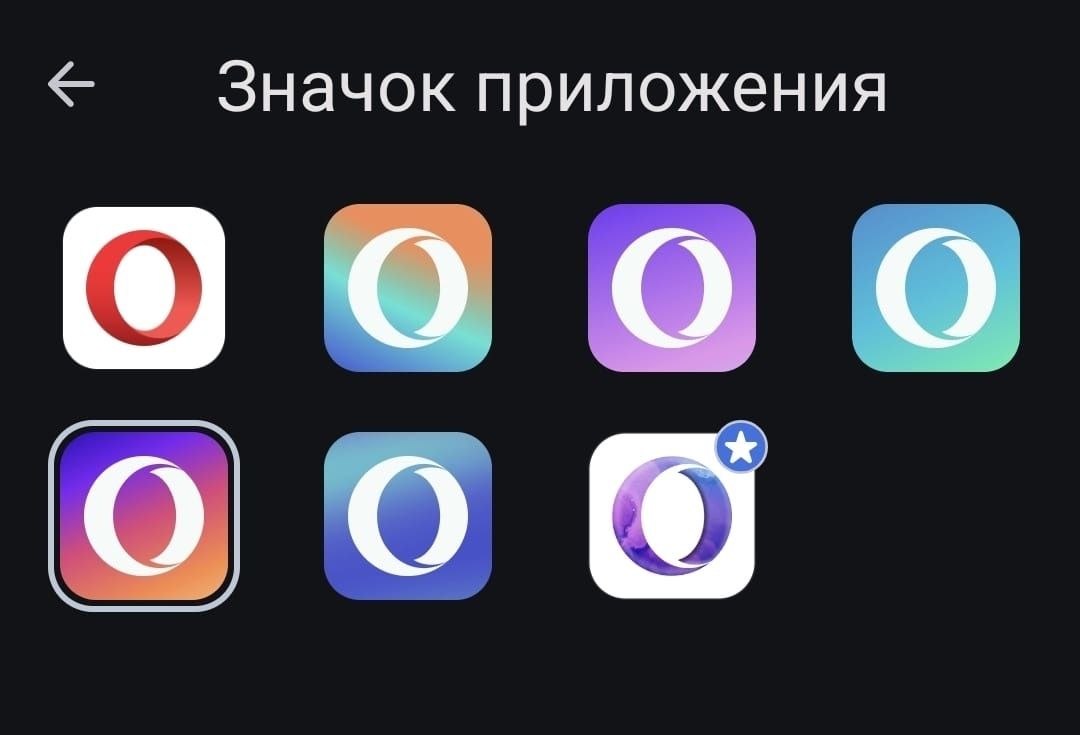
                            Hello, is it possible to change the OPERA icon in the PC version? Like the mobile version?
                            P.S. I understand you can use any icon you want, but I'd like you to take care of this ))
                            02799357-db06-41fb-89eb-ccf43b5acf14.jpg

                            Reply Quote 0
                              1 Reply Last reply
                            • N
                              neo136 @Opera Comments Bot last edited by

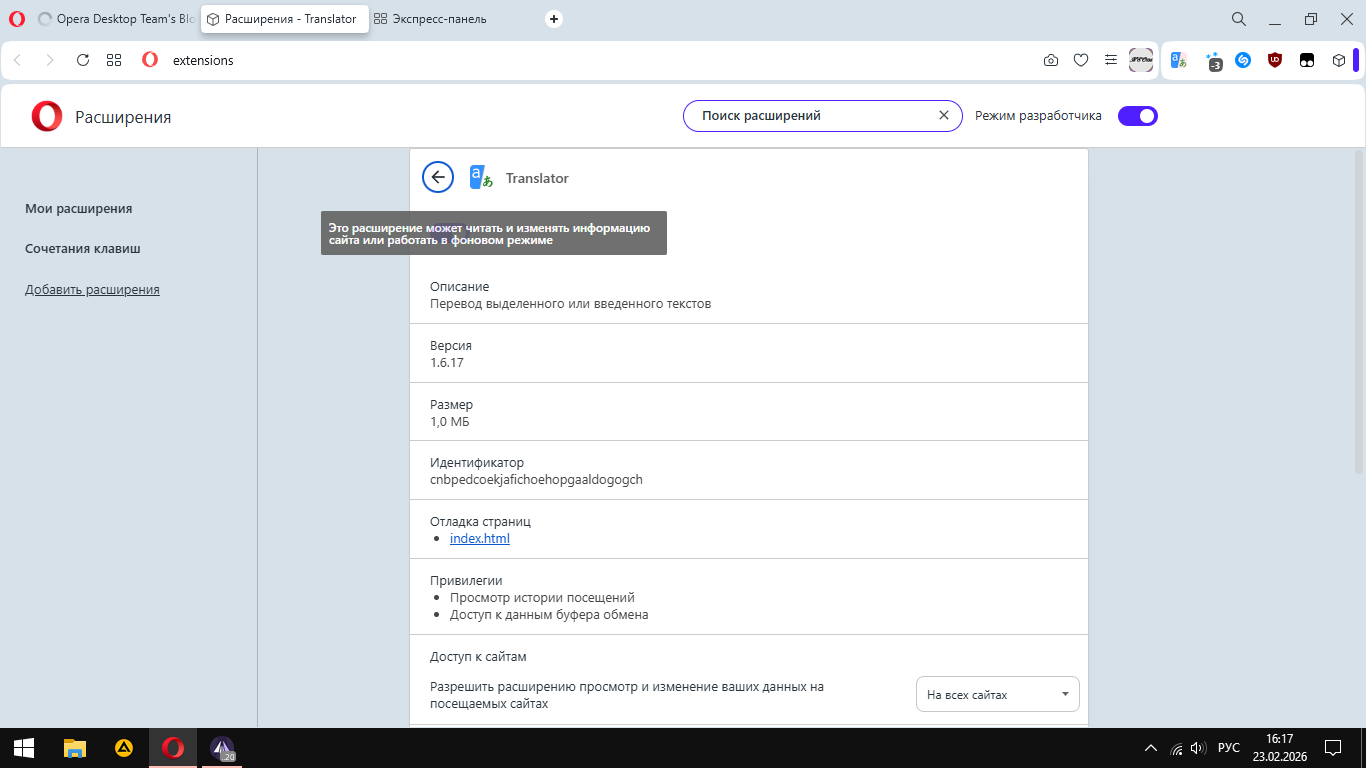
                              @Opera-Comments-Bot 4a6a5e87-c473-45bb-a2e1-52647de452d1-image.png

                              For several versions already, there has been a problem with the inability to enable and disable extensions due to a tooltip that closes the button.

                              Reply Quote 1
                                Opera-QA-Team 1 Reply Last reply
                              • rick2
                                rick2 @Opera-QA-Team last edited by

                                @Opera-QA-Team Well, must have been a glitch in tne Matrix 'cause I just upgraded Opera Stable in my notebook and I can't reproduce the address bar bug anymore.
                                Sorry for the noise.

                                Reply Quote 0
                                  1 Reply Last reply
                                • Opera-QA-Team
                                  Opera-QA-Team Opera @neo136 last edited by

                                  @neo136: Hi, thanks for sharing. We already know this bug, it's RNA-2008 and it's awaiting fix.

                                  Reply Quote 0
                                    1 Reply Last reply
                                  • N
                                    nadie-nada-nunca last edited by

                                    Reported as OOD-747: Middle click on bookmarks bar folder opens in weird order

                                    When you have some tabs open and middle-click on a folder in the bookmarks bar, the first bookmark in the folder opens to the right of the existing tabs, while the rest open to the left.

                                    Reply Quote 0
                                      Opera-QA-Team 1 Reply Last reply
                                    • Opera-QA-Team
                                      Opera-QA-Team Opera @nadie-nada-nunca last edited by

                                      @nadie-nada-nunca: Hello,thanks for reminding 🙂 it will be fixed when possible.

                                      Reply Quote 0
                                        1 Reply Last reply
                                      • First post
                                        Last post

                                      Computer browsers

                                      • Opera for Windows
                                      • Opera for Mac
                                      • Opera for Linux
                                      • Opera beta version
                                      • Opera USB

                                      Mobile browsers

                                      • Opera for Android
                                      • Opera Mini
                                      • Opera Touch
                                      • Opera for basic phones

                                      • Add-ons
                                      • Opera account
                                      • Wallpapers
                                      • Opera Ads

                                      • Help & support
                                      • Opera blogs
                                      • Opera forums
                                      • Dev.Opera

                                      • Security
                                      • Privacy
                                      • Cookies Policy
                                      • EULA
                                      • Terms of Service

                                      • About Opera
                                      • Press info
                                      • Jobs
                                      • Investors
                                      • Become a partner
                                      • Contact us

                                      Follow Opera

                                      • Opera - Facebook
                                      • Opera - Twitter
                                      • Opera - YouTube
                                      • Opera - LinkedIn
                                      • Opera - Instagram

                                      © Opera Software 1995-