• Login
    • Search
    • Categories
    • Recent
    • Tags
    • Users
    • Groups
    • Rules
    • Help

    Do more on the web, with a fast and secure browser!

    Download Opera browser with:

    • built-in ad blocker
    • battery saver
    • free VPN
    Download Opera

    Opera 125.0.5727.1 developer update

    Blogs
    desktop blog comments
    9
    25
    654
    Loading More Posts
    • Oldest to Newest
    • Newest to Oldest
    • Most Votes
    Reply
    • Reply as topic
    Log in to reply
    This topic has been deleted. Only users with topic management privileges can see it.
    • deathcat
      deathcat @leocg last edited by

      @leocg: By the time they update to 141 or 142, their competitors will already be on 145 or 146. That's why one wonders what kind of mess is going on with Opera's developers, that they're unable to support the current engine and are lagging behind like some amateur startup. I'm not even talking about the slew of minor bugs that haven't been fixed for years. They've released a bunch of different browser versions and can't make any of them current and stable.

      Reply Quote 1
        leocg 1 Reply Last reply
      • leocg
        leocg Moderator Volunteer @deathcat last edited by

        @deathcat As far as I know, current stable Chromium is 142 and it's been a while that Opera uses stable Chromium in all its channels.

        Reply Quote 0
          deathcat 1 Reply Last reply
        • deathcat
          deathcat @leocg last edited by

          @leocg: Opera's stable channel currently has Chromium: 140.0.7339.249. Where did you find 142? In a couple of days, 143 will be stable. Other developers are already testing 144 on their Dev channels. So, the question arises: why is Chromium still relevant in Opera, even on the Dev channel, where they're stuck on 140.0.7339.208?

          Reply Quote 0
            leocg 1 Reply Last reply
          • leocg
            leocg Moderator Volunteer @deathcat last edited by

            @deathcat Did you understand that Opera uses stable version of Chromium in its stable, beta and developer channels?

            Reply Quote 0
              deathcat 1 Reply Last reply
            • chloe898
              chloe898 @Opera Comments Bot last edited by

              @Opera-Comments-Bot Thanks for the update! I’m excited to try the refreshed split-screen feature. I know it’s still in development, but I’ll test it out and share any bugs or feedback I find.

              Reply Quote 0
                Opera-QA-Team 1 Reply Last reply
              • deathcat
                deathcat @leocg last edited by

                @leocg: I already realized you're talking nonsense, or, like Opera, pretending not to understand what you're talking about. Chromium 144 should already be testing on the developer channel, so they can then move to the stable channel, as they did before, lagging behind by a couple of weeks. Now they're stuck on 140 and can't seem to make any progress.

                Reply Quote 0
                  leocg 1 Reply Last reply
                • leocg
                  leocg Moderator Volunteer @deathcat last edited by

                  @deathcat Because Opera seems to have decided to stop using Chromium Developer on Opera Developer. It's been a while that Opera only uses stable versions of Chromium in all Opera One channels and it seems to have been a deliberated choice.

                  Reply Quote 0
                    andrew84 1 Reply Last reply
                  • andrew84
                    andrew84 @leocg last edited by

                    @leocg said in Opera 125.0.5727.1 developer update:

                    As far as I know, current stable Chromium is 142 and it's been a while that Opera uses stable Chromium in all its channels.

                    So currently Developer version should have 142 stable version at least, not the 140.

                    Reply Quote 0
                      1 Reply Last reply
                    • mbstafs
                      mbstafs last edited by

                      I used to be able to quickly disable ad or tracker blocking on a page by clicking on the "security" badge in the URL bar. That is, without manually managing exceptions in the settings.

                      Now, this badge is grayed out on all tabs and does nothing. Is anyone else seeing this? Is this a regression?

                      opera-developer 125.0.5727.1, on Linux Fedora F43 x86_64, installed as RPM (update) from the official repository.

                      Reply Quote 0
                        Opera-QA-Team 1 Reply Last reply
                      • andrew84
                        andrew84 last edited by

                        Btw, the video PiP's volume is still not synchronized well (at least on youtube live videos.).
                        https://forums.opera.com/post/355081
                        It seems the same in Edge (so chromium issue as it seems), can't check in FireFox right now.
                        *I wonder that taking into account all the innovative modular designs and the hyped AI stuff such common things can't improved.

                        Reply Quote 0
                          leocg 1 Reply Last reply
                        • leocg
                          leocg Moderator Volunteer @andrew84 last edited by

                          @andrew84 Volume on video pop-out follows YouTube's normalised volume

                          Reply Quote 0
                            andrew84 1 Reply Last reply
                          • Opera-QA-Team
                            Opera-QA-Team Opera @chloe898 last edited by

                            @chloe898: Hello, thanks! We are always happy to hear valuable comments from Users.

                            Reply Quote 0
                              1 Reply Last reply
                            • Opera-QA-Team
                              Opera-QA-Team Opera @andrew84 last edited by

                              @andrew84: Hi, thanks for your valuable feedback about the new split screen. And, regarding 'the minimize button's blue border' - I coulnd't repeat it on Win11 nor Win10, but we will keep an eye on this.

                              Reply Quote 0
                                andrew84 1 Reply Last reply
                              • Opera-QA-Team
                                Opera-QA-Team Opera @mbstafs last edited by

                                @mbstafs: Hi, thanks for reporting. Do you use any extension, maybe ad-blocking related? Please try temporarily disabling all your extensions and check again.

                                Reply Quote 0
                                  1 Reply Last reply
                                • Opera-QA-Team
                                  Opera-QA-Team Opera @parduspars last edited by

                                  @parduspars: Hi, thanks for reporting! We already know this issue and we are working on the solution.

                                  Reply Quote 0
                                    1 Reply Last reply
                                  • Opera-QA-Team
                                    Opera-QA-Team Opera @KenedSF last edited by

                                    @kenedsf: Hi, thanks for reporting! We already know this issue and we are working on the solution.

                                    Reply Quote 0
                                      1 Reply Last reply
                                    • andrew84
                                      andrew84 @Opera-QA-Team last edited by

                                      @Opera-QA-Team said in Opera 125.0.5727.1 developer update:

                                      regarding 'the minimize button's blue border' - I coulnd't repeat it on Win11 nor Win10

                                      It's bad.

                                      After collapsing the address field in split screen I also see the blue border, but this time for EasySetup icon and there's the closing cross overlapping account icon.
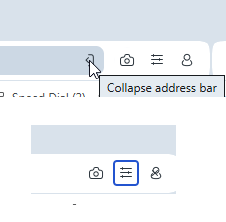
                                      2025-12-01_103401.png

                                      Reply Quote 0
                                        1 Reply Last reply
                                      • andrew84
                                        andrew84 @leocg last edited by

                                        @leocg said in Opera 125.0.5727.1 developer update:

                                        YouTube's normalised volume

                                        I think end user shouldn't care if there smth. normalized or not. The volume control should work and not jump back (I think it's obvious).

                                        Reply Quote 0
                                          1 Reply Last reply
                                        • First post
                                          Last post

                                        Computer browsers

                                        • Opera for Windows
                                        • Opera for Mac
                                        • Opera for Linux
                                        • Opera beta version
                                        • Opera USB

                                        Mobile browsers

                                        • Opera for Android
                                        • Opera Mini
                                        • Opera Touch
                                        • Opera for basic phones

                                        • Add-ons
                                        • Opera account
                                        • Wallpapers
                                        • Opera Ads

                                        • Help & support
                                        • Opera blogs
                                        • Opera forums
                                        • Dev.Opera

                                        • Security
                                        • Privacy
                                        • Cookies Policy
                                        • EULA
                                        • Terms of Service

                                        • About Opera
                                        • Press info
                                        • Jobs
                                        • Investors
                                        • Become a partner
                                        • Contact us

                                        Follow Opera

                                        • Opera - Facebook
                                        • Opera - Twitter
                                        • Opera - YouTube
                                        • Opera - LinkedIn
                                        • Opera - Instagram

                                        © Opera Software 1995-