Opera 131.0.5877.74 Stable update
-
slim54 last edited by slim54
endless installation, either through the browser itself or through a regular installation file. it started with the appearance of the update
131.0.5877.55 when updating from version 131.0.5877.24...
It's the same with 131.0.5877.74.
the only thing that helped was to go to the archive from the website with the versions and download from there.


-
andrew84 last edited by andrew84
Split screen: Fixed crash on double-clicking the address bar
I thought it fixes the crash when clicking tabs in the address bar (because I saw the same rna in Developer's changelog ) but here in Stable it still crashing the browser.
Also, still crashing when using the tabs cycler (Ctrl+tab) while playing YT video.
-
Sopronman last edited by
Horizontal tabs are OK, but verticals are always jumping. The same also by Developer version. Vertical tabs are in Chrome and Firefox without problems.
-
stebot65 last edited by
When I press the tab island on the right side, to expand my addons, opera crashes every single time, after this latest update.
-
 thelittlebrowserthatcould last edited by
What improvement does the slower startup time exhibited over recent releases achieve?
-
 Opera-QA-Team Opera last edited by
@stebot65: Thanks for letting us know. It is already fixed, the fix should be released with the new version.
-
steeveboy last edited by
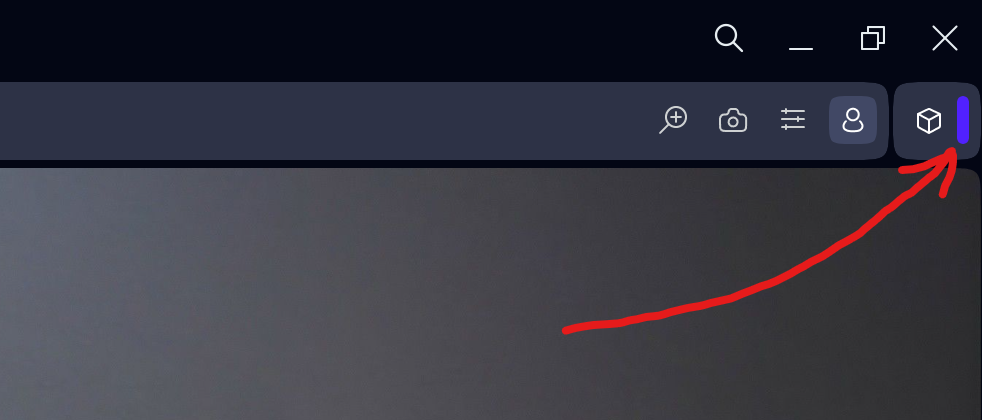
Found a very strange bug... Opera crashes if you click this purple line here right after the extensions symbol...
-
Opera-QA-Team Opera last edited by
@steeveboy: Hi, yes, it's already fixed, will be released with the new update.
-
andrew84 last edited by
his update fixes a crash that could occur when clicking the extension bar handle:
Why the crash in split screen is still not fixed.
-
steeveboy last edited by
@opera-qa-team: Thank you very much for the quick fix and update! I appreciate it!
 Already downloaded Version: 131.0.5877.97 fromt FTP-server. Great job, it's fixed. It collapses as it should without crashing. Have a great and sunny weekend guys!
 -
albano23 last edited by albano23
The stable versions of Opera 131, from version 54 to the current one ending in 97, have several serious bugs in their snap (Ubuntu 22.04.05 LTS in my case) that should be fixed: 1) They fill the GNOME logs with thousands of messages with the error "Invalid RE2 repetition size, invalid perl operator"; 2) This causes a large amount of disk space to be consumed in a single session, as can be seen with the commands
sudo journalctl --disk-usageandsudo ls -lh /var/log/journal/*/*.journal; and 3) In version 74, a very serious error occurred when updating the chromium-ffmpeg snap: "at least file with resources (.pak) is corrupted, please reinstall opera". Luckily, shutting down and restarting my PC fixed it for me. // In version 131 ending in 24, none of these bugs were present. I don't recommend usingsudo journalctl --vacuum-time=1dto fix the issue of thousands of messages mentioned in point 1, because it could break your current session. I would like these problems to be reviewed by both you and the Snap Opera packagers. I hope all these issues will be resolved in version 132, which will use Chrome's 148 engine.