• Login
    • Search
    • Categories
    • Recent
    • Tags
    • Users
    • Groups
    • Rules
    • Help

    Do more on the web, with a fast and secure browser!

    Download Opera browser with:

    • built-in ad blocker
    • battery saver
    • free VPN
    Download Opera

    Opera 131.0.5877.24 Stable update

    Blogs
    desktop blog comments
    20
    44
    1791
    Loading More Posts
    • Oldest to Newest
    • Newest to Oldest
    • Most Votes
    Reply
    • Reply as topic
    Log in to reply
    This topic has been deleted. Only users with topic management privileges can see it.
    • burnout426
      burnout426 Volunteer @sklunk last edited by

      @sklunk Yeah, that's always been annoying. It just does simple alphabetical sorting and doesn't handle build numbers well.

      Reply Quote 0
        1 Reply Last reply
      • otoswald
        otoswald @Opera-QA-Team last edited by

        @Opera-QA-Team
        Please I am finding it difficult to redeem my over 4200 opera points, I use the Opera Mini browser, but in the reward and redeem section there's no option for me to redeem my points, and I am already worried, please I need your assistance, thanks.

        Reply Quote 0
          Opera-QA-Team 1 Reply Last reply
        • S
          sklunk @raphaelbm last edited by

          @raphaelbm

          The sort order I am talking about is not on the Change Log page, it's the directory where all stable releases of Desktop Opera are maintained. If you click the link in my previous post it will take you there. Again, these are only stable releases, not all betas/etc., which is why I just always check there instead of the Opera blogs.

          Reply Quote 0
            1 Reply Last reply
          • S
            Stealthlink67 last edited by

            Now my YouTube wont play. I get the adblocker lock up and cant get past it. Just installed 131.0.5877.31 now youtube not playing

            Reply Quote 0
              thelittlebrowserthatcould burnout426 2 Replies Last reply
            • S
              sicu220 last edited by

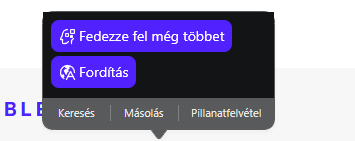
              Hello! Bugs: Opera AI highlighter looks bad. It's perfect there.
              The part above looks ugly.
              54e6f39f-c9cc-4ff1-86a4-6fd41255fce1-image.png

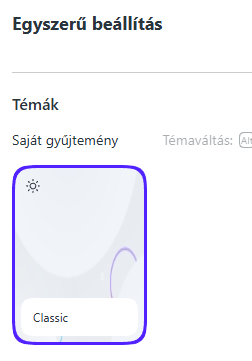
              In the simple settings menu, the blue line only appears when I move the mouse there, otherwise it doesn't. It should always be there.
              dd65e650-eb18-4bc4-98bf-e52ae5fd4c5f-image.png
              In the history menu at the top of the search bar, the word "between" no longer fits. The word is cut off.

              3b676877-b723-4577-8868-2acff55d705c-image.png

              VPN icon does not disappear from the address bar when it is turned off. How can I remove it from there?

              bffebd1d-1fac-4b0f-be73-0ee1b0977885-image.png

              Reply Quote 0
                1 Reply Last reply
              • R
                raphaelbm @sklunk last edited by

                @sklunk: slightly better sort order...

                version
                131.0.5877.24
                131.0.5877.5
                130.0.5847.92
                130.0.5847.82
                130.0.5847.41
                130.0.5847.12
                129.0.5823.65
                129.0.5823.44
                129.0.5823.28
                129.0.5823.22
                129.0.5823.15
                128.0.5807.77
                128.0.5807.66
                128.0.5807.52
                128.0.5807.37
                128.0.5807.25
                127.0.5778.125
                127.0.5778.76
                127.0.5778.64
                127.0.5778.47
                127.0.5778.14
                126.0.5750.124
                126.0.5750.59
                126.0.5750.43
                126.0.5750.37
                126.0.5750.18
                125.0.5729.49
                125.0.5729.21
                125.0.5729.15
                125.0.5729.12
                124.0.5705.65
                124.0.5705.42
                124.0.5705.15
                123.0.5669.47
                123.0.5669.23
                122.0.5643.150
                122.0.5643.142
                122.0.5643.92
                122.0.5643.71
                122.0.5643.51
                122.0.5643.24
                122.0.5643.17
                121.0.5600.50
                121.0.5600.38
                120.0.5543.201
                120.0.5543.161
                120.0.5543.128
                120.0.5543.93
                120.0.5543.61
                120.0.5543.38
                119.0.5497.141
                119.0.5497.131
                119.0.5497.110
                119.0.5497.88
                119.0.5497.70
                119.0.5497.56
                119.0.5497.40
                119.0.5497.38
                119.0.5497.29
                118.0.5461.104
                118.0.5461.83
                118.0.5461.60
                118.0.5461.41
                117.0.5408.197
                117.0.5408.163
                117.0.5408.154
                117.0.5408.142
                117.0.5408.93
                117.0.5408.53
                117.0.5408.39
                117.0.5408.35
                117.0.5408.32
                116.0.5366.127
                116.0.5366.71
                116.0.5366.51
                116.0.5366.35
                116.0.5366.21
                115.0.5322.119
                115.0.5322.109
                115.0.5322.77
                115.0.5322.68
                114.0.5282.235
                114.0.5282.222
                114.0.5282.185
                114.0.5282.154
                114.0.5282.144
                114.0.5282.115
                114.0.5282.102
                114.0.5282.94
                114.0.5282.86
                114.0.5282.21
                113.0.5230.142
                113.0.5230.136
                113.0.5230.132
                113.0.5230.86
                113.0.5230.62
                113.0.5230.55
                113.0.5230.47
                113.0.5230.32
                113.0.5230.31
                112.0.5197.53
                112.0.5197.39
                112.0.5197.30
                112.0.5197.25
                112.0.5197.24
                111.0.5168.61
                111.0.5168.55
                111.0.5168.43
                111.0.5168.25
                110.0.5130.82
                110.0.5130.66
                110.0.5130.64
                110.0.5130.49
                110.0.5130.39
                110.0.5130.35
                110.0.5130.23
                109.0.5097.80
                109.0.5097.68
                109.0.5097.59
                109.0.5097.45
                109.0.5097.38
                109.0.5097.35
                109.0.5097.33
                108.0.5067.40
                108.0.5067.29
                108.0.5067.24
                108.0.5067.20
                107.0.5045.71
                107.0.5045.36
                107.0.5045.21
                107.0.5045.15
                106.0.4998.70
                106.0.4998.66
                106.0.4998.52
                106.0.4998.41
                106.0.4998.28
                106.0.4998.19
                106.0.4998.16
                105.0.4970.60
                105.0.4970.48
                105.0.4970.34
                105.0.4970.29
                105.0.4970.21
                105.0.4970.16
                105.0.4970.13
                104.0.4944.72
                104.0.4944.54
                104.0.4944.36
                104.0.4944.33
                104.0.4944.28
                104.0.4944.23
                103.0.4928.47
                103.0.4928.34
                103.0.4928.26
                103.0.4928.16
                102.0.4880.78
                102.0.4880.70
                102.0.4880.56
                102.0.4880.51
                102.0.4880.46
                102.0.4880.40
                102.0.4880.33
                102.0.4880.29
                102.0.4880.16
                101.0.4843.58
                101.0.4843.43
                101.0.4843.33
                101.0.4843.25
                100.0.4815.76
                100.0.4815.54
                100.0.4815.47
                100.0.4815.30
                100.0.4815.21
                100.0.4815.20
                99.0.4788.88
                99.0.4788.77
                99.0.4788.65
                99.0.4788.47
                99.0.4788.31
                99.0.4788.13
                99.0.4788.9
                98.0.4759.39
                98.0.4759.15
                98.0.4759.6
                97.0.4719.83
                97.0.4719.63
                97.0.4719.43
                97.0.4719.28
                97.0.4719.26

                Reply Quote 0
                  1 Reply Last reply
                • R
                  raphaelbm @burnout426 last edited by

                  @burnout426 said:

                  @raphaelbm said in Opera 131.0.5877.24 Stable update:

                  Version 131.0.5877.31 is unannounced.

                  Might have been an update that was only there on the servers for a short bit and got then got pulled. 131.0.5877.24 is shown as the newest now.

                  If you have .31, you might want to manually download and install .24 as there might be something wrong with .31.

                  Thanks - BUT - the purpose of my post is to highlight that "releases should not be posted BEFORE an announcement".
                  I don't speak Norwegian and so cannot tell the Opera folks about this documentation error.
                  If you can - please pass it on as a DOCUMENTATION BUG. Thx Raphael

                  Reply Quote 0
                    rick2 1 Reply Last reply
                  • ocirnes
                    ocirnes @whisperer last edited by

                    @whisperer: confirmed, Win11

                    Reply Quote 0
                      1 Reply Last reply
                    • A
                      andrew84 @whisperer last edited by andrew84

                      @whisperer Do you have auto video pop-out option turned on?

                      I didn't mange to reproduce the crash here on Win10 following your description.
                      But I easily can reproduce the bug (crash) if the auto PiP option is enabled.
                      Open YT and start playing video > create new tab (PiP should appear) > now using Ctrl+tab (holding Ctrl a bit longer) crashes the browser.

                      Reply Quote 0
                        whisperer 1 Reply Last reply
                      • whisperer
                        whisperer @andrew84 last edited by

                        @andrew84 said in Opera 131.0.5877.24 Stable update:

                        @whisperer Do you have auto video pop-out option turned on?

                        yes, I did not disable it like you did.

                        Reply Quote 0
                          A 1 Reply Last reply
                        • A
                          andrew84 @whisperer last edited by

                          @whisperer So after disabling it still crashing?

                          Reply Quote 0
                            whisperer 1 Reply Last reply
                          • whisperer
                            whisperer @andrew84 last edited by

                            @andrew84 said in Opera 131.0.5877.24 Stable update:

                            @whisperer So after disabling it still crashing?

                            Yes, after disabling it and enabling it again, it's still crashing 😉

                            Reply Quote 0
                              A 1 Reply Last reply
                            • A
                              andrew84 @whisperer last edited by

                              @whisperer said in Opera 131.0.5877.24 Stable update:

                              after disabling it and enabling it again, it's still crashing

                              I meant that while the option is disabled the browser crashes too?

                              Reply Quote 0
                                whisperer 1 Reply Last reply
                              • whisperer
                                whisperer @andrew84 last edited by

                                @andrew84 said in Opera 131.0.5877.24 Stable update:

                                I meant that while the option is disabled the browser crashes too?

                                Undoubtedly. There are numerous bugs in Opera. 😉

                                Reply Quote 1
                                  A 1 Reply Last reply
                                • S
                                  steeveboy last edited by

                                  Hello Opera Team,

                                  I am writing to provide feedback regarding the latest UI changes in Opera One (Version: 131.0.5877.24).

                                  In previous versions, there was a very helpful small purple notification dot (a mini-circle) on the top-right of the download arrow icon whenever a download was completed. This allowed users to see at a glance that their file was ready without having to click the icon or wait for the pop-up.

                                  In the current version, this indicator is gone. Currently, there is no visual feedback on the toolbar icon itself after a download finishes. This is a significant downgrade in terms of usability and "Quality of Life."

                                  My request:
                                  Please bring back the notification dot or provide a toggle in the settings to re-enable "Download Completion Indicators" on the toolbar icon. It was a subtle but essential part of the workflow.

                                  Is this a known bug in the current build, or was this a deliberate design choice?

                                  Reply Quote 0
                                    Opera-QA-Team 1 Reply Last reply
                                  • rick2
                                    rick2 @raphaelbm last edited by

                                    @raphaelbm: Releases are usually posted before the announcement so it's available when people read the announcement.
                                    It takes a while for the update to propagate to mirrors, etc, and you don't want people complaining that they don't receive the update that was just announced 🙂

                                    This was probably just a fluke, someone published an update they shouldn't have and you got (un)lucky enough to have updated during that time window.

                                    Reply Quote 0
                                      1 Reply Last reply
                                    • Opera-QA-Team
                                      Opera-QA-Team Opera @otoswald last edited by

                                      @otoswald: Hello, this thread is for Opera Desktop. For Opera Mini, please go to 'Mobile' tab 🙂

                                      Reply Quote 0
                                        1 Reply Last reply
                                      • U
                                        Urby938 last edited by

                                        Hi i run opera with parameter C:\Users\burzu\AppData\Local\Programs\Opera\opera.exe -disable-features=NativeNotifications to have classic browser notifications istead of native windows ones this worked on opera 130.... And now in Opera 131 only desktop notifications working.... can you fix this?

                                        Reply Quote 0
                                          Opera-QA-Team burnout426 2 Replies Last reply
                                        • javiermontana
                                          javiermontana last edited by

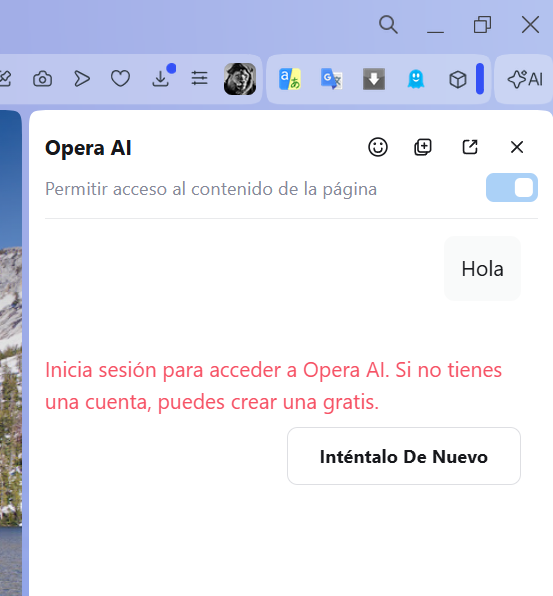
                                          After this update, Opera AI isn't working. It tells me I need to log in with an OpenAI account, even though I'm already logged in with my Opera account.
                                          2105b722-35ea-4170-af34-2867fe750545-image.png

                                          Reply Quote 0
                                            Opera-QA-Team 1 Reply Last reply
                                          • Himmelsschlingel
                                            Himmelsschlingel last edited by

                                            I was pleasantly surprised to find uBlock-filter lists to be turned on manually in the ad blocker preferences. I'm not sure, when this feature appeared but it's a very good thing not to have to download and install the respective extension any longer.
                                            I think Opera should promote this feature more openly, actually.

                                            Reply Quote 0
                                              thelittlebrowserthatcould 1 Reply Last reply
                                            • First post
                                              Last post

                                            Computer browsers

                                            • Opera for Windows
                                            • Opera for Mac
                                            • Opera for Linux
                                            • Opera beta version
                                            • Opera USB

                                            Mobile browsers

                                            • Opera for Android
                                            • Opera Mini
                                            • Opera Touch
                                            • Opera for basic phones

                                            • Add-ons
                                            • Opera account
                                            • Wallpapers
                                            • Opera Ads

                                            • Help & support
                                            • Opera blogs
                                            • Opera forums
                                            • Dev.Opera

                                            • Security
                                            • Privacy
                                            • Cookies Policy
                                            • EULA
                                            • Terms of Service

                                            • About Opera
                                            • Press info
                                            • Jobs
                                            • Investors
                                            • Become a partner
                                            • Contact us

                                            Follow Opera

                                            • Opera - Facebook
                                            • Opera - Twitter
                                            • Opera - YouTube
                                            • Opera - LinkedIn
                                            • Opera - Instagram

                                            © Opera Software 1995-