• Login
    • Search
    • Categories
    • Recent
    • Tags
    • Users
    • Groups
    • Rules
    • Help

    Do more on the web, with a fast and secure browser!

    Download Opera browser with:

    • built-in ad blocker
    • battery saver
    • free VPN
    Download Opera

    Opera 131.0.5868.0 developer update

    Blogs
    desktop blog comments
    6
    19
    960
    Loading More Posts
    • Oldest to Newest
    • Newest to Oldest
    • Most Votes
    Reply
    • Reply as topic
    Log in to reply
    This topic has been deleted. Only users with topic management privileges can see it.
    • A
      andrew84 @andrew84 last edited by

      @andrew84 Another one bug I noticed is that the popup stays visible after scrolling and doesn't disappear like previously.

      The 'redesign' should be inside the EarlyBird or don't remove the flag at least, the feature is not ready at all to be enabled by default.

      Reply Quote 0
        1 Reply Last reply
      • Opera-QA-Team
        Opera-QA-Team Opera @vladbabinets last edited by

        @vladbabinets: Hello! It’s usually just the VPN adding an extra stop for your internet traffic. Your data gets encrypted and sent through another server first, so it naturally takes a bit longer. Also, if that VPN server is far away or busy, things can feel even slower. If you want it faster, try a different server (closer ones usually help) or turn it off when you don’t really need it.

        Reply Quote 0
          1 Reply Last reply
        • SiMcarD78
          SiMcarD78 @andrew84 last edited by

          @andrew84: Totally agree. The pinned icon is quite ugly.

          Reply Quote 0
            A 1 Reply Last reply
          • A
            andrew84 @SiMcarD78 last edited by andrew84

            @SiMcarD78 I just don't understand who redesign this and who approves this.
            The new search popup is ugly also imho (both looking and working)

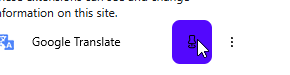
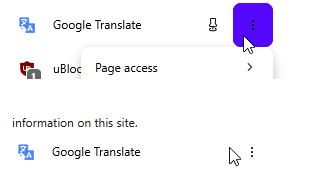
            Btw, the icons are buggy.

            • After pinning/unpinning the icon can change to black randomly.
              2026-04-16_212034.png

            *After opening the 3 dots menu and then clicking outside on the icon's area, the icon disappears and then appears after moving cursor.
            2026-04-16_212108.png

            Reply Quote 0
              Opera-QA-Team 1 Reply Last reply
            • Opera-QA-Team
              Opera-QA-Team Opera @andrew84 last edited by

              @andrew84: Hello, it is not fixed yet, this was added by mistake. I removed it from changelog.

              Reply Quote 0
                1 Reply Last reply
              • A
                andrew84 last edited by

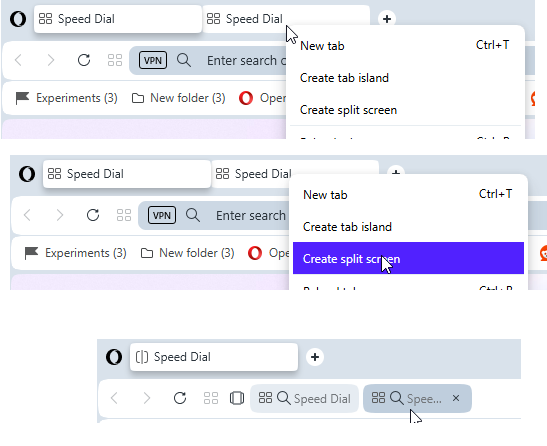
                I select two (or more) tabs by holding Ctrl key.
                Right click and select 'create split screen'
                I click on the tab in the address bar
                Crash happens here.
                2026-04-17_114703.png

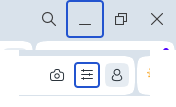
                Also, in additon to the previously reported random blue borders for the minimize and EasySetup buttons
                2026-02-17_125953.png

                Now there's a border (circle) for the extension icon
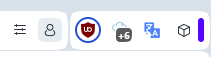
                2026-04-17_115810.png

                Reply Quote 0
                  burnout426 1 Reply Last reply
                • burnout426
                  burnout426 Volunteer @andrew84 last edited by

                  @andrew84 CrashID=bp-5416c845-c6c3-49c2-8350-169a60260417 for the crash.

                  Reply Quote 1
                    1 Reply Last reply
                  • A
                    andrew84 last edited by

                    There are still no improvements regarding the tab island naming and management.

                    • there's still no option to quickly ungroup islands (nonsense)
                    • there's still the both 'pill' + name
                    • 'new tab in island' should be on the tooltip (can replace the small + circle appearing which need to be caught by user)
                    • no popup appearing on first island creation
                    • islands still can't be pinned
                    • still no highlighting in island's dropdown
                    • still no color indication for tabs in the dropdown pointing the reference to the island.

                    suggestions with pictures here
                    https://forums.opera.com/post/395109
                    https://forums.opera.com/post/395122

                    Reply Quote 0
                      1 Reply Last reply
                    • Opera-QA-Team
                      Opera-QA-Team Opera @andrew84 last edited by

                      @andrew84: Hello, thanks for reporting!

                      Reply Quote 0
                        A 1 Reply Last reply
                      • A
                        andrew84 @Opera-QA-Team last edited by andrew84

                        @Opera-QA-Team the icon should be changed to smth more pleasant and informative to the eyes.
                        like in Edge or similar
                        2026-04-17_155847.png
                        Even the simple radio checkboxes (like in sidebar setup) would look better

                        2026-04-17_160928.png

                        The old ones (its logic) were very nice (outlined icon means unpinned and filled means pinned). Maybe the fill color can be changed to black (or according to the theme)
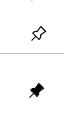
                        2026-04-17_160325.png

                        Reply Quote 0
                          1 Reply Last reply
                        • First post
                          Last post

                        Computer browsers

                        • Opera for Windows
                        • Opera for Mac
                        • Opera for Linux
                        • Opera beta version
                        • Opera USB

                        Mobile browsers

                        • Opera for Android
                        • Opera Mini
                        • Opera Touch
                        • Opera for basic phones

                        • Add-ons
                        • Opera account
                        • Wallpapers
                        • Opera Ads

                        • Help & support
                        • Opera blogs
                        • Opera forums
                        • Dev.Opera

                        • Security
                        • Privacy
                        • Cookies Policy
                        • EULA
                        • Terms of Service

                        • About Opera
                        • Press info
                        • Jobs
                        • Investors
                        • Become a partner
                        • Contact us

                        Follow Opera

                        • Opera - Facebook
                        • Opera - Twitter
                        • Opera - YouTube
                        • Opera - LinkedIn
                        • Opera - Instagram

                        © Opera Software 1995-
