Opera 131.0.5868.0 developer update
-
andrew84 last edited by
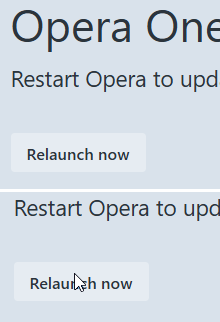
The relaunch button is still looking inactive and without indication on hover.
-
andrew84 last edited by andrew84
You continue breaking the features that worked well.
Now the search popup looks like icons only (none of the buttons is preactivated) and on hover it flickers while oversized button appear.
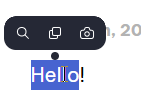
At the same time, I can move cursor over the searh popup and nothing happens (most probably because of the huge buttons padding)
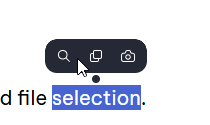
Suggestions were described here https://forums.opera.com/post/401600
*I don't even mention again the partially broken 'scroll to top' feature. It's phenomenal but it's still scrolling to top while moving tab (~3 years bug). Also the PiP still looks bad with its full dimming on hover, without timing and with its reverse volume adjustment from top to bottom.
-
andrew84 last edited by andrew84
It's sad that despite of multiple reports and requests the habitual (like in pre One versions) tabstrip's tabs management smoothness wasn't fully restored during three years.
for example...
- It's still not possible to drop a tab after the [+] button, new window is created instead.

-
Still not possible easily insert a tab between existing tab.
On the particular screenshot under the tab which is being dragged there's fully hid another tabstrip's tab

-
So is need to move draggable tab left and right to put is correctly. But in this case there'll tabs overlay and thus tab island creation is coming depending on how fast and precise user must be.
But there's no option to disable the tab islands creation by draggingtabs.
*Btw, Edge has such option

-
after such manipulation often a new tab is created not as the last one but somewhere between existing tabs.

Th new UI is more complicated to use in overall.
-
vladbabinets last edited by

Hello. Could you please tell me why my speed is so slow with the built-in VPN? -
burnout426 Volunteer last edited by
@andrew84 I filed DNA-119219 on that in October of 2024. No comments on it.
-
andrew84 last edited by
@burnout426 Now they have RNA instead. Maybe it was just lost while transferring DNA > RNA.
But taking into account that bugs stay for years probably they don't care much. -
andrew84 last edited by
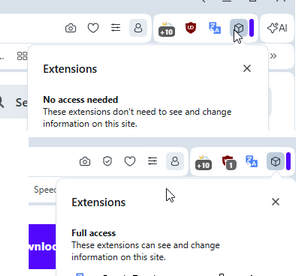
RNA-2865 Extension popup is cut when AI feature is disabled
It can be said that it's still cut (the right border and its shadow are not visible)
-
 Opera-QA-Team Opera last edited by
@vladbabinets: Hello! It’s usually just the VPN adding an extra stop for your internet traffic. Your data gets encrypted and sent through another server first, so it naturally takes a bit longer. Also, if that VPN server is far away or busy, things can feel even slower. If you want it faster, try a different server (closer ones usually help) or turn it off when you don’t really need it.
-
-
andrew84 last edited by andrew84
@SiMcarD78 I just don't understand who redesign this and who approves this.
The new search popup is ugly also imho (both looking and working)Btw, the icons are buggy.
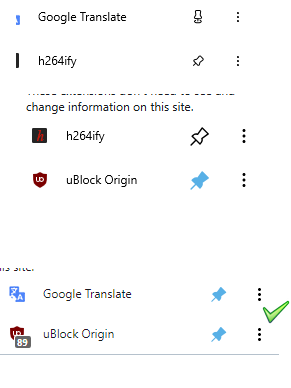
- After pinning/unpinning the icon can change to black randomly.
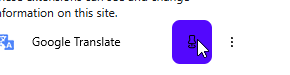
*After opening the 3 dots menu and then clicking outside on the icon's area, the icon disappears and then appears after moving cursor.
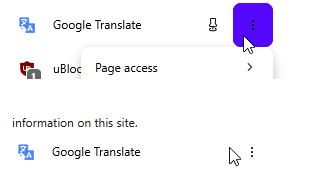
- After pinning/unpinning the icon can change to black randomly.
-
Opera-QA-Team Opera last edited by
@andrew84: Hello, it is not fixed yet, this was added by mistake. I removed it from changelog.
-
andrew84 last edited by
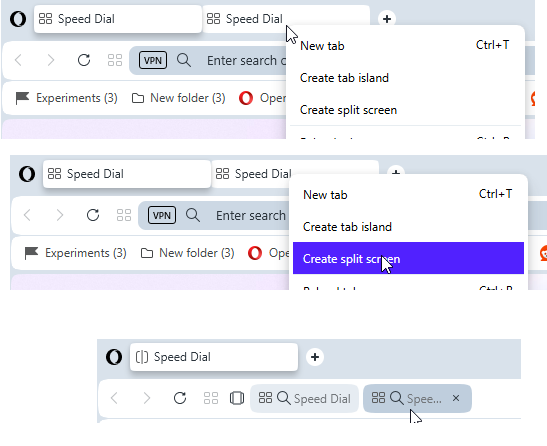
I select two (or more) tabs by holding Ctrl key.
Right click and select 'create split screen'
I click on the tab in the address bar
Crash happens here.
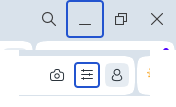
Also, in additon to the previously reported random blue borders for the minimize and EasySetup buttons
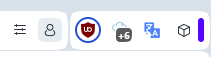
Now there's a border (circle) for the extension icon
-
burnout426 Volunteer last edited by
@andrew84 CrashID=bp-5416c845-c6c3-49c2-8350-169a60260417 for the crash.
-
andrew84 last edited by
There are still no improvements regarding the tab island naming and management.
- there's still no option to quickly ungroup islands (nonsense)
- there's still the both 'pill' + name
- 'new tab in island' should be on the tooltip (can replace the small + circle appearing which need to be caught by user)
- no popup appearing on first island creation
- islands still can't be pinned
- still no highlighting in island's dropdown
- still no color indication for tabs in the dropdown pointing the reference to the island.
suggestions with pictures here
https://forums.opera.com/post/395109
https://forums.opera.com/post/395122 -
-
andrew84 last edited by andrew84
@Opera-QA-Team the icon should be changed to smth more pleasant and informative to the eyes.
like in Edge or similar

Even the simple radio checkboxes (like in sidebar setup) would look better

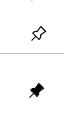
The old ones (its logic) were very nice (outlined icon means unpinned and filled means pinned). Maybe the fill color can be changed to black (or according to the theme)
-
Opera-QA-Team Opera last edited by
@burnout426: Thanks, we have this crash reported and we will fix it when possible.
-
Locked by Opera-QA-Team