Opera 136.0.6008.80 Stable update
-

-
andrew84 last edited by
I couldn't yet reproducing the bug regarding the moving window vs invisible elements > https://forums.opera.com/post/410412
I don't know if this was really fixed or it's just random temporary behaviour. In Dev it's still quite easy to reproduce.
The searchTabs button still doesn't work in vertical mode and the wrong ugly cursosr are still there.
-
andrew84 last edited by
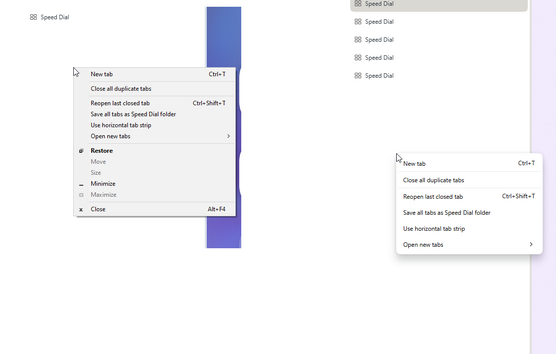
tabs context menu is missing when clicking below the tabs.
the menu looks ifferent Stable vs Developer.
-
ironbone last edited by
Opera issues on Ubuntu 26.04 (Wayland / GNOME): Picture-in-Picture & Menu Rendering Problems
I recently updated my system to Ubuntu 26.04 running GNOME, which defaults to Wayland without an X11 option. Ever since the upgrade, I’ve been running into a couple of major issues with Opera:
Video Pop-out / Picture-in-Picture (e.g., YouTube):
The video pop-out window appears in the middle of the screen instead of the bottom-right corner.
More critically, it fails to stay "Always on Top." As soon as I click anywhere else on the screen, the pop-out hides behind other windows.
Truncated / Invisible Opera Menu:
The Opera main menu is improperly rendered and truncated. Text labels are cut off, making several menu items unreadable or invisible.
Since Ubuntu 26.04 runs Wayland by default, these issues will likely affect all Ubuntu users upgrading to this release.
Is anyone else experiencing these bugs under native Wayland in GNOME? Are there any known workarounds or flags to fix window placement and always-on-top behavior?
-
Opera-QA-Team Opera last edited by
@andrew84: It is gone by reverting a different thing. On the released Developer you can still see it, but with the next one it will be also gone.
-
-
Opera-QA-Team Opera last edited by
@ironbone: Hello, thanks, this a Chromium bug, you can check that it's also reproducible in Chrome. It was reported to Chromium a long time age: https://issues.chromium.org/issues/40285423
-
sgrandin last edited by sgrandin
In Settings, two things.
-
In Privacy Protection, block ads > Manage Exceptions doesn't show any results. It did yesterday, several of mine, with the previous build - and I had added another, no longer there. Adding one now still doesn't show anything.
-
In Settings, when entering a search term, such as 'adblock,' the cursor leaves the search field as soon as the 'a' is entered, which cuts off a more focused search without having to mouse back or scroll down and guess which one below pertains to adblocking. In addition, all the letter a's are highlighted in yellow down the page, along with result numbers for some of them, which is distracting, a lot to visually sort through.
-
-

-
froboc0p1 last edited by
It would be so helpful if you made it possible to combine the Split Screen and Pin Tab. I want to be able to create a Split Screen where one tab stays pinned to the left side of the browser, while I can switch between tabs on the right side without having to exit the split screen or create a new one. For example, it would be SO helpful for if I could pin my email tab to the left side, then go surfing on the right side through a series of tabs that have info I need to enter into the email without all the switching. Can we have this feature, please??
-
sgrandin last edited by
There's been a recent problem over several builds at https://finance.yahoo.com/. Namely, Yahoo's popup notifications request system, accept or block, doesn't recognize Block. That is, every new time at their Finance page, specifically at My Portfolio in my case, the popup reappears.Clicking Block again didn't stop it. In addition to contacting Yahoo Finance IT, I tried pausing AdBlock on the page and that ended the popups (Opera's adblock still on). At the request of AdBlock, I unpaused it to recreate the issue, which it did. Now, paused again, it's still putting up the popups each time. Excepting the page in Opera's blocker doesn't stop it either now. At first, it occurred with at least one other browser, which is why I didn't raise it earlier, but now it's not replicating with Edge, FF or Chrome. And, as I've reported today, Manage Exceptions is not showing anything. So not sure what's going on.
-
ironbone last edited by
When using Google Slides in Opera on Linux (GNOME), the top navigation menu does not work consistently. Clicking on menu items frequently produces no response, though it occasionally registers.
-
sgrandin last edited by sgrandin
Past 10 days or so, jamanetwork.com and articles are throwing up "Your connection is not private error" (net::ERR_CERT_AUTHORITY_INVALID)
I deleted all its third-party cookies and it worked ok after Opera restart. However, a couple of days later, back to it. Not happening with FF, Edge and Chrome after clearing, but haven't seen after a few days yet. The site uses Cloudfare for security, so perhaps it's happening ay that stage.
Ex: https://click1.email.jamanetwork.com/t.do?id=405127:57608:9D27C888-5D9A-491B-B5C5-B93DA7B56FCA:1791230029 -
-
Locked by leocg