Opera 133 Stable
-
 Opera Comments Bot last edited by
Dear Opera Users! Opera has released a new initial update, it is based on Chromium version: 149.0.7827.197. Known issues: You can find the full list in the changelog. Happy browsing! Installation links:
Read full blog post: Opera 133 Stable
-
 thelittlebrowserthatcould last edited by
There's been a dramatic slowdown for me, for the last few releases. The browser UI locks up for 30 seconds or more when moving between heavily populated workspaces. Tab-scrolling won't work, for example. Debian release.
-
albano23 last edited by leocg
I already posted it in the stable version of Opera 131.0.5877.74 (I use Ubuntu 22.04.5 LTS) and it's still not fixed; in fact, it's gotten worse: The messages "INVALID RE2: INVALID REPETITION SIZE (200, 1300)" and "INVALID RE2: INVALID PEARL OPERATOR : (?!, //)" keep appearing, filling the GNOME system with junk files that consume a lot of megabytes daily. And now in this version 133, it's still there, and if you right-click and select "Recover Tab," my PC freezes completely (four times today). With all due respect, it's a disgrace. The only version without this problem, among all the recent stable releases, that didn't have the "invalid RE2 SIZE" and "PEARL OPERATOR" errors was Opera 132.0.5905.37. I'm adding my previous message, which I posted in the Opera stable version. 131.0.5877.74. I'M USING THE SNAP FORMAT. Please, even if it's an automated script, do things right. I know you put a lot of effort into it, but the Linux user in Snap seems abandoned. It's unacceptable that these errors occur throughout the entire 131 range, part of 132, and now in 133. And on top of that, version 133 doesn't recognize h.265, and Netflix says that even though I have DRM enabled to watch Netflix, it gives me error 077701-1003. In other words, it says I can't watch it because DRM isn't enabled in the Opera 133 configuration, When It Is Activated.
I'm adding my previous message, which I posted in the Opera stable version. 131.0.5877.74. "The stable versions of Opera 131, from version 54 to the current one ending in 97, have several serious bugs in their snap (Ubuntu 22.04.05 LTS in my case) that should be fixed: 1) They fill the GNOME logs with thousands of messages with the error "Invalid RE2 repetition size, invalid perl operator"; 2) This causes a large amount of disk space to be consumed in a single session, as can be seen with the commands sudo journalctl --disk-usage and sudo ls -lh /var/log/journal//.journal; and 3) In version 74, a very serious error occurred when updating the chromium-ffmpeg snap: "at least file with resources (.pak) is corrupted, please reinstall opera". Luckily, shutting down and restarting my PC fixed it for me. // In version 131 ending in 24, none of these bugs were present. I don't recommend using sudo journalctl --vacuum-time=1d to fix the issue of thousands of messages mentioned in point 1, because it could break your current session. I would like these problems to be reviewed by both you and the Snap Opera packagers. I hope all these issues will be resolved in version 132, which will use Chrome's 148 engine."


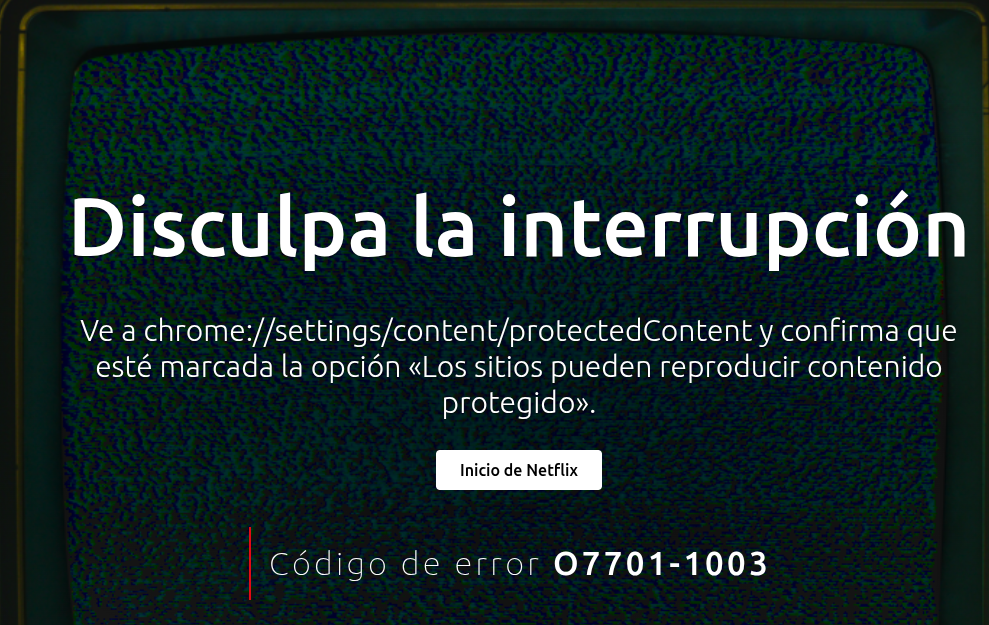
Regards, I hope you can fix this. Thanks, and I hope a moderator or technical manager can respond.
-
Urby938 last edited by
Please bring back browser notifications now only native windows ones working!!
-
red last edited by red
I have two problems now with this version in Fedora 44/Mate.
One is that the Opera window now has standard decorations as in the following image,
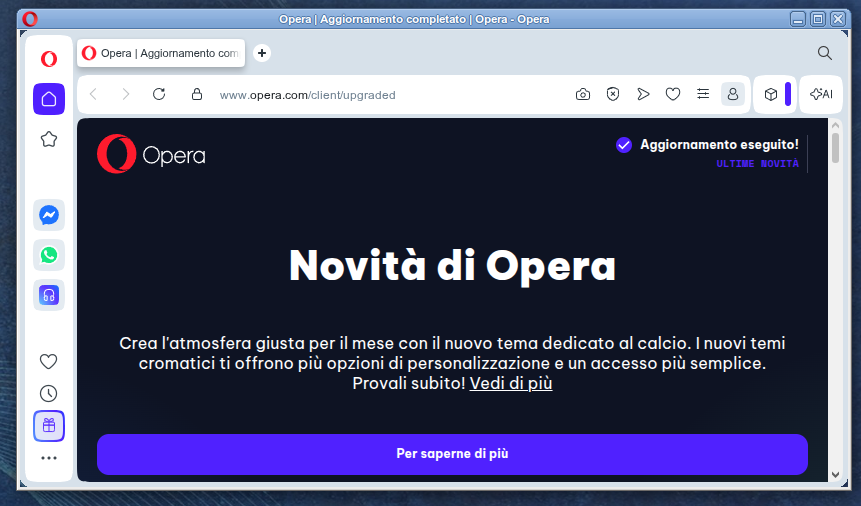
instead of being borderless, as it should:
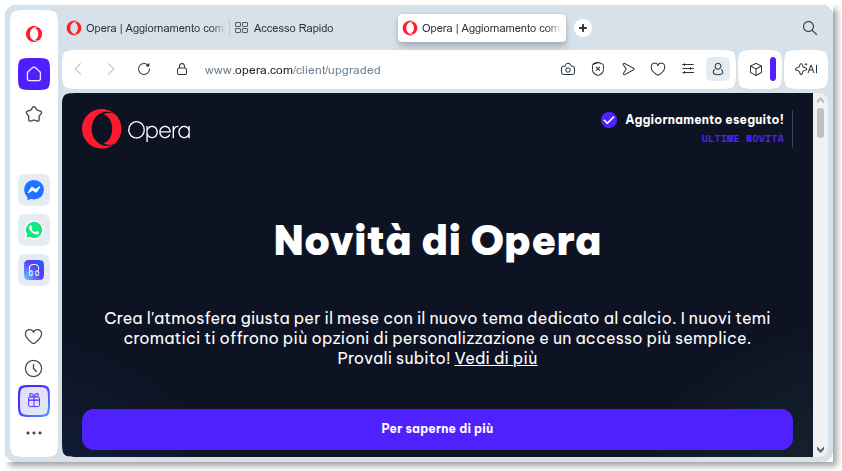
The second problem is that the Right Mouse Button is disabled in the area marked in green below:
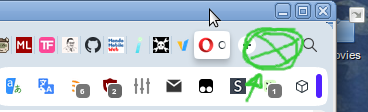
while instead it should provide this menu:
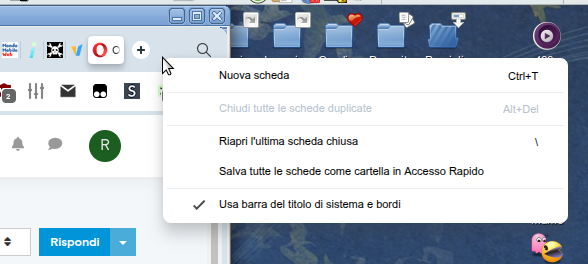
P.S. To the Opera Team, thanks for the great browser, and please, be steadfast on the V2 manifest support.
Keep those zombies alive!!!

-
red last edited by red
@red Oh, I forgot to talk about a third problem that's been there for a few releases. Opera has recently become extremely laggy to respond to window resizing, taking from a few seconds, to the extent of not responding at all to maximize (even if using the maximize button-that-shouldn't-even-be-there... the window maxes, but the content is not updated).
I have to resort to hitting F11 twice to force a redraw. -
karen-arzumanyan last edited by
The bug BUG-21893 is also present in version 133.0.5932.10 !!!
PS: The problem very is old, and by BUG-21893 it's any months old (06/03/26), and it's still not fixed
-
 whisperer last edited by
Since version 132.0.5905.102 (tested with Windows versions), there is not hint at the bottom showing the url when hovering over an link in a second Opera Window.
The developer version (134.0.5945.0) has this issue as well.
Version 132.0.5905.73 and earlier worked OK.
-
raphaelbm last edited by
Changelog is missing. Itis mentioned in the release notes but is not there when you click it.
see: https://blogs.opera.com/desktop/changelog-for-133/
404 - Page not found
Sorry, something went wrong. The page you're looking for was not found. Try Opera Browser - now with a built-in ad blocker, battery saver and free VPN. -
-
DHHD last edited by
@burnout426 So, that means waiting another couple of months for the fix in the stable version.
-
-
whisperer last edited by
@whisperer said in Opera 131.0.5877.74 Stable update:
Crash when not using %s in site search definition (Opera for Windows)
Create a shortcut to go to the Opera website:Go to opera://settings/searchEngines
Click the Add button to add a site search
Enter these details: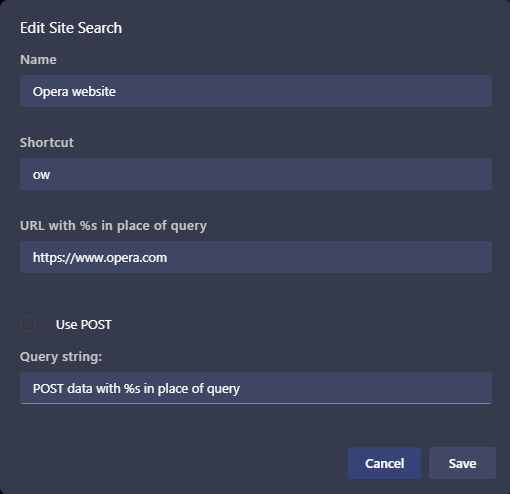
(Notice that no %s in used in the URL)
Click SaveNow test it:
Open a new tab (Ctrl+T)
Type "ow", then press Space, then press EnterOpera crashes.
(Tested with Opera 131.0.5877.97)Still not fixed.
-
whisperer last edited by
@whisperer said in Opera 133 Stable:
Since version 132.0.5905.102 (tested with Windows versions), there is not hint at the bottom showing the url when hovering over an link in a second Opera Window.
The developer version (134.0.5945.0) has this issue as well.
Version 132.0.5905.73 and earlier worked OK.Still not fixed.
Note that when a feature is missing in a second window (or consecutive windows), that obviously hinders usability. -
Locked by
 leocg
leocg
