• Login
    • Search
    • Categories
    • Recent
    • Tags
    • Users
    • Groups
    • Rules
    • Help

    Do more on the web, with a fast and secure browser!

    Download Opera browser with:

    • built-in ad blocker
    • battery saver
    • free VPN
    Download Opera

    Opera 133 Stable

    Blogs
    desktop blog comments
    10
    15
    750
    Loading More Posts
    • Oldest to Newest
    • Newest to Oldest
    • Most Votes
    Reply
    • Reply as topic
    Log in to reply
    This topic has been deleted. Only users with topic management privileges can see it.
    • R
      red last edited by red

      I have two problems now with this version in Fedora 44/Mate.
      One is that the Opera window now has standard decorations as in the following image,
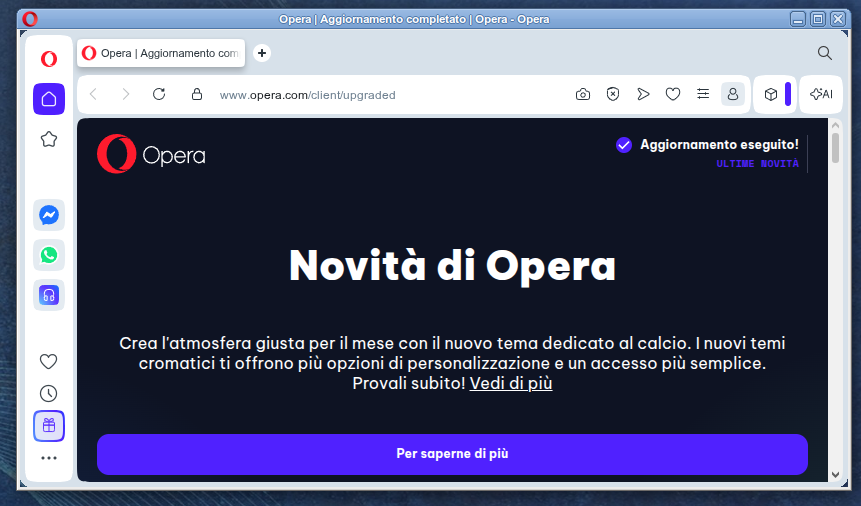
      Schermata su 2026-06-29 23-04-03.png

      instead of being borderless, as it should:
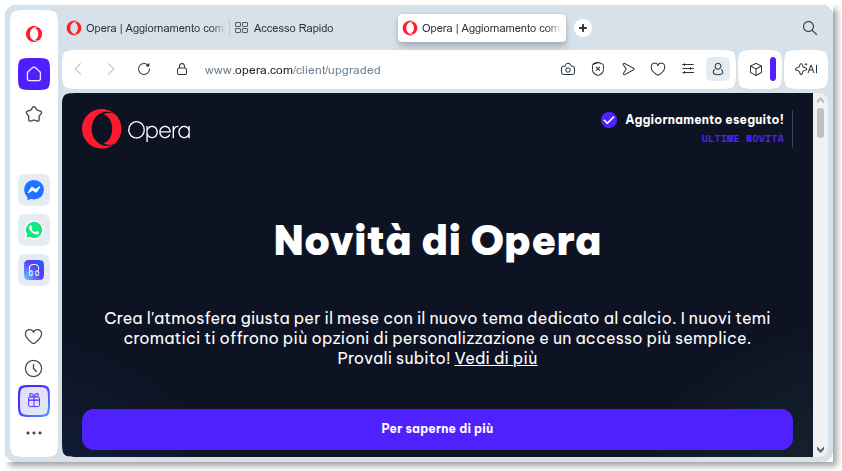
      Schermata su 2026-06-29 21-12-33.png

      The second problem is that the Right Mouse Button is disabled in the area marked in green below:
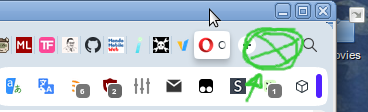
      Opera2.png

      while instead it should provide this menu:
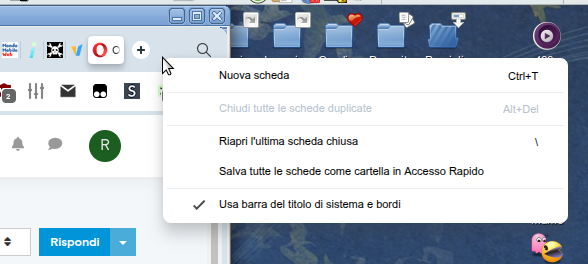
      Senzanome.png

      P.S. To the Opera Team, thanks for the great browser, and please, be steadfast on the V2 manifest support.
      Keep those zombies alive!!! 🧟♂ ☺

      Reply Quote 0
        R 1 Reply Last reply
      • R
        red @red last edited by red

        @red Oh, I forgot to talk about a third problem that's been there for a few releases. Opera has recently become extremely laggy to respond to window resizing, taking from a few seconds, to the extent of not responding at all to maximize (even if using the maximize button-that-shouldn't-even-be-there... the window maxes, but the content is not updated).
        I have to resort to hitting F11 twice to force a redraw.

        Reply Quote 0
          1 Reply Last reply
        • K
          karen-arzumanyan last edited by

          The bug BUG-21893 is also present in version 133.0.5932.10 !!!

          PS: The problem very is old, and by BUG-21893 it's any months old (06/03/26), and it's still not fixed

          Reply Quote 0
            1 Reply Last reply
          • whisperer
            whisperer last edited by

            Since version 132.0.5905.102 (tested with Windows versions), there is not hint at the bottom showing the url when hovering over an link in a second Opera Window.

            The developer version (134.0.5945.0) has this issue as well.

            Version 132.0.5905.73 and earlier worked OK.

            Reply Quote 0
              1 Reply Last reply
            • R
              raphaelbm last edited by

              Changelog is missing. Itis mentioned in the release notes but is not there when you click it.

              see: https://blogs.opera.com/desktop/changelog-for-133/
              404 - Page not found
              Sorry, something went wrong. The page you're looking for was not found. Try Opera Browser - now with a built-in ad blocker, battery saver and free VPN.

              Reply Quote 0
                1 Reply Last reply
              • D
                DHHD last edited by

                Opera doesn't support 2K broadcasts on Twitch.

                Reply Quote 0
                  burnout426 1 Reply Last reply
                • burnout426
                  burnout426 Volunteer @DHHD last edited by

                  @DHHD It’s fixed in Opera Developer so far.

                  Reply Quote 0
                    D 1 Reply Last reply
                  • D
                    DHHD @burnout426 last edited by

                    @burnout426 So, that means waiting another couple of months for the fix in the stable version.

                    Reply Quote 0
                      burnout426 1 Reply Last reply
                    • burnout426
                      burnout426 Volunteer @DHHD last edited by

                      @DHHD The fix might be able to be backported. Not sure yet.

                      Reply Quote 0
                        1 Reply Last reply
                      • whisperer
                        whisperer last edited by

                        @whisperer said in Opera 131.0.5877.74 Stable update:

                        Crash when not using %s in site search definition (Opera for Windows)
                        Create a shortcut to go to the Opera website:

                        Go to opera://settings/searchEngines
                        Click the Add button to add a site search
                        Enter these details: 820387f4-437e-45da-afc8-b2f882094e4f-image.png
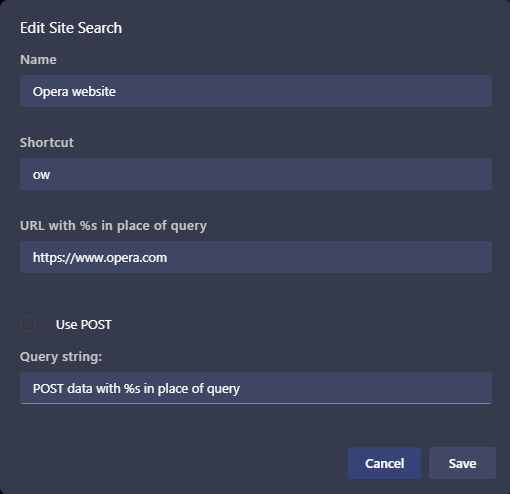
                        (Notice that no %s in used in the URL)
                        Click Save

                        Now test it:

                        Open a new tab (Ctrl+T)
                        Type "ow", then press Space, then press Enter

                        Opera crashes.
                        (Tested with Opera 131.0.5877.97)

                        Still not fixed.

                        Reply Quote 0
                          1 Reply Last reply
                        • whisperer
                          whisperer last edited by

                          @whisperer said in Opera 133 Stable:

                          Since version 132.0.5905.102 (tested with Windows versions), there is not hint at the bottom showing the url when hovering over an link in a second Opera Window.
                          The developer version (134.0.5945.0) has this issue as well.
                          Version 132.0.5905.73 and earlier worked OK.

                          Still not fixed.
                          Note that when a feature is missing in a second window (or consecutive windows), that obviously hinders usability.

                          Reply Quote 0
                            1 Reply Last reply
                          • First post
                            Last post

                          Computer browsers

                          • Opera for Windows
                          • Opera for Mac
                          • Opera for Linux
                          • Opera beta version
                          • Opera USB

                          Mobile browsers

                          • Opera for Android
                          • Opera Mini
                          • Opera Touch
                          • Opera for basic phones

                          • Add-ons
                          • Opera account
                          • Wallpapers
                          • Opera Ads

                          • Help & support
                          • Opera blogs
                          • Opera forums
                          • Dev.Opera

                          • Security
                          • Privacy
                          • Cookies Policy
                          • EULA
                          • Terms of Service

                          • About Opera
                          • Press info
                          • Jobs
                          • Investors
                          • Become a partner
                          • Contact us

                          Follow Opera

                          • Opera - Facebook
                          • Opera - Twitter
                          • Opera - YouTube
                          • Opera - LinkedIn
                          • Opera - Instagram

                          © Opera Software 1995-