• Login
    • Search
    • Categories
    • Recent
    • Tags
    • Users
    • Groups
    • Rules
    • Help

    Do more on the web, with a fast and secure browser!

    Download Opera browser with:

    • built-in ad blocker
    • battery saver
    • free VPN
    Download Opera

    Opera 132.0.5905.73 Stable update

    Blogs
    desktop blog comments
    8
    13
    308
    Loading More Posts
    • Oldest to Newest
    • Newest to Oldest
    • Most Votes
    Reply
    • Reply as topic
    Log in to reply
    This topic has been deleted. Only users with topic management privileges can see it.
    • Opera-QA-Team
      Opera-QA-Team Opera last edited by

      Starting the discussion

      Reply Quote 0
        1 Reply Last reply
      • A
        andrew84 last edited by andrew84

        Force dark page toggle in EasySetup doesn't remember its state after theme's mode switching.

        Fixed white flash on Opera startup

        I didn't have the white flash. I had some pinkish full screen flash and I still have it.

        Reply Quote 1
          Opera-QA-Team 1 Reply Last reply
        • A
          andrew84 last edited by andrew84

          *The both EasySetup and sidebar setup panel still don't reset scrolling position on open.

          *Easysetup still closing after trying to grab the scroll bar while cursor is on the 1px content border.

          *The wallpaper carousel still doesn't work quite correctly. After selecting wallpaper it's resetting each time and shows the active wallpaper as first tile.
          The carousel should remember its cycled position with selected wallpaper instead. Like it worked in preOne version.

          Additional suggestion here could be that wallpaper/themes tiles carousel can be rotated not only by using the right-left arrow buttons but also by moving mouse while pressing and holding mouse's left button.
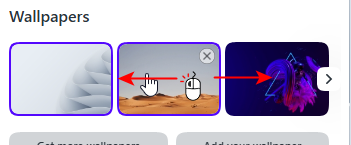
          2026-06-16_154651.png

          *Despite of being reported, the themes editing shows different dialogs (old vs new) depending on it was opened in EasySeup or using right click while on start page.

          Reply Quote 0
            1 Reply Last reply
          • J
            jojo0587 last edited by

            If I right-click on an empty space on the home page and select the theme editing option, the old theme editing view is displayed.

            My proposals for changes in Opera (Google Document).
            - There are not enough signs to put all the links here.

            Reply Quote 0
              Opera-QA-Team 1 Reply Last reply
            • K
              Kaberia @Opera Comments Bot last edited by

              @Opera-Comments-Bot let me try it

              Reply Quote 0
                1 Reply Last reply
              • Opera-QA-Team
                Opera-QA-Team Opera @jojo0587 last edited by

                @jojo0587: Hi, we already fixed this bug - it will be released with the next update.

                Reply Quote 0
                  1 Reply Last reply
                • Opera-QA-Team
                  Opera-QA-Team Opera @andrew84 last edited by Opera-QA-Team

                  @andrew84: There was a problem on startup with dynamic themes, like Aurora, Midsommar. For 2-3 seconds there was a white flashbang and then the theme loaded normally.

                  Reply Quote 0
                    A 1 Reply Last reply
                  • A
                    antonio1678 last edited by

                    148.0.7778.254? But 148 ESR is currently at 148.0.7778.271 and thus you are missing the 33 security fixes that Google pushed out yesterday, seven of which are lablelled critical.

                    Reply Quote 0
                      1 Reply Last reply
                    • A
                      andrew84 @Opera-QA-Team last edited by

                      @Opera-QA-Team Clear. But for Classic theme there's still some pinkish fullcsreen flash on startup

                      Reply Quote 0
                        1 Reply Last reply
                      • SemSemSem
                        SemSemSem last edited by

                        Today's update to the "respected" Opera brought me a never-ending download of a file with the .crx extension. No tricks, cleaning, or rebooting helped. Anyone who encountered this problem and resolved it, please help!

                        Reply Quote 0
                          1 Reply Last reply
                        • M
                          Mashine last edited by Mashine

                          This is still not fixed.
                          Some favicons that were white before are now black and almost invisible.image_2026-06-19_120429389.png

                          Reply Quote 0
                            1 Reply Last reply
                          • K
                            Kaberia @Opera Comments Bot last edited by

                            @Opera-Comments-Bot my history isn't refreshing

                            Reply Quote 0
                              1 Reply Last reply
                            • First post
                              Last post

                            Computer browsers

                            • Opera for Windows
                            • Opera for Mac
                            • Opera for Linux
                            • Opera beta version
                            • Opera USB

                            Mobile browsers

                            • Opera for Android
                            • Opera Mini
                            • Opera Touch
                            • Opera for basic phones

                            • Add-ons
                            • Opera account
                            • Wallpapers
                            • Opera Ads

                            • Help & support
                            • Opera blogs
                            • Opera forums
                            • Dev.Opera

                            • Security
                            • Privacy
                            • Cookies Policy
                            • EULA
                            • Terms of Service

                            • About Opera
                            • Press info
                            • Jobs
                            • Investors
                            • Become a partner
                            • Contact us

                            Follow Opera

                            • Opera - Facebook
                            • Opera - Twitter
                            • Opera - YouTube
                            • Opera - LinkedIn
                            • Opera - Instagram

                            © Opera Software 1995-