Opera 126.0.5748.0 developer update
-
andrew84 last edited by andrew84
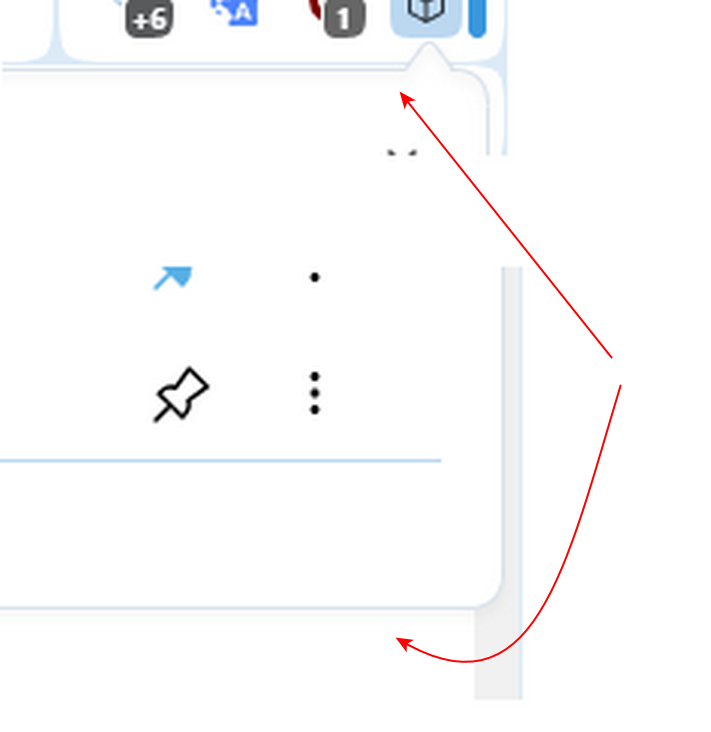
@Opera-QA-Team I also noticed that toolbar popups have a weird shadow effect for the top border. Maybe its by design but it looks blurry or like 3d effect (it seems like the top's shadow should be under the popup, not on top).
Bottom's and edge borders look clear.For example Extensons popup.
-
donq last edited by donq
@opera-qa-team: No checkbox boders anywhere. Check for example: MDN site: https://developer.mozilla.org/en-US/docs/Web/HTML/Reference/Elements/input/checkbox
(That was reported already for previous dev version.) -

-
 blacksunray last edited by
my opera goes to the new version, and the search box is gone, and configuration "Enable the search box in the address bar" is no more in the configuration . how I enable the search box again?
-
Opera-QA-Team Opera last edited by
@blacksunray: Hi, thanks for spotting the issue. It is already reported and will be fixed.
-
blacksunray last edited by
@opera-qa-team: Thank you for answering my question. Merry Christmas to the whole team and keep up the good work!
-
filbo last edited by filbo
@sopronman: they're phasing out the beta build, leaving only 'stable' and 'dev' builds (but adding an 'early bird' setting to the stable build). Not sure why none of the Opera employees have mentioned it. Here is the blog post: https://blogs.opera.com/desktop/2025/12/opera-presents-early-bird-mode/
-
 KevinHarrell last edited by
Thanks for the update. Appreciate the transparency around known issues. Looking forward to the fixes and checking out the changelog. Great work by the team.
-
filbo last edited by
Starting with this release (but potentially a bit earlier as I may not have restarted between a couple earlier opera-developer builds): when Opera first starts up, the address bar is truncated. I see something like 30-35 chars worth, then a slight fade, then just empty background (as if the URL were only that long, but it is not).
This is visible on multiple tabs. As soon as I click inside the address bar, the full contents become visible, and this 'sticks' and fixes the address bar appearance on all tabs, for the rest of the session.
(Also: learned this because a web site crashed Opera. The site was messages.google.com, their web-access-to-SMS/RCS site. I had operated its '...' menu > Send feedback, wrote them a bug report, clicked on their 'take screenshot' button, got as far as telling it to actually take the screenshot -- and Opera restarted. Have not tried to reproduce this since then, not particularly enjoying sudden browser restarts...
Obviously these are two separate bugs for you to look into... : )
-
filbo last edited by
@filbo aaaand... confirmed the crash bug. Steps:
-
messages.google.com -- then do whatever setup is required for them to mirror your phone's SMS/RCS onto that site (might work without that -- not tested)
-
'⋮' menu on per-chat-top-bar of site > Send feedback
-
enter any text into 'Description' box
-
'Capture screenshot'
-
dialog pops up, 'Allow messages.google.com to see this tab?'
-
click [Allow]
-
Opera crashes instantly
-
-
filbo last edited by filbo
An ongoing issue with how Opera is framed on my desktop. First, I'm running Debian 'sid' with what I believe is its most default windowing environment: Gnome (49.1) with its Mutter window manager, a Wayland session, and 'adwaita' theme.
Long ago, Opera offered to frame its windows with the operating system / window manager's widgets, or Opera's own; but I can no longer find this option, so the only choice is 'Opera's own'; which means the window lacks normal widgets like 'close', 'minimize', etc. But it still has a drag handle area in the top bar (small bits of it, away from the various browser widgets).
The problem: subwindows also lack these widgets, and do not have a drag area. I am thinking particularly of the Inspector window, when it is detached from the browser window. It has no place to grab and drag.
So in sum: Linux:Gnome:Mutter:Wayland:Opera, detached Inspector window has no window manager widgets, particularly no drag area.
-
Referenced by
 leocg
leocg
-
-
Locked by leocg



