• Login
    • Search
    • Categories
    • Recent
    • Tags
    • Users
    • Groups
    • Rules
    • Help

    Do more on the web, with a fast and secure browser!

    Download Opera browser with:

    • built-in ad blocker
    • battery saver
    • free VPN
    Download Opera

    Opera 125.0.5729.49 Stable update

    Blogs
    desktop blog comments
    11
    17
    757
    Loading More Posts
    • Oldest to Newest
    • Newest to Oldest
    • Most Votes
    Reply
    • Reply as topic
    Log in to reply
    This topic has been deleted. Only users with topic management privileges can see it.
    • Opera-QA-Team
      Opera-QA-Team Opera @max1c last edited by

      @max1c: Hello, what OS is it? I checked at Windows11 and can't reproduce it.

      Reply Quote 0
        max1c 1 Reply Last reply
      • Opera-QA-Team
        Opera-QA-Team Opera @whisperer last edited by

        @whisperer: Hi, thanks for reporting, we know this issue and it's awaiting fix.

        Reply Quote 1
          1 Reply Last reply
        • Urby938
          Urby938 last edited by

          Youtube notifications stil dont work when enabled. Windows 11 25H2

          Reply Quote 0
            1 Reply Last reply
          • ironbone
            ironbone last edited by

            As reported for the last 4 updates, Opera does not work well with Wayland (ubuntu + Gnome).
            Xorg works ok

            Reply Quote 0
              1 Reply Last reply
            • max1c
              max1c @Opera-QA-Team last edited by

              @opera-qa-team: Ok, turns out it was an extension doing this. Thanks!

              Reply Quote 0
                Opera-QA-Team 1 Reply Last reply
              • kamil777b
                kamil777b last edited by

                Would be great to be able to close tab again...
                Currently if a lot of tabs are opened so that if you position cursor over a tab the list of tabs disaplyed "as prompt" vertically is using all available space on list, I cannot click anything on this tab including right mouse button to expand menu because right now the tab is hidden by row with some kind of emojis.
                Make Tab Great Again, Please!!!

                Reply Quote 0
                  Opera-QA-Team 1 Reply Last reply
                • bbildman
                  bbildman @andrew84 last edited by

                  @andrew84 said in Opera 125.0.5729.49 Stable update:

                  @whisperer Indeed.
                  Also, there's empty icons (to upload custom image I guess).
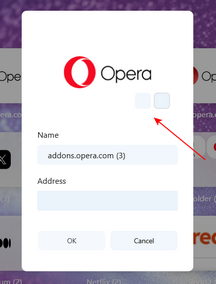
                  2025-12-18_164611.png

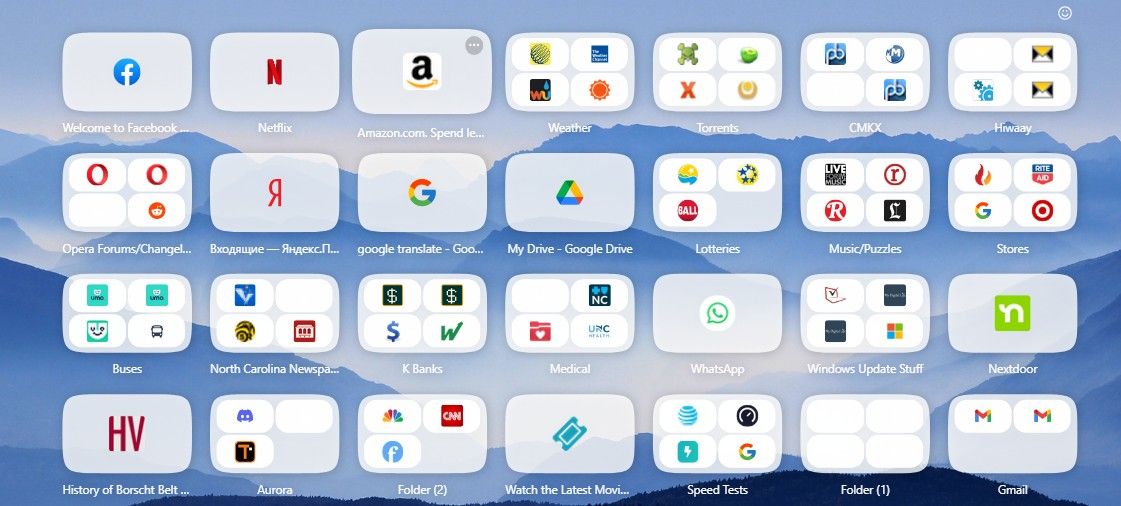
                  You mean like this Empty Speed Dial icons and also empty icons within another?? ::Screenshot_1.jpg

                  Reply Quote 0
                    1 Reply Last reply
                  • metana
                    metana last edited by metana

                    Still having the problem with dev tools in full screen, it cant be resized,

                    name:      opera
                    summary:   Fast, secure, easy-to-use browser
                    publisher: Opera (opera-software✓)
                    store-url: https://snapcraft.io/opera
                    license:   unset
                    description: |
                      Try the Opera browser - now with a built-in ad blocker, battery saver and
                      free VPN.
                    commands:
                      - opera
                    snap-id:      AljMvoQbHtnnrka00lIoxHJ6Qhfn0X8m
                    tracking:     latest/stable
                    refresh-date: yesterday at 15:10 +0330
                    channels:
                      latest/stable:    125.0.5729.49 2025-12-18 (418) 188MB -
                      latest/candidate: ↑                                    
                      latest/beta:      ↑                                    
                      latest/edge:      125.0.5729.49 2025-12-18 (418) 188MB -
                    installed:          125.0.5729.49            (418) 188MB -
                    
                    Reply Quote 0
                      1 Reply Last reply
                    • max1c
                      max1c last edited by

                      Can you guys please fix the Amazon search with 'z'? Been broken for weeks and you don't allow changing it. I have to created a custom one using 'a' instead.

                      Reply Quote 0
                        1 Reply Last reply
                      • Opera-QA-Team
                        Opera-QA-Team Opera @max1c last edited by

                        @max1c: Good to hear, thanks for letting us know : )

                        Reply Quote 0
                          1 Reply Last reply
                        • Opera-QA-Team
                          Opera-QA-Team Opera @kamil777b last edited by

                          @kamil777b: Hello, we know the issue, but thanks for the reminder!

                          Reply Quote 0
                            1 Reply Last reply
                          • First post
                            Last post

                          Computer browsers

                          • Opera for Windows
                          • Opera for Mac
                          • Opera for Linux
                          • Opera beta version
                          • Opera USB

                          Mobile browsers

                          • Opera for Android
                          • Opera Mini
                          • Opera Touch
                          • Opera for basic phones

                          • Add-ons
                          • Opera account
                          • Wallpapers
                          • Opera Ads

                          • Help & support
                          • Opera blogs
                          • Opera forums
                          • Dev.Opera

                          • Security
                          • Privacy
                          • Cookies Policy
                          • EULA
                          • Terms of Service

                          • About Opera
                          • Press info
                          • Jobs
                          • Investors
                          • Become a partner
                          • Contact us

                          Follow Opera

                          • Opera - Facebook
                          • Opera - Twitter
                          • Opera - YouTube
                          • Opera - LinkedIn
                          • Opera - Instagram

                          © Opera Software 1995-