Opera 133.0.5932.85 Stable update
-
raphaelbm last edited by
@raphaelbm: reported as Opera BUG
BUG-26839 Browser Assistant remains on the taskbar after An Update - it should not -
 korol78 last edited by korol78
Hello, these buttons don't work when I'm logged into my Google account. They work when I log out.
What could be the problem?

-
-
andrew84 last edited by andrew84
@korol78 Exactly the same issue like used to be in 130 version.
https://blogs.opera.com/desktop/2026/04/opera-130-stable/#comment-401790Not Opera fault. I have the same in Edge.
While in Opera developer it works fine.
I'm on Win 10.Edit: btw, I tried right now in Opera 133.0.5932.85 Portable and here it works fine.
-
korol78 last edited by
@andrew84 said:
@korol78 Exactly the same issue like used to be in 130 version.
https://blogs.opera.com/desktop/2026/04/opera-130-stable/#comment-401790Not Opera fault. I have the same in Edge.
While in Opera developer it works fine.
I'm on Win 10.Edit: btw, I tried right now in Opera 133.0.5932.85 Portable and here it works fine.
Okay, then maybe you can tell me what and where to change in my Google account settings?
-
 thelittlebrowserthatcould last edited by thelittlebrowserthatcould
This Linux dialog should be dismissible by clicking elsewhere in the application.
In the current deb build I have to open the dialog in another application and dismiss it there, to also dismiss it in Opera.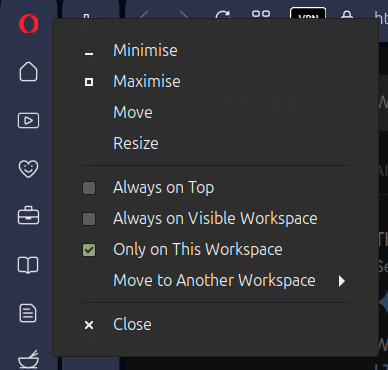
-
 whisperer last edited by
@whisperer said in Opera 133 Stable:
Since version 132.0.5905.102 (tested with Windows versions), there is not hint at the bottom showing the url when hovering over an link in a second Opera Window.
The developer version (134.0.5945.0) has this issue as well.
Version 132.0.5905.73 and earlier worked OK.
Still not fixed.
Note that when a feature is missing in a second window (or consecutive windows), that obviously hinders usability. -
whisperer last edited by
@whisperer said in Opera 131.0.5877.74 Stable update:
Crash when not using %s in site search definition (Opera for Windows)
Create a shortcut to go to the Opera website:Go to opera://settings/searchEngines
Click the Add button to add a site search
Enter these details: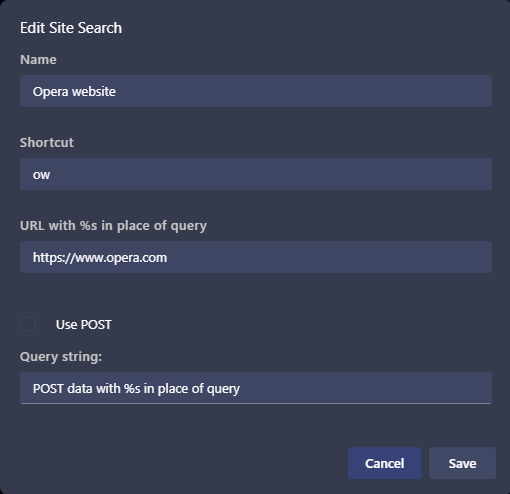
(Notice that no %s in used in the URL)
Click SaveNow test it:
Open a new tab (Ctrl+T)
Type "ow", then press Space, then press EnterOpera crashes.
(Tested with Opera 131.0.5877.97)Still not fixed.
-
thelittlebrowserthatcould last edited by
@thelittlebrowserthatcould:
The dialog appears when vertical tabs are used and there's a right-click in the address bar.
