Opera 132.0.5883.0 developer update
-
 mohamedsalah Opera last edited by
@vladbabinets The vertical tab strip is currently resizeable you can make it as small as the fav icon of the opened pages, is there a specific reason to why you would like to fully hide it?
-
-
burnout426 Volunteer last edited by
@mohamedsalah said in Opera 132.0.5883.0 developer update:
The vertical tab strip is currently resizeable you can make it as small as the fav icon of the opened pages
I noticed that the start page favicon gets cut off a tiny bit when you shrink the vertical tab strip all the way.
-
-
vladbabinets last edited by
@mohamedsalah: I meant horizontal mode. I'd hide it to save screen space.
-
 Opera-QA-Team Opera last edited by
@vladbabinets: Hi, the feature is still in development, we are considering hiding that horizontal tab strip : )
-
andrew84 last edited by andrew84
@Opera-QA-Team said in Opera 132.0.5883.0 developer update:
we are considering hiding that horizontal tab strip
the empty tab strip is a good place to clearly show page name in the center while in vertical mode. Hiding should be optional, not by default.

-
andrew84 last edited by
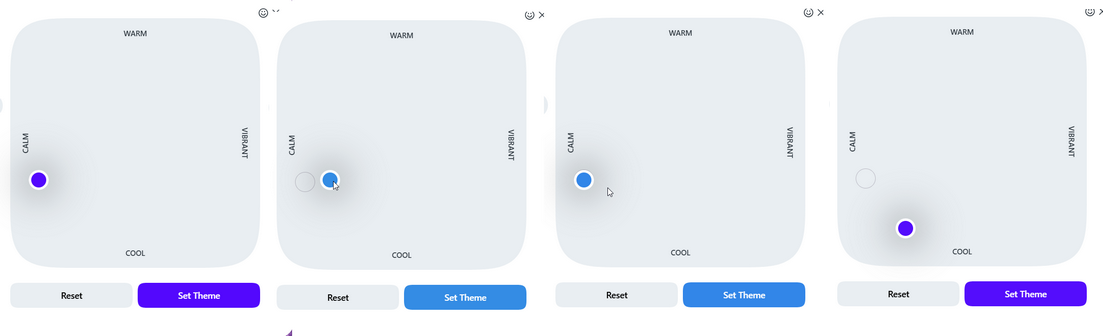
Just now I discovered that the color palette in theme editing dialog works quite incorrectly.
After moving the indicator dot away from the default bluish/purplish color position and then moving it back the tone is wrong (bright blue).
The real default tone is located somewhere almost at the bottom while moving the dot manually. But in this case the color of the tabstrip is not the same (gray) as in the default position.*Yes, it still possible to hit the default position manually if being very precise and in this case the theme's default tone switches on instantly despite of the bright blue palette's area.
-
andrew84 last edited by
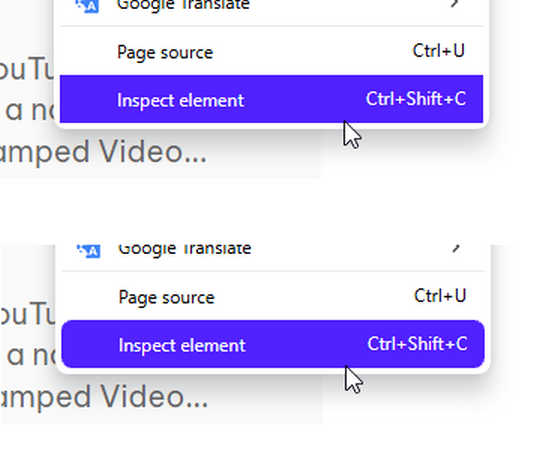
Following the round corners design I think that the highlighting boxes inside the round cornered menus/dropdowns should also have the round corners.
-
Locked by Opera-QA-Team

