• Login
    • Search
    • Categories
    • Recent
    • Tags
    • Users
    • Groups
    • Rules
    • Help

    Do more on the web, with a fast and secure browser!

    Download Opera browser with:

    • built-in ad blocker
    • battery saver
    • free VPN
    Download Opera

    Opera 132.0.5883.0 developer update

    Blogs
    desktop blog comments
    7
    14
    311
    Loading More Posts
    • Oldest to Newest
    • Newest to Oldest
    • Most Votes
    Reply
    • Reply as topic
    Log in to reply
    This topic has been deleted. Only users with topic management privileges can see it.
    • A
      andrew84 last edited by andrew84

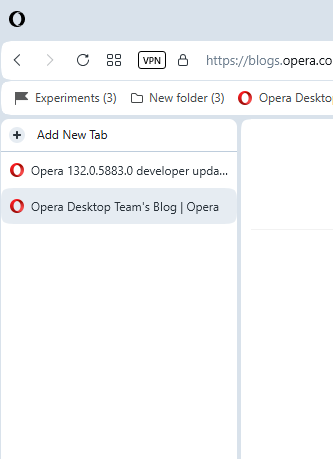
      vertical tabs suggestions:

      • I guess the vertical tabs panel shouldn't be as high as the pinned sidebar (should be below the toolbar/bookmarks bar).

      *Btw, it possible to achieve such layout by turning on 'autohide sidebar'.
      2026-04-29_150110.png

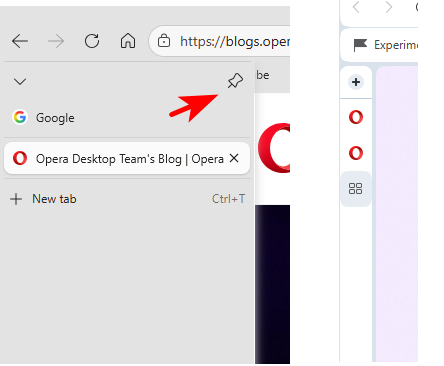
      • the vertical tabs pane should have pin/unpin option like in Edge. So when unpinned the narrow bar will be only shown (only favicons), on hover the pane will expand.
      2026-04-29_150733.png

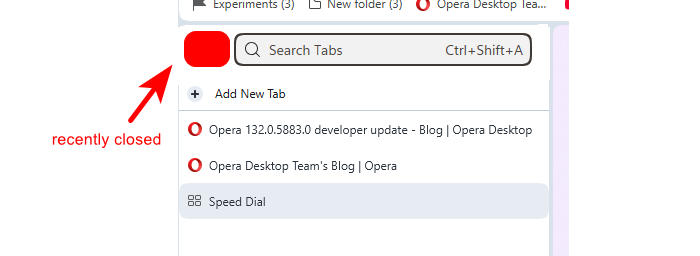
      • expanded pane could contain search tabs field and recently closed dropdown button (like in Edge as well).
        2026-04-29_151104.png
      Reply Quote 0
        A 1 Reply Last reply
      • mohamedsalah
        mohamedsalah Opera @vladbabinets last edited by

        @vladbabinets The vertical tab strip is currently resizeable you can make it as small as the fav icon of the opened pages, is there a specific reason to why you would like to fully hide it?

        Reply Quote 0
          burnout426 V 2 Replies Last reply
        • KenedSF
          KenedSF last edited by

          Vertical tabs : 👏👏👏👏
          Waiting for multi pips.

          Reply Quote 0
            KenedSF 1 Reply Last reply
          • burnout426
            burnout426 Volunteer @mohamedsalah last edited by

            @mohamedsalah said in Opera 132.0.5883.0 developer update:

            The vertical tab strip is currently resizeable you can make it as small as the fav icon of the opened pages

            I noticed that the start page favicon gets cut off a tiny bit when you shrink the vertical tab strip all the way.

            Reply Quote 0
              1 Reply Last reply
            • KenedSF
              KenedSF @KenedSF last edited by

              @kenedsf: Please add blur to vertical tabs. Thanks.

              Reply Quote 0
                1 Reply Last reply
              • V
                vladbabinets @mohamedsalah last edited by

                @mohamedsalah: I meant horizontal mode. I'd hide it to save screen space.

                Reply Quote 0
                  Opera-QA-Team 1 Reply Last reply
                • Opera-QA-Team
                  Opera-QA-Team Opera @vladbabinets last edited by

                  @vladbabinets: Hi, the feature is still in development, we are considering hiding that horizontal tab strip : )

                  Reply Quote 0
                    A 1 Reply Last reply
                  • A
                    andrew84 @Opera-QA-Team last edited by andrew84

                    @Opera-QA-Team said in Opera 132.0.5883.0 developer update:

                    we are considering hiding that horizontal tab strip

                    the empty tab strip is a good place to clearly show page name in the center while in vertical mode. Hiding should be optional, not by default.

                    2026-04-30_105625.png

                    Reply Quote 0
                      1 Reply Last reply
                    • A
                      andrew84 @andrew84 last edited by

                      @andrew84 in addition to the mention suggestions the vertical tabs panel should have an option whether to show on the left or on the right side. Then will be no conflict when using the both auto sidebar and vertical tabs.

                      Reply Quote 0
                        1 Reply Last reply
                      • A
                        andrew84 last edited by

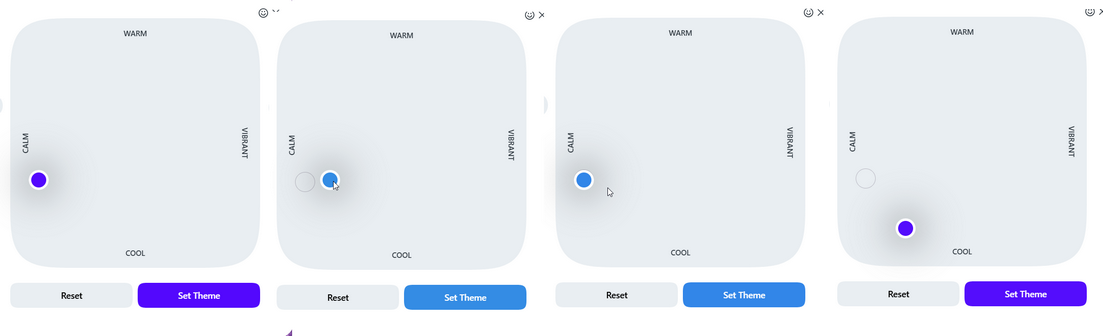
                        Just now I discovered that the color palette in theme editing dialog works quite incorrectly.

                        After moving the indicator dot away from the default bluish/purplish color position and then moving it back the tone is wrong (bright blue).
                        The real default tone is located somewhere almost at the bottom while moving the dot manually. But in this case the color of the tabstrip is not the same (gray) as in the default position.

                        *Yes, it still possible to hit the default position manually if being very precise and in this case the theme's default tone switches on instantly despite of the bright blue palette's area.
                        2026-04-30_165513.png

                        Reply Quote 0
                          1 Reply Last reply
                        • First post
                          Last post

                        Computer browsers

                        • Opera for Windows
                        • Opera for Mac
                        • Opera for Linux
                        • Opera beta version
                        • Opera USB

                        Mobile browsers

                        • Opera for Android
                        • Opera Mini
                        • Opera Touch
                        • Opera for basic phones

                        • Add-ons
                        • Opera account
                        • Wallpapers
                        • Opera Ads

                        • Help & support
                        • Opera blogs
                        • Opera forums
                        • Dev.Opera

                        • Security
                        • Privacy
                        • Cookies Policy
                        • EULA
                        • Terms of Service

                        • About Opera
                        • Press info
                        • Jobs
                        • Investors
                        • Become a partner
                        • Contact us

                        Follow Opera

                        • Opera - Facebook
                        • Opera - Twitter
                        • Opera - YouTube
                        • Opera - LinkedIn
                        • Opera - Instagram

                        © Opera Software 1995-