• Login
    • Search
    • Categories
    • Recent
    • Tags
    • Users
    • Groups
    • Rules
    • Help

    Do more on the web, with a fast and secure browser!

    Download Opera browser with:

    • built-in ad blocker
    • battery saver
    • free VPN
    Download Opera

    Opera 130.0.5847.41 Stable update

    Blogs
    desktop blog comments
    9
    19
    540
    Loading More Posts
    • Oldest to Newest
    • Newest to Oldest
    • Most Votes
    Reply
    • Reply as topic
    Log in to reply
    This topic has been deleted. Only users with topic management privileges can see it.
    • Opera Comments Bot
      Opera Comments Bot last edited by

      Hello! Opera’s latest update is here, version: 130.0.5847.41 What’s new? You can find the full list in the changelog. Happy browsing! Installation links:

      Read full blog post: Opera 130.0.5847.41 Stable update

      Reply Quote 0
        1 Reply Last reply
      • Opera-QA-Team
        Opera-QA-Team Opera last edited by

        Starting the discussion

        Reply Quote 0
          1 Reply Last reply
        • U
          Urby938 last edited by

          and how to use the volume booster? its enabled but i dont see it anywhere

          Reply Quote 0
            U 1 Reply Last reply
          • U
            Urby938 @Urby938 last edited by

            @urby938: sorry i got it

            Reply Quote 0
              1 Reply Last reply
            • S
              sicu220 last edited by

              Hello! Bugs: Opera account icon account is large in Opera AI sidebar.

              cd5ba3e7-c4b4-432a-881a-cd008ada4e90-image.png
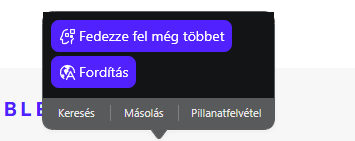
              Opera AI highlighter looks bad. It should look like it does in Neon browser. It's perfect there.
              The part above looks ugly.
              f4973032-479b-4dff-8337-e8ca3531eb1a-image.png
              With dark theme, a black frame appears under the chat. It doesn't fit there.

              b5cfcbe7-e7dd-4734-aa22-b3828888dc76-image.png
              In the simple settings menu, the background image is a little off. The blue line only appears when I move the mouse there, otherwise it doesn't. It should be there all the time.
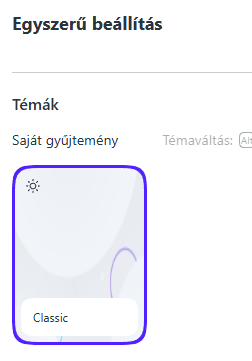
              211b1e8c-12e3-4f2e-ae65-da4894c5e54d-image.png

              Reply Quote 0
                Opera-QA-Team 1 Reply Last reply
              • K
                karen-arzumanyan last edited by

                Please pay attention to the bug: BUG-21893

                The dialog box for adding a page or folder to the bookmarks bar extends beyond the monitor borders.

                Steps to reproduce the issue:
                1.Create multiple folders with several nesting levels (I have three).
                2.Open the dialog box for adding a new folder or page to a third-level folder.
                3.Then, you can try opening several more tree levels in this dialog box without collapsing them.
                4.Click "Save" or "Enter."
                5. After this, subsequent Add dialogs will always display the tree structure as it was when you last saved it. However, the dialog window extends beyond the screen, so much so that even collapsing all the branches doesn't help. You can only click Escape to close it.

                Reply Quote 0
                  1 Reply Last reply
                • Opera-QA-Team
                  Opera-QA-Team Opera @sicu220 last edited by

                  @sicu220: Hello, the icon in AI tab is reported as RNA-2911. The search popup is being redesigned and will look quite differently soon. Black bar under the input field - we will check this, thanks for reporting.
                  Regarding settings and theme selection - can you explain a bit more please? I don't really know what blue line you are writing about. Thanks!

                  Reply Quote 0
                    A 1 Reply Last reply
                  • A
                    andrew84 @Opera-QA-Team last edited by andrew84

                    @Opera-QA-Team said in Opera 130.0.5847.41 Stable update:

                    I don't really know what blue line you are writing about

                    I guess the talk about the theme tile's blue border indicating currently active theme.

                    I can add here that currently active wallpaper is not visible when opening the EasySetup.

                    The wallpaper tiles carousel remember its state but it should reset each time the menu opens and show currently active wallpaper (like it work in preOne version) or currently active wallpaper's tile should be always first.
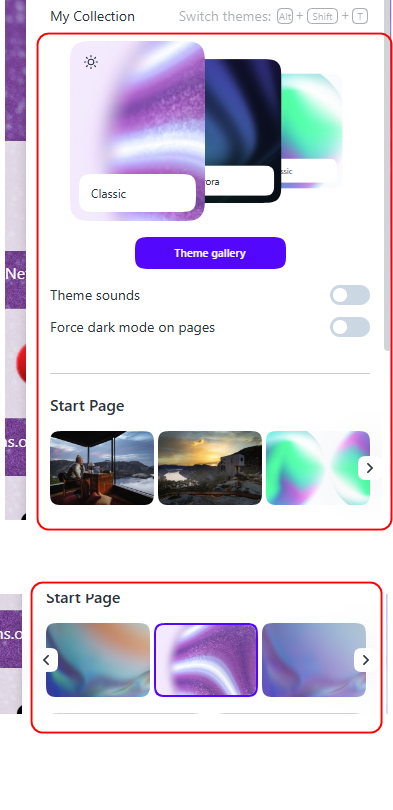
                    2026-04-17_105425.png

                    • and in Settings wallpaper tiles have the vertical white line in the center.
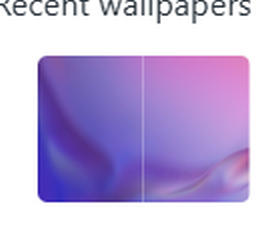
                      2026-04-17_111913.png
                    Reply Quote 0
                      1 Reply Last reply
                    • Himmelsschlingel
                      Himmelsschlingel last edited by

                      I'm not sure, if it started with the latest update, but the last tab on the left side cannot be closed, no "x" to click. Only happens to the Windows version, Mac works correctly.

                      Reply Quote 0
                        Opera-QA-Team 1 Reply Last reply
                      • korol78
                        korol78 last edited by

                        Hello, how do I export passwords from Opera? There used to be a feature, but now I can't find it.

                        Reply Quote 0
                          1 Reply Last reply
                        • korol78
                          korol78 last edited by

                          In the mobile version, you can save passwords to a CSV file, but how do you do this on a PC?

                          Reply Quote 0
                            burnout426 1 Reply Last reply
                          • burnout426
                            burnout426 Volunteer @korol78 last edited by

                            @korol78 Goto the URL opera://password-manager/settings

                            Reply Quote 0
                              korol78 2 Replies Last reply
                            • korol78
                              korol78 @burnout426 last edited by korol78

                              @burnout426 said:

                              @korol78 Goto the URL opera://password-manager/settings

                              Thank you

                              Reply Quote 0
                                1 Reply Last reply
                              • korol78
                                korol78 @burnout426 last edited by

                                @burnout426:
                                And it is no longer possible to access this menu through Opera settings, am I correct?

                                Reply Quote 0
                                  burnout426 Opera-QA-Team 2 Replies Last reply
                                • burnout426
                                  burnout426 Volunteer @korol78 last edited by burnout426

                                  @korol78 In settings, it's under "Autofill & Passwords -> Password Manager" and then you'd go to settings in the password manager.

                                  You can also bookmark the URL as a bookmark or speed dial. You can also add the password manager to the sidebar if you want.

                                  Also ,when you're on a login form page where you have your login info saved for the site, you should see a key on the address bar to the right of the address field that you can click and click the "Password Manager" button there.

                                  Reply Quote 0
                                    korol78 1 Reply Last reply
                                  • Opera-QA-Team
                                    Opera-QA-Team Opera @korol78 last edited by

                                    @korol78: It is possible. O-menu -> Settings -> Autofill and passwords -> Password Manager -> Settings (on the left)

                                    Reply Quote 0
                                      korol78 1 Reply Last reply
                                    • Opera-QA-Team
                                      Opera-QA-Team Opera @Himmelsschlingel last edited by

                                      @himmelsschlingel: Hello, it works OK for me. What Windows version do you have?

                                      Reply Quote 0
                                        1 Reply Last reply
                                      • korol78
                                        korol78 @burnout426 last edited by korol78

                                        @burnout426 said:

                                        @korol78 In settings, it's under "Autofill & Passwords -> Password Manager" and then you'd go to settings in the password manager.

                                        You can also bookmark the URL as a bookmark or speed dial. You can also add the password manager to the sidebar if you want.

                                        Also ,when you're on a login form page where you have your login info saved for the site, you should see a key on the address bar to the right of the address field that you can click and click the "Password Manager" button there.

                                        @burnout426 said:

                                        @korol78 In settings, it's under "Autofill & Passwords -> Password Manager" and then you'd go to settings in the password manager.

                                        You can also bookmark the URL as a bookmark or speed dial. You can also add the password manager to the sidebar if you want.

                                        Also ,when you're on a login form page where you have your login info saved for the site, you should see a key on the address bar to the right of the address field that you can click and click the "Password Manager" button there.

                                        Yes, I understand you, but for some reason now my settings on the left side are not displayed - they disappeared!? What could be the problem?
                                        Снимок экрана 2026-04-19 092140.jpg

                                        Reply Quote 0
                                          1 Reply Last reply
                                        • korol78
                                          korol78 @Opera-QA-Team last edited by

                                          @opera-qa-team said:

                                          @korol78: It is possible. O-menu -> Settings -> Autofill and passwords -> Password Manager -> Settings (on the left)
                                          Yes, I understand you, but for some reason now my settings on the left side are not displayed - they disappeared!? What could be the problem?

                                          Reply Quote 0
                                            1 Reply Last reply
                                          • First post
                                            Last post

                                          Computer browsers

                                          • Opera for Windows
                                          • Opera for Mac
                                          • Opera for Linux
                                          • Opera beta version
                                          • Opera USB

                                          Mobile browsers

                                          • Opera for Android
                                          • Opera Mini
                                          • Opera Touch
                                          • Opera for basic phones

                                          • Add-ons
                                          • Opera account
                                          • Wallpapers
                                          • Opera Ads

                                          • Help & support
                                          • Opera blogs
                                          • Opera forums
                                          • Dev.Opera

                                          • Security
                                          • Privacy
                                          • Cookies Policy
                                          • EULA
                                          • Terms of Service

                                          • About Opera
                                          • Press info
                                          • Jobs
                                          • Investors
                                          • Become a partner
                                          • Contact us

                                          Follow Opera

                                          • Opera - Facebook
                                          • Opera - Twitter
                                          • Opera - YouTube
                                          • Opera - LinkedIn
                                          • Opera - Instagram

                                          © Opera Software 1995-