• Login
    • Search
    • Categories
    • Recent
    • Tags
    • Users
    • Groups
    • Rules
    • Help

    Do more on the web, with a fast and secure browser!

    Download Opera browser with:

    • built-in ad blocker
    • battery saver
    • free VPN
    Download Opera

    Opera 128.0.5790.0 developer update

    Blogs
    desktop blog comments
    3
    6
    459
    Loading More Posts
    • Oldest to Newest
    • Newest to Oldest
    • Most Votes
    Reply
    • Reply as topic
    Log in to reply
    This topic has been deleted. Only users with topic management privileges can see it.
    • Opera Comments Bot
      Opera Comments Bot last edited by

      Hello! New update to Opera developer is now available, version: 128.0.5790.0! Key highlights: For a full list of changes check out our changelog. Happy browsing! Installation links:

      Read full blog post: Opera 128.0.5790.0 developer update

      Reply Quote 0
        1 Reply Last reply
      • A
        andrew84 last edited by

        Split Screen fixes

        1. while in split screen there's still no 'open link in new tab' in context menu.
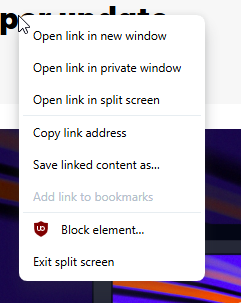
          2026-01-26_154645.png

        2. When already in split screen mode context menu> 'open link in split screen' in the left screen creates the screen between two existing screen, not as the last one 3rd screen.
          And there's an empty space is created on the tabstrip.
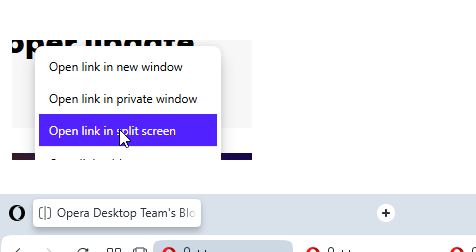
          2026-01-26_155217.png

        3. Here it doesn't allow to select (focus) split tab by clicking split tabs in address bar, it shows the address instead.
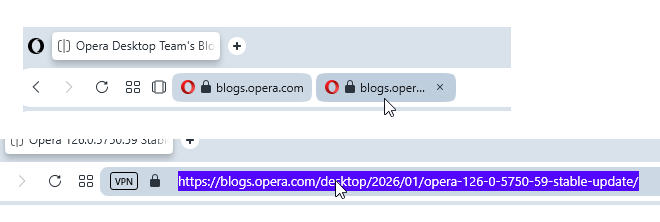
        2026-01-26_155114.png

        Reply Quote 0
          Opera-QA-Team 1 Reply Last reply
        • Opera-QA-Team
          Opera-QA-Team Opera @andrew84 last edited by Opera-QA-Team

          @andrew84: Hello, thank you for the valuable feedback.

          1. RNA-2146
          2. RNA-2147
          3. The behaviour is expected.
          Reply Quote 0
            A 1 Reply Last reply
          • A
            andrew84 @Opera-QA-Team last edited by

            @Opera-QA-Team said in Opera 128.0.5790.0 developer update:

            The behaviour is expected.

            I checked it in Stable (with EarlyBird on) and there it allows first to select (highlight) tab, the second click shows address bar.

            Reply Quote 0
              Opera-QA-Team 1 Reply Last reply
            • Opera-QA-Team
              Opera-QA-Team Opera @andrew84 last edited by

              @andrew84: That's true, but the behaviour was changed. It's in the changelog: RNA-1997 Implement expanding domain chips’ full URL by one click

              Reply Quote 0
                A 1 Reply Last reply
              • A
                andrew84 @Opera-QA-Team last edited by

                @Opera-QA-Team said in Opera 128.0.5790.0 developer update:

                expanding domain chips’ full URL by one click

                Ok. I checked it also i Edge and it seems there it works in the same (one click) way.
                Not the best ways in my opinion because to switch split screens or to restore the 'two tabs view' every time is need to search for empty space to click (or click the collapse icon each time) otherwise the address stays highlighted and unclear what screen it belongs to.

                Reply Quote 0
                  1 Reply Last reply
                • Locked by  leocg leocg 
                • First post
                  Last post

                Computer browsers

                • Opera for Windows
                • Opera for Mac
                • Opera for Linux
                • Opera beta version
                • Opera USB

                Mobile browsers

                • Opera for Android
                • Opera Mini
                • Opera Touch
                • Opera for basic phones

                • Add-ons
                • Opera account
                • Wallpapers
                • Opera Ads

                • Help & support
                • Opera blogs
                • Opera forums
                • Dev.Opera

                • Security
                • Privacy
                • Cookies Policy
                • EULA
                • Terms of Service

                • About Opera
                • Press info
                • Jobs
                • Investors
                • Become a partner
                • Contact us

                Follow Opera

                • Opera - Facebook
                • Opera - Twitter
                • Opera - YouTube
                • Opera - LinkedIn
                • Opera - Instagram

                © Opera Software 1995-


