Opera 126.0.5750.37 Stable update
-
 Opera-QA-Team Opera last edited by
@andrew84: Hello, thanks for the feedback. The popup for collapsed islands is already fixed in version 126.0.5750.43. Highlighting bug in light mode is a known issue (RNA-344) and it's awaiting fix. Regarding pinning Tab Islands we will consider it, but why are you saying it's not possible to review the list (of ex. headphones) again another day? If you have option to recover your tabs on startup, they will be there.
-
Opera-QA-Team Opera last edited by
@andrew84: Hi, thanks for the reminder about RNA-1553, it's awaiting fix. Regarding the scroll bar issue in EasySetup, can you share more information? I checked and can normally grab the scrollbar and move it up and down. The pane is not closed. What OS do you have?
-
-
andrew84 last edited by
@Opera-QA-Team said in Opera 126.0.5750.37 Stable update:
it's not possible to review the list (of ex. headphones) again another day? If you have option to recover your tabs on startup, they will be there.
In this case all the session's tabs will be restored, not only inside islands. And here tabs are restored not in the form of islands but all at once.
*I guess it's easy to understand why the pinning option is important in case of islands feature. If you refer to the 'restore' session tabs option, then 'tab pinning' option is also not necessary following the logic.
-
andrew84 last edited by andrew84
@Opera-QA-Team said in Opera 126.0.5750.37 Stable update:
Regarding the scroll bar issue in EasySetup, can you share more information?
I thought the bug is already confirmed but actually it's even not reproduced.
I already provided a link to forum where the bug is described by @burnout426 https://forums.opera.com/post/396821I'm on win 10 but as seen from the bug describing post the issue is also on Win 11.
-
andrew84 last edited by andrew84
It seems there's a bug when trying to edit workspace through the sidebar. Same in Developer version.
After right clicking workspace's icon and selecting 'edit' there's no edit dialog appearing but workspaces list is shown. So 'edit' particular workspaces = 'manage workspaces' in this case.
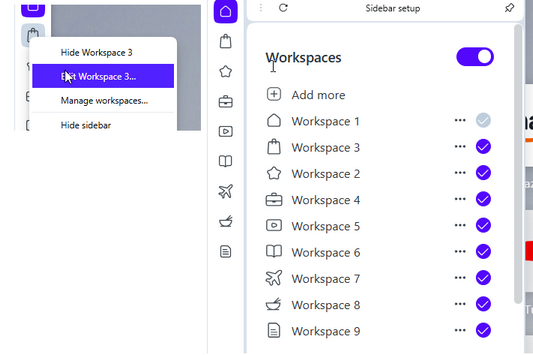
*It works once after browser starting but doesn't work later when trying to edit for the 2nd time. Another issue here is that if I closed the sidebar setup pane with 'edit' popup left open, later I right click another workspace to edit it shows the previously opened dialog what confuses a lot.
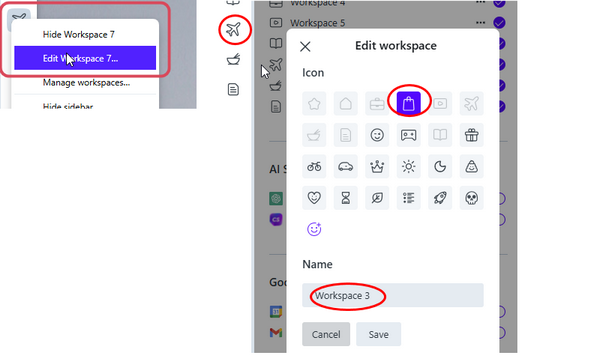
**Sometime after mentioned manipulations the sidebar setup opens blank (restart is need to get it back ).

***Checked the things in pre-One version and all is fine there, works correctly in all the cases.
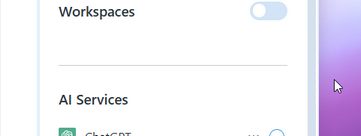
**** Also, there's a bit too much space is reserved next to the setup pane's right edge (too wide shadow effect or smth. else) where the pane doesn't react for closing by clicking outside. So the screenshot shows the panel won't close if I click here.
-
Opera-QA-Team Opera last edited by
@andrew84: Hello, thanks for sharing the issues. The workspaces bugs need fix indeed, they are already reported.
-
anidais 0 last edited by
So anyone know why Bing rewards searches don't give points in Opera? I would like to make Opera my default browser but this is a deal breaker. Every time there is a new version I check but the issue persists. Maybe it has to do with the built-in VPN? Bing rewards works fine in other browsers. Also, an issue I reported years ago hasn't been fixed, and it's the tooltips that appear when hovering any link being white while in dark mode.
-
-
Locked by
 leocg
leocg