• Login
    • Search
    • Categories
    • Recent
    • Tags
    • Users
    • Groups
    • Rules
    • Help

    Do more on the web, with a fast and secure browser!

    Download Opera browser with:

    • built-in ad blocker
    • battery saver
    • free VPN
    Download Opera

    Opera 125 Stable

    Blogs
    desktop blog comments
    15
    38
    409
    Loading More Posts
    • Oldest to Newest
    • Newest to Oldest
    • Most Votes
    Reply
    • Reply as topic
    Log in to reply
    This topic has been deleted. Only users with topic management privileges can see it.
    • fitzydj
      fitzydj @leocg last edited by

      @leocg I understand that you can reenable the V2 extensions.
      I have read that there maybe potential security risks running older V2 extensions that have not been updated so I have decided to be cautious and only run V3 extensions.
      I only run two extra extensions an Adblocker currently trying Ghostery and Antigram

      Reply Quote 0
        1 Reply Last reply
      • raphaelbm
        raphaelbm last edited by leocg

        Opera 125 is announced but wont update. Please fix asap. Thx Raphael
        Of course I don't expect a reply. Will I get a reply?

        (I cannot add the screenshot because the attach feature is missing in this editor)

        Reply Quote 1
          raphaelbm fitzydj leocg 5 Replies Last reply
        • raphaelbm
          raphaelbm @raphaelbm last edited by

          @raphaelbm: Here is the screenshot. (I dragged the image in to the chat but nothing happened)

          Reply Quote 0
            1 Reply Last reply
          • fitzydj
            fitzydj @raphaelbm last edited by

            @raphaelbm said in Opera 125 Stable:

            Opera 125 is announced but wont update. Please fix asap. Thx Raphael
            Of course I don't expect a reply. Will I get a reply?

            (I cannot add the screenshot because the attach feature is missing in THIS editor)

            You can to https://get.opera.com/ftp/pub/opera/desktop/ and dowlnoad the full installer.

            Reply Quote 0
              raphaelbm 2 Replies Last reply
            • DerSchlingel
              DerSchlingel last edited by

              On MacOS I still don't get the update, neither by trying to update nor by Opera installer.

              Reply Quote 0
                1 Reply Last reply
              • botspot
                botspot last edited by

                Getting core dumps on RPM-based distro. Opera won't even open.

                Reply Quote 0
                  1 Reply Last reply
                • raphaelbm
                  raphaelbm @fitzydj last edited by

                  @fitzydj: Thankyou for the installer link.
                  However, my purpose in making the report is to encourage Opera to fix the problem now and for the future. From the other comments I see this has been a disastrous release and I am inclined to wait till there is a revision. I wont be updating Opera any time soon.

                  btw. Does Opera dev team listen to this forum? If not ; why not. Thx Raphael

                  Reply Quote 0
                    leocg 1 Reply Last reply
                  • raphaelbm
                    raphaelbm @fitzydj last edited by

                    @fitzydj: Thank you for the installer link. IT DOES NOT work...

                    Instead it merely installs the OLD Opera version 124.0.5705.65
                    I was expecting to find Stable 125.0.5729.12 – 2025-12-04 - duh!

                    I am in UK Windows 10 Home (x64) Version 22H2 (build 19045.6575)

                    Reply Quote 0
                      1 Reply Last reply
                    • raphaelbm
                      raphaelbm @fitzydj last edited by

                      @fitzydj: @fitzydj: Thank you for the installer link. IT DOES NOT work...

                      Instead it merely installs the OLD Opera version 124.0.5705.65
                      I was expecting to find Stable 125.0.5729.12 – 2025-12-04 - duh!

                      I am in UK Windows 10 Home (x64) Version 22H2 (build 19045.6575)
                      "You can only post once every 120 second(s) - please wait before posting again"

                      Reply Quote 0
                        fitzydj 1 Reply Last reply
                      • whisperer
                        whisperer last edited by whisperer

                        Using the Windows version of Opera in dark mode, go to password manager (opera://password-manager/passwords) and click the Add button. There is no visible cursor..

                        Reply Quote 0
                          1 Reply Last reply
                        • fitzydj
                          fitzydj @raphaelbm last edited by

                          @raphaelbmThe updater worked for me and I was going from 124..0.5705.42. I updated yesterday to 124..0.5705.65 but didn't like the Purple Holiday Widget that kept popping up so I went to the old version.
                          I downloaded the Opera Setup File for 125 today and it updated no issues. I had disabled Auto Update after yesterday.
                          Winget maybe another option to update.

                          Reply Quote 0
                            1 Reply Last reply
                          • leocg
                            leocg Moderator Volunteer @raphaelbm last edited by

                            @raphaelbm Updates to a new major version may take some time to propagate.

                            Reply Quote 0
                              1 Reply Last reply
                            • leocg
                              leocg Moderator Volunteer @raphaelbm last edited by

                              @raphaelbm You can only upload images from the forum.

                              Reply Quote 0
                                1 Reply Last reply
                              • leocg
                                leocg Moderator Volunteer @raphaelbm last edited by

                                @raphaelbm Yes, people from Opera check the release posts.

                                Reply Quote 0
                                  1 Reply Last reply
                                • raphaelbm
                                  raphaelbm @raphaelbm last edited by

                                  @raphaelbm: I have filed the bug. see
                                  https://opera.atlassian.net/servicedesk/customer/portal/52/BUG-17976

                                  Reply Quote 0
                                    1 Reply Last reply
                                  • sgrandin
                                    sgrandin last edited by sgrandin

                                    Win 11 Pro x64, 25H2. This release is not handling the top articles on the home page at fasterskier.com correctly, cutting them off the upper half of the images. Look fine in Edge, Chrome, FF.
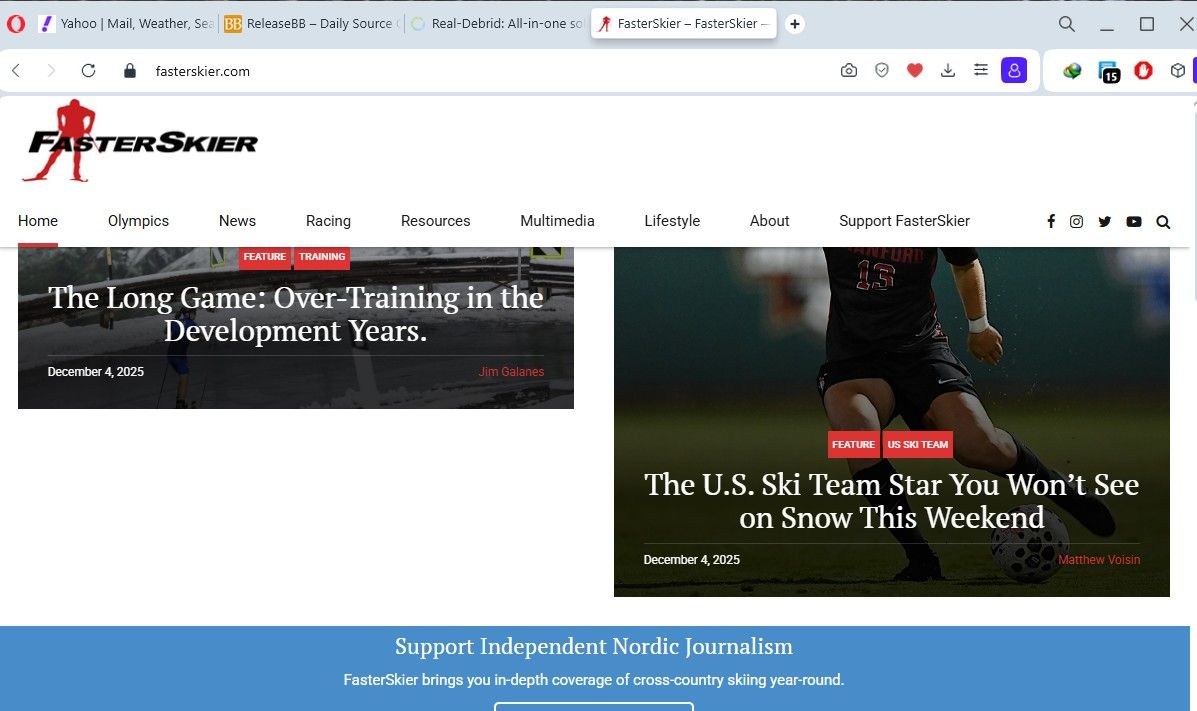
                                    FasterSkier in Opera 12-4-25.jpg

                                    Reply Quote 0
                                      1 Reply Last reply
                                    • First post
                                      Last post

                                    Computer browsers

                                    • Opera for Windows
                                    • Opera for Mac
                                    • Opera for Linux
                                    • Opera beta version
                                    • Opera USB

                                    Mobile browsers

                                    • Opera for Android
                                    • Opera Mini
                                    • Opera Touch
                                    • Opera for basic phones

                                    • Add-ons
                                    • Opera account
                                    • Wallpapers
                                    • Opera Ads

                                    • Help & support
                                    • Opera blogs
                                    • Opera forums
                                    • Dev.Opera

                                    • Security
                                    • Privacy
                                    • Cookies Policy
                                    • EULA
                                    • Terms of Service

                                    • About Opera
                                    • Press info
                                    • Jobs
                                    • Investors
                                    • Become a partner
                                    • Contact us

                                    Follow Opera

                                    • Opera - Facebook
                                    • Opera - Twitter
                                    • Opera - YouTube
                                    • Opera - LinkedIn
                                    • Opera - Instagram

                                    © Opera Software 1995-