• 登录
    • 搜索
    • 版块
    • 最新
    • 话题
    • 用户
    • 群组
    • Rules
    • Help

    Do more on the web, with a fast and secure browser!

    Download Opera browser with:

    • built-in ad blocker
    • battery saver
    • free VPN
    Download Opera

    My flow "failed to connect"

    Opera Touch
    my flow connection
    107
    169
    198132
    正在加载更多帖子
    • 从旧到新
    • 从新到旧
    • 最多赞同
    回复
    • 在新帖中回复
    登录后回复
    此主题已被删除。只有拥有主题管理权限的用户可以查看。
    • 老用户
      老用户 最后由 编辑

      Me too have this problem. Please help me or say me how to export this "flow". I have too many pages in my touch, but ı can't sync with my pc. If ı export this flow and pages, not problem for me. And I'm sorry for my English. 🙂

      回复 引用 0
        leocg 1 条回复 最后回复
      • leocg
        leocg Moderator Volunteer @游客 最后由 编辑

        @jetwarker You can't export Flow's content.

        回复 引用 0
          1 条回复 最后回复
        • 老用户
          老用户 @Mixbox99 最后由 老用户 编辑

          @Mixbox99 You're right, I just use 1 connection between my phone and computer. I thought all PC browsers connected to the same account (so not using the QR code) would share the same flow (?)...

          回复 引用 1
            Mixbox99 1 条回复 最后回复
          • Mixbox99
            Mixbox99 @游客 最后由 编辑

            @mwfontes But it used to work like a year ago or two years ago... I don't know when exactly it stopped. I had to reset my PC to factory settings in late June 2020 and this is when I found out I am no longer able to connect more than one PC.
            In order to connect more than one PC I uded QR code - it connected PC to already exisiting Flow with its content. But back then Opera used to distinguish PCs but their name e.g. hp probook 450 or DELL Vostro 3456. Now it says just "desktop".

            回复 引用 0
              老用户 1 条回复 最后回复
            • nadie-nada-nunca
              nadie-nada-nunca @游客 最后由 编辑

              @mwfontes Won't this actually delete My Flow's content?

              回复 引用 0
                老用户 1 条回复 最后回复
              • 老用户
                老用户 @Mixbox99 最后由 编辑

                @Mixbox99 Hmm... interesting... I'll try to add another PC to the flow and see what happens...

                回复 引用 0
                  1 条回复 最后回复
                • 老用户
                  老用户 @nadie-nada-nunca 最后由 编辑

                  @nadie-nada-nunca Unfortunately, yes. But that's the only way I managed to make it work so far. A bummer, I know, but I couldn't find any other way to be able to use it back again.

                  回复 引用 0
                    1 条回复 最后回复
                  • SonicWeaver
                    SonicWeaver @游客 最后由 编辑

                    @mwfontes Thanks for the post but it did not work for me.

                    回复 引用 2
                      老用户 老用户 2 条回复 最后回复
                    • 老用户
                      老用户 @SonicWeaver 最后由 编辑

                      @SonicWeaver 😿

                      回复 引用 0
                        1 条回复 最后回复
                      • Mixbox99
                        Mixbox99 最后由 编辑

                        Hello, so I am happy to announce that with Opera ver 70.0.3728.71 I can connect more than one PC to My Flow 🙂

                        回复 引用 2
                          1 条回复 最后回复
                        • MateusRosolem
                          MateusRosolem 最后由 编辑

                          I got it! I just deactivated my Ad Block and delete my data from My Flow Pc, and deleted and re-installed Opera Touch and it worked

                          回复 引用 1
                            Kexx avtugrul 2 条回复 最后回复
                          • rocketank
                            rocketank @游客 最后由 编辑

                            @mwfontes thanks, worked for me too!

                            回复 引用 0
                              1 条回复 最后回复
                            • Kexx
                              Kexx @MateusRosolem 最后由 编辑

                              @MateusRosolem

                              Doesn't work for me.
                              But this works.

                              www.jpg

                              回复 引用 4
                                SonicWeaver 老用户 MrBartosh 3 条回复 最后回复
                              • SonicWeaver
                                SonicWeaver @Kexx 最后由 编辑

                                @Kexx Thank you! Thank you! I have been trying fix this for almost a year with my Note 9 and this worked! Did I say Thank you?

                                回复 引用 1
                                  1 条回复 最后回复
                                • 老用户
                                  老用户 @Kexx 最后由 编辑

                                  @Kexx Thanks but no luck for me 😞 I'm leaving this browser now. The only reason I use it is Youtube commercials are gone with this one on my iPhone.

                                  回复 引用 0
                                    1 条回复 最后回复
                                  • RealestNooby
                                    RealestNooby @chubners 最后由 编辑

                                    @chubners said in My flow "failed to connect":

                                    I had this problem after I reinstalled my Opera and erased my user data, I got to connect everything the same way it was before, except Flow. Then I turned off vpn, adblock, nothing worked for me but delete my previous Flow information from my phone and unfortunately I lost many important messages... You have to disconnect both phone and desktop on settings and then delete Flow completely so it'll work I don't know why. When I got my new notebook I had to transfer everything from the old one and I got zero problems with Opera, I've never been so disappointed.

                                    that works my gosh i had delete the stupid app to get it to work i was surprised

                                    回复 引用 0
                                      1 条回复 最后回复
                                    • 老用户
                                      老用户 @SonicWeaver 最后由 编辑

                                      @SonicWeaver said in My flow "failed to connect":

                                      @mwfontes Thanks for the post but it did not work for me.

                                      hi, for me neither

                                      回复 引用 0
                                        1 条回复 最后回复
                                      • ROBDE
                                        ROBDE 最后由 ROBDE 编辑

                                        Hello,
                                        after the latest update to Upera 60 on Android, flow was introduced under settings. But it is impossible to connect the PC to opera. Only connecting PC to opera touch works under left menü bar Flow...
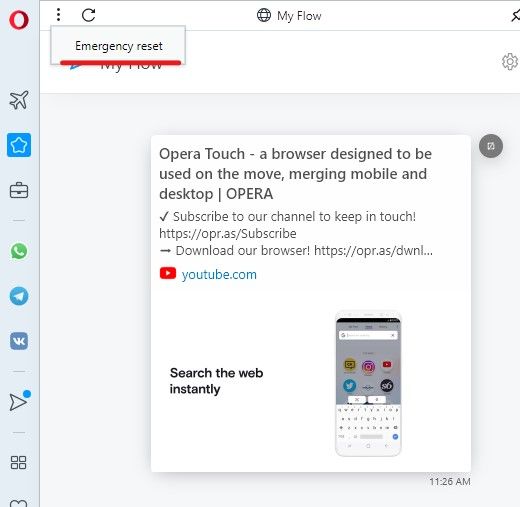
                                        EDIT: It works now, after going to Flow on PC, top left 3 dots and doing emergency reset. Then restarted opera on pc 2 times , choose connect on android and opened www.opera.com/connect on pc
                                        after connecting each phone, I restarted opera on pc

                                        回复 引用 0
                                          1 条回复 最后回复
                                        • Tom-Olie
                                          Tom-Olie @oleksa 最后由 编辑

                                          @oleksa I tried that solution, and it works! Thanks

                                          回复 引用 0
                                            1 条回复 最后回复
                                          • bambast
                                            bambast @游客 最后由 编辑

                                            @ITAKAAAAA
                                            Still the same problems, 2.5 years later. Guess "My Flow" is not supported anymore and cancelled.

                                            回复 引用 0
                                              Tom-Olie 1 条回复 最后回复
                                            • First post
                                              Last post

                                            Computer browsers

                                            • Opera for Windows
                                            • Opera for Mac
                                            • Opera for Linux
                                            • Opera beta version
                                            • Opera USB

                                            Mobile browsers

                                            • Opera for Android
                                            • Opera Mini
                                            • Opera Touch
                                            • Opera for basic phones

                                            • Add-ons
                                            • Opera account
                                            • Wallpapers
                                            • Opera Ads

                                            • Help & support
                                            • Opera blogs
                                            • Opera forums
                                            • Dev.Opera

                                            • Security
                                            • Privacy
                                            • Cookies Policy
                                            • EULA
                                            • Terms of Service

                                            • About Opera
                                            • Press info
                                            • Jobs
                                            • Investors
                                            • Become a partner
                                            • Contact us

                                            Follow Opera

                                            • Opera - Facebook
                                            • Opera - Twitter
                                            • Opera - YouTube
                                            • Opera - LinkedIn
                                            • Opera - Instagram

                                            © Opera Software 1995-