• 登录
    • 搜索
    • 版块
    • 最新
    • 话题
    • 用户
    • 群组
    • Rules
    • Help

    Do more on the web, with a fast and secure browser!

    Download Opera browser with:

    • built-in ad blocker
    • battery saver
    • free VPN
    Download Opera

    My flow "failed to connect"

    Opera Touch
    my flow connection
    107
    169
    198139
    正在加载更多帖子
    • 从旧到新
    • 从新到旧
    • 最多赞同
    回复
    • 在新帖中回复
    登录后回复
    此主题已被删除。只有拥有主题管理权限的用户可以查看。
    • Tom-Olie
      Tom-Olie @bambast 最后由 编辑

      @bambast what I did was to disconnect all devices linked to the Flow. Then, first, I connected my phone, followed by the other devices.

      So basically, disconnect all devices. First connect your phone. Followed by your other devices.

      回复 引用 0
        1 条回复 最后回复
      • baligo
        baligo 最后由 编辑

        OK people, after trying every single solution suggested in this thread (including emergency resetting My Flow) without any success, let me share how I solved the problem:

        • Backing up My Flow:
        1. Open My Flow.
        2. Click somewhere on a text.
        3. Press Ctrl+A on the keyboard, this will select everything so you can export your precious stuff. 🙂
        4. Open Notepad, Word or any text editor, paste the contents of My Flow and save it.
          Now that your content is backed up, proceed with the connecting steps:
        • Resetting every device:
          And I'm not even sure if this is needed at all (cause I already had emergency reset and didn't have the opportunity to try without this step) so at first you could try to connect without resetting and losing your data:
        1. Open My Flow.
        2. Click the three dots and then Emergency reset.
        3. Reset the other devices too.
          Again - I'm not sure this is required.
        • Connecting devices:
        1. Open opera.com/connect
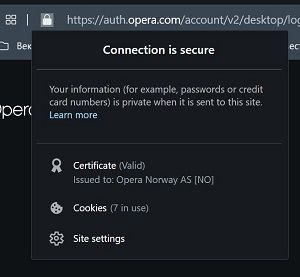
        2. Click Page information icon in the Address bar.
          Screenshot 2020-10-05 102041.jpg
        3. Click Site settings.
        4. Opera Settings page opens and I changed every Block to Allow.
        5. Now connect your devices. Reload page if needed.
        6. Revert back to default settings on Opera Settings page by clicking the Reset permissions button.
        7. Post back the contents of the old My Flow. Time consuming! I have 38 pages of clear format text without space before, after and between lines in Word to put back. Post by post.

        I so hope this process works for you too and even without the resetting part.

        回复 引用 5
          kenny47 liewcheonfong v-m-smith Skorgarmaor 4 条回复 最后回复
        • kenny47
          kenny47 @baligo 最后由 编辑

          @baligo
          Had this problem, my problem was that my desktop and phone were using different wifi connections. Once they were on same they connected with no problem. Hope this helps some of you.

          回复 引用 0
            1 条回复 最后回复
          • 老用户
            老用户 最后由 编辑

            i found the solution here https://forums.opera.com/topic/32339/opera-touch-flow-failed-to-connect-pairing-devices-not-allowed-here

            I removed all my older pairings and then I was able to connect

            回复 引用 1
              1 条回复 最后回复
            • liewcheonfong
              liewcheonfong @baligo 最后由 编辑

              @baligo it works! thank you so much! 😗

              回复 引用 1
                baligo 1 条回复 最后回复
              • baligo
                baligo @liewcheonfong 最后由 编辑

                @liewcheonfong I'm glad it worked. It took me couple days trying this and that to figure it out. Did you try without the resetting part?

                回复 引用 0
                  1 条回复 最后回复
                • 老用户
                  老用户 最后由 编辑

                  Hey there, @ITAKAAAAA!

                  🍌 What a slippery question!
                  😵 So slippery, that I fell flat on my face!

                  😧 What an error!
                  You are experiancing an error in Opera, please contact Opera so they can fix this unexpected error...

                  🙁 Sorry!

                  回复 引用 0
                    1 条回复 最后回复
                  • hewesscliff
                    hewesscliff 最后由 leocg 编辑

                    Click on "my flow" where it appears to scan with the QR code, on the top corner left you will have three dots, click on them and go to "Emergency reset", I think that solves your problem.

                    回复 引用 0
                      1 条回复 最后回复
                    • MrGoldstick
                      MrGoldstick 最后由 编辑

                      lol I just had to uninstall opera touch app and reinstall it again. just.. wow.

                      回复 引用 0
                        egoistbiri 1 条回复 最后回复
                      • egoistbiri
                        egoistbiri @MrGoldstick 最后由 编辑

                        @MrGoldstick said in My flow "failed to connect":

                        lol I just had to uninstall opera touch app and reinstall it again. just.. wow.

                        I agree it is possible solution. When I uninstalled opera touch then restarted system and reconnect finally succeed. Actually I was using opera because of its flow feature. Now I do not need to use it anymore.

                        回复 引用 0
                          1 条回复 最后回复
                        • 老用户
                          老用户 最后由 编辑

                          I had the same problem when trying to connect my new phone. Disconnecting my computer to My Flow as described above fixed it. I had my old phone and and a tablet still connected so I just reconnected the computer to the My Flow on the tablet (I suppose I could have reconnected to my old phone too) so I didn't lose all my flow history. I then connected my new phone to my flow on the computer. All good thanks.

                          回复 引用 0
                            1 条回复 最后回复
                          • RealestNooby
                            RealestNooby 最后由 编辑

                            Ok here is how to fix it, open the qr code on a white surface, fixed or just open it in paint 3d

                            回复 引用 0
                              1 条回复 最后回复
                            • v-m-smith
                              v-m-smith @baligo 最后由 编辑

                              @baligo said in My flow "failed to connect":

                              Open Notepad, Word or any text editor, paste the contents of My Flow and save it.

                              Man, you just gave me a good idea to Backup! Anyway Flow is now a good tool to search info. So I tired to do as you said - Ctrr-A to copy all selected content of My Flow - and paste it into MS OneNote - it got it like a charm! With all that pictures and links. Now I have much more usability to search for my Flow records!
                              BUT! But you must manually move and move slider upto to most top in My Flow until you got needed deep of timestamps of posts. Because by default My Flow shows posts preloaded for not more than couple of last months !

                              回复 引用 1
                                baligo 1 条回复 最后回复
                              • baligo
                                baligo @v-m-smith 最后由 编辑

                                @v-m-smith Yeah, forgot to mention you have to scroll up to the beginning beforehand. 🙂

                                回复 引用 0
                                  1 条回复 最后回复
                                • 老用户
                                  老用户 最后由 编辑

                                  can't connect to iPhone ... I have to check the connection but I'm connected normally ...

                                  回复 引用 1
                                    1 条回复 最后回复
                                  • spencerross
                                    spencerross 已封禁 @游客 最后由 编辑

                                    @itakaaaaa same thing I am facing when the opera touch I have installed.

                                    回复 引用 2
                                      moppera 1 条回复 最后回复
                                    • paulorubimf
                                      paulorubimf 最后由 编辑

                                      Have you tried to connect the laptop with the cell phone instead of the cell phone with the laptop? Generate the QRCODE on the cell phone, capture the screen and read the QRCODE on the laptop using any website that does this. I had the same problem, I did it that way and it worked!

                                      回复 引用 0
                                        1 条回复 最后回复
                                      • 老用户
                                        老用户 @游客 最后由 编辑 此回复已被删除!
                                        回复 引用 0
                                          1 条回复 最后回复
                                        • Phoenixoboros
                                          Phoenixoboros 最后由 编辑

                                          Same issue here, is there a hard limit on the number of devices in a flow?

                                          回复 引用 1
                                            RealestNooby 1 条回复 最后回复
                                          • RealestNooby
                                            RealestNooby @Phoenixoboros 最后由 编辑

                                            @phoenixoboros how many are you trying to connect

                                            回复 引用 0
                                              Phoenixoboros 1 条回复 最后回复
                                            • First post
                                              Last post

                                            Computer browsers

                                            • Opera for Windows
                                            • Opera for Mac
                                            • Opera for Linux
                                            • Opera beta version
                                            • Opera USB

                                            Mobile browsers

                                            • Opera for Android
                                            • Opera Mini
                                            • Opera Touch
                                            • Opera for basic phones

                                            • Add-ons
                                            • Opera account
                                            • Wallpapers
                                            • Opera Ads

                                            • Help & support
                                            • Opera blogs
                                            • Opera forums
                                            • Dev.Opera

                                            • Security
                                            • Privacy
                                            • Cookies Policy
                                            • EULA
                                            • Terms of Service

                                            • About Opera
                                            • Press info
                                            • Jobs
                                            • Investors
                                            • Become a partner
                                            • Contact us

                                            Follow Opera

                                            • Opera - Facebook
                                            • Opera - Twitter
                                            • Opera - YouTube
                                            • Opera - LinkedIn
                                            • Opera - Instagram

                                            © Opera Software 1995-