• 登录
    • 搜索
    • 版块
    • 最新
    • 话题
    • 用户
    • 群组
    • Rules
    • Help

    Do more on the web, with a fast and secure browser!

    Download Opera browser with:

    • built-in ad blocker
    • battery saver
    • free VPN
    Download Opera

    My flow "failed to connect"

    Opera Touch
    my flow connection
    107
    169
    198110
    正在加载更多帖子
    • 从旧到新
    • 从新到旧
    • 最多赞同
    回复
    • 在新帖中回复
    登录后回复
    此主题已被删除。只有拥有主题管理权限的用户可以查看。
    • 老用户
      老用户 @游客 最后由 编辑

      @ITAKAAAAA You must just connect on your opera account to retry.

      回复 引用 0
        1 条回复 最后回复
      • 老用户
        老用户 最后由 编辑

        same with me.

        回复 引用 0
          1 条回复 最后回复
        • crolug
          crolug 最后由 编辑

          Doesn't work with Opera Developer for me.

          回复 引用 0
            1 条回复 最后回复
          • chubners
            chubners 最后由 编辑

            I had this problem after I reinstalled my Opera and erased my user data, I got to connect everything the same way it was before, except Flow. Then I turned off vpn, adblock, nothing worked for me but delete my previous Flow information from my phone and unfortunately I lost many important messages... You have to disconnect both phone and desktop on settings and then delete Flow completely so it'll work I don't know why. When I got my new notebook I had to transfer everything from the old one and I got zero problems with Opera, I've never been so disappointed.

            回复 引用 0
              SonicWeaver m4ssacre RealestNooby 3 条回复 最后回复
            • SonicWeaver
              SonicWeaver @chubners 最后由 编辑

              @chubners I'm glad to see you got it going again! I've spent hours dicking around with it and still can't get it working.

              I'd like to try your approach but am not sure I understand what you mean by "You have to disconnect both phone and desktop on settings and then delete Flow completely". Would you mind terribly if I bother you for step by step instructions? I'd love to get flow working again.

              回复 引用 0
                1 条回复 最后回复
              • m4ssacre
                m4ssacre @chubners 最后由 m4ssacre 编辑

                @chubners ufff... this might sound harsh, but I don't see the flow as a storage of important information.

                It totally feels as something which allows you to temporarily transfer stuff from one device to another. Maybe it's just me who feels that way because I'm a web developer. I also remove all messages from the flow regularly to keep it clean.

                I know you where not expecting to loose this information and this sucks. Seeing this service as a save place to store important things was a little naive, though 😕
                Another thing: When you deleted your flow, didn't you see the message which states that everything will be gone?

                @SonicWeaver Step by Step? There is only one way. Also on the mobile phone, it's easy to find at "My Flow" -> Burger Menu on top right -> Settings -> Delete My Flow
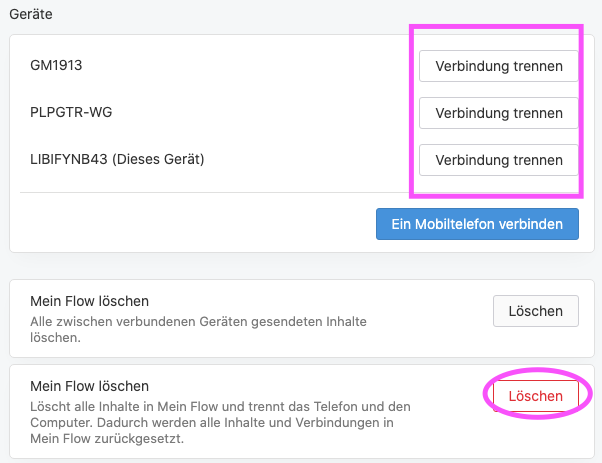
                75cd62cf-5212-4da7-8fc2-5229480a8bfe-image.png

                回复 引用 0
                  SonicWeaver 1 条回复 最后回复
                • SonicWeaver
                  SonicWeaver @m4ssacre 最后由 编辑

                  @m4ssacre I have spent hours screwing around to get Flow working on my Note 9 and have tried every suggestion on this thread. I understand how to delete the flow from the cpu and phone and have tried that but it still doesn't work it. But does work with 2 other phone with no problems.

                  I am asking how chubners what is meant by - "You have to disconnect both phone and desktop on settings and then delete Flow completely".

                  How do you disconnect both the phone and computer?

                  回复 引用 1
                    1 条回复 最后回复
                  • 老用户
                    老用户 最后由 编辑

                    Have you allowed the permissions required so that Opera Touch works properly?

                    回复 引用 0
                      SonicWeaver 1 条回复 最后回复
                    • SonicWeaver
                      SonicWeaver @游客 最后由 编辑

                      @duck202 Yes. Other than Flow Opera Touch works fine. It fails at the scan and manual code input.

                      回复 引用 0
                        1 条回复 最后回复
                      • ardatuna11
                        ardatuna11 最后由 编辑

                        Opera Touch lastest version on iPhone and opera deskop for mac lastest version on lastest macos doesn't work.

                        回复 引用 0
                          1 条回复 最后回复
                        • zine00
                          zine00 最后由 编辑

                          same here doesn't work
                          14/06/2020
                          Country : Algeria
                          phone : Condor
                          OS : Windows 10

                          回复 引用 0
                            1 条回复 最后回复
                          • 老用户
                            老用户 最后由 编辑

                            My Flow wasn’t deleting stuff so I reset it and now trying to add my devices back and none of them are able to connect either with the QR scan of the password ’failed to connect check your network settings’ not sure where to go from here really

                            回复 引用 2
                              1 条回复 最后回复
                            • ardatuna11
                              ardatuna11 最后由 leocg 编辑

                              Is there anybody from Opera developers here who reads and care about us?

                              回复 引用 4
                                1 条回复 最后回复
                              • Mixbox99
                                Mixbox99 最后由 编辑

                                I have the same problem. Opera for Windows ver: 69.0.3686.40, Opera Touch 2.5.2 for Android. I discovered the problem when trying to connect another desktop. Of course it failed to connect. I disconnected all devices
                                (big mistake because I lost everything that was on My Flow), disabled adblockers (but that is so stupid.. it used to work with ad blokers!) and even re-installed Opera for Windows.
                                I also cleared cashe of my mobile Opera. It connect to only one dekstop. It fails to connect another.
                                The desktop is called "desktop" on the list of connected devices - when My Flow used to work correctly "desktop" had its name which was vivible in This PCs properties.

                                回复 引用 0
                                  1 条回复 最后回复
                                • tetul
                                  tetul 最后由 编辑

                                  So what worked for me was to go to the phone, and disconnect the computer in question, and on the computergo and "disable flow". Then shut down opera on the PC and reconnect. It worked on the first instance for me.

                                  回复 引用 0
                                    Mixbox99 1 条回复 最后回复
                                  • Mixbox99
                                    Mixbox99 @tetul 最后由 编辑

                                    @tetul said in My flow "failed to connect":

                                    So what worked for me was to go to the phone, and disconnect the computer in question, and on the computergo and "disable flow". Then shut down opera on the PC and reconnect. It worked on the first instance for me.

                                    Great but it works only for one Desktop. Have you tried to connect another desktop? Well it fails for me.

                                    回复 引用 0
                                      1 条回复 最后回复
                                    • beabazsi
                                      beabazsi 最后由 编辑

                                      Dear Everyone,

                                      I've got the same problem connecting a new destop of mine and my phone. I have already deleted the old desktop, to which I could only connect the same phone with the manually entered code (the QR didn't work). However, I can't connect Opera Touch on my Nokia 6.2 and Opera on Windows 10 Pro desktop.

                                      Upon opening Flow's connect a phone menu, I even tried jumping to the QR code reader in Opera touch and it told me it was not possible to connect these two devices.

                                      Does anybody happen to have a solution to this? I also tried disabling my firewall on the desktop, but that didn't work, either.

                                      Thanks

                                      回复 引用 1
                                        1 条回复 最后回复
                                      • 老用户
                                        老用户 最后由 编辑

                                        OK, after many days trying it, I found the solution (for me at least) and it is very simple:

                                        • Go to your phone's flow -> top-right menu (three dots) -> Settings
                                        • Under "My Flow" select "Delete My Flow"
                                        • Scan the QR Code again to connect. Voilà.
                                        回复 引用 4
                                          beabazsi Mixbox99 nadie-nada-nunca SonicWeaver rocketank 8 条回复 最后回复
                                        • beabazsi
                                          beabazsi @游客 最后由 编辑

                                          @mwfontes Thank you, it has indeed solved it! 🙂

                                          回复 引用 0
                                            1 条回复 最后回复
                                          • Mixbox99
                                            Mixbox99 @游客 最后由 Mixbox99 编辑

                                            @mwfontes said in My flow "failed to connect":

                                            OK, after many days trying it, I found the solution (for me at least) and it is very simple:

                                            • Go to your phone's flow -> top-right menu (three dots) -> Settings
                                            • Under "My Flow" select "Delete My Flow"
                                            • Scan the QR Code again to connect. Voilà.

                                            Hi, your solution means that my already connected desktop will disconnect. Of course I can delete "my flow" and connect mobile phone with PC. What I cannot do is connect another PC to already connected PC number 1 and mobile.
                                            My current Opera ver 69.0.3686.77
                                            Opera Touch 2.5.2

                                            Anyone have a solution how to connect more than one desktop and mobile phone all together? e.g. 2 desktops and one mobile phone?

                                            回复 引用 3
                                              老用户 overdrive13 2 条回复 最后回复
                                            • First post
                                              Last post

                                            Computer browsers

                                            • Opera for Windows
                                            • Opera for Mac
                                            • Opera for Linux
                                            • Opera beta version
                                            • Opera USB

                                            Mobile browsers

                                            • Opera for Android
                                            • Opera Mini
                                            • Opera Touch
                                            • Opera for basic phones

                                            • Add-ons
                                            • Opera account
                                            • Wallpapers
                                            • Opera Ads

                                            • Help & support
                                            • Opera blogs
                                            • Opera forums
                                            • Dev.Opera

                                            • Security
                                            • Privacy
                                            • Cookies Policy
                                            • EULA
                                            • Terms of Service

                                            • About Opera
                                            • Press info
                                            • Jobs
                                            • Investors
                                            • Become a partner
                                            • Contact us

                                            Follow Opera

                                            • Opera - Facebook
                                            • Opera - Twitter
                                            • Opera - YouTube
                                            • Opera - LinkedIn
                                            • Opera - Instagram

                                            © Opera Software 1995-